<?xml version="1.0" encoding="utf-8"?>
<feed xmlns="http://www.w3.org/2005/Atom">
  <title>Vega Beyond</title>
  
  <subtitle>遥远的织女星</subtitle>
  <link href="/rss.xml" rel="self"/>
  
  <link href="http://vegabeyond.com/"/>
  <updated>2020-10-26T05:14:45.712Z</updated>
  <id>http://vegabeyond.com/</id>
  
  <author>
    <name>Vega Bai</name>
    
  </author>
  
  <generator uri="http://hexo.io/">Hexo</generator>
  
  <entry>
    <title>UE4.25 Chaos - Build Engine from Source</title>
    <link href="http://vegabeyond.com/2020/10/25/UE-BuildFromSource-Chaos/"/>
    <id>http://vegabeyond.com/2020/10/25/UE-BuildFromSource-Chaos/</id>
    <published>2020-10-26T04:30:00.000Z</published>
    <updated>2020-10-26T05:14:45.712Z</updated>
    
    <content type="html"><![CDATA[<p>之前尝试从Github上pull了一下UE 4.25包含Chaos系统的分支，用VS2017编译了一下。记录一下步骤。</p><p>步骤</p><a id="more"></a><ol><li><p><a href="https://www.unrealengine.com/zh-CN/ue4-on-github" target="_blank" rel="noopener">获得UE在Github上源代码的访问权</a>，需要把自己的Github账号与UE账号绑定。</p></li><li><p><a href="https://docs.unrealengine.com/zh-CN/GettingStarted/DownloadingUnrealEngine/index.html" target="_blank" rel="noopener">下载虚幻引擎源代码</a>，下载后先解压，做到第2步，先不要设置其他。</p></li><li><p><a href="https://docs.unrealengine.com/zh-CN/Engine/Chaos/ChaosDestruction/ChaosDestructionOverview/index.html" target="_blank" rel="noopener">Chaos破坏系统概述</a>，根据这个文档修改 UE4Editor.Target.cs ，添加需要的行。</p><p>这里我按照官网的设置后边都会有运行error打不开引擎，下面这行最后的词我依然保持Shared才能用 “BuildEnvironment = TargetBuildEnvironment.Shared;” 。这个问题好像有点玄学，这个<a href="https://forums.unrealengine.com/unreal-engine/announcements-and-releases/1641765-how-to-enable-chaos?q=Unique" target="_blank" rel="noopener">论坛帖子</a>报告了两种设置各有成功和失败的情况，所以都尝试了一下。</p></li><li><p>根据上面文档继续编译引擎，运行 Setup.bat 和 GenerateProjectFiles.bat 。</p></li><li><p>打开生成的ue4.sln，设置 Development Editor ，然后Build。这样编译后的文件需要从VS里按F5运行UE的Editor，也可以找到Debug文件夹直接打开UEEditor.exe，但是不能脱离VS项目运行，那样应该需要编译release版本，尝试了一下没有成功，本文最后有一些记录。</p></li><li><p>运行后，新建并打开项目，设置Chaos插件，也就是文档里的第7步。重启编辑器，就可以找到Chaos面板了。</p></li></ol><p>顺便一提，大部分UE的中文文档，只需要把对应英文文档链接里的en-US改成zh-CN就好啦～</p><p>关于打包release版本的引擎，过程中搜到一个小工具叫<a href="https://github.com/rfsheffer/PyUE4Builder" target="_blank" rel="noopener">PyUE4Builder</a>，也是个好评如潮的工具，然而当时这个小工具只支持到4.24，想打包4.25的但是改了一些设置都失败了。还有一个是<a href="https://github.com/ryanjon2040/UE4-Binary-Builder" target="_blank" rel="noopener">UE4-Binary-Builder</a>，看样子这个更新比较勤快，需要的小伙伴可以参考最新的文档试试。</p>]]></content>
    
    <summary type="html">
    
      &lt;p&gt;之前尝试从Github上pull了一下UE 4.25包含Chaos系统的分支，用VS2017编译了一下。记录一下步骤。&lt;/p&gt;
&lt;p&gt;步骤&lt;/p&gt;
    
    </summary>
    
      <category term="TechArt" scheme="http://vegabeyond.com/categories/TechArt/"/>
    
    
      <category term="UE4" scheme="http://vegabeyond.com/tags/UE4/"/>
    
  </entry>
  
  <entry>
    <title>AR Prototype - Cyberpunk Version World 赛博朋克版本的世界</title>
    <link href="http://vegabeyond.com/2020/07/16/UEPrototype-AR-CyberpunkVersionWorld/"/>
    <id>http://vegabeyond.com/2020/07/16/UEPrototype-AR-CyberpunkVersionWorld/</id>
    <published>2020-07-16T08:06:30.000Z</published>
    <updated>2020-07-16T18:46:55.249Z</updated>
    
    <content type="html"><![CDATA[<p>A rapid prototype for phone AR design, demos how we enter the cyberpunk version of the world.<br>AR设计的快速原型实现，展示我们怎样进入赛博朋克版本的世界。</p><div class="video-container"><iframe src="//www.youtube.com/embed/vrjDN6lVOVQ" frameborder="0" allowfullscreen></iframe></div><p>The basic idea is that there are many version of our world we live and they are always there, all we need is just a portal to enter it, and regardless of what AR device we are using. So these AR worlds are consistent, and have location based contents to either provide useful information, or help entertain the users.</p><a id="more"></a><p>The development of this demo consists of the following sections:</p><h3 id="Cyberpunk-Postprocess"><a href="#Cyberpunk-Postprocess" class="headerlink" title="Cyberpunk Postprocess"></a>Cyberpunk Postprocess</h3><p>Postprocess in Unreal is a way of image processing, the difference is the process is more suitable for dealing with real-time rendering output of 3D geometry, with the depth buffer of the 3D scene.<br>Here since I have a portal, the postprocess effect sometimes need to be applied partially on the screen (refer to portal section in the following, ensure the effects are the same). So I did all the post process in the post process material, directly apply to the CameraImage texture. The processes are:</p><ol><li>Apply color grading lookup table got from photoshop. Applying color grading in Photoshop is easy and strong, but Unreal does not provide much image processing functions built-in in shaders, so Color Lookup Table (LUT) is a very convenient way to applying pre-defined color grading in Unreal materials.</li><li>Get the bright areas and blur them, to create the feeling of neon lights.</li><li>Add very thin moving fog texture.</li><li>Add LOMO style darker edge and corner to the screen output.<br><img src="PostprocessColorGrading.png" alt="PostprocessColorGrading"></li></ol><h3 id="Portal-Effect-and-Function"><a href="#Portal-Effect-and-Function" class="headerlink" title="Portal Effect and Function"></a>Portal Effect and Function</h3><p>The portal function demoed here used Scene Color behind translucent for cyberpunk image color grading, and Scene Capture function for capturing the holo cat, grids and planes, then add them together.<br>The visual effect for portal is a combination of circling particles, ribbon particle trails, and event triggered particle sparks.<br><img src="PortalEffect.png" alt="PortalEffect.png"></p><h3 id="Hologram-Cat"><a href="#Hologram-Cat" class="headerlink" title="Hologram Cat"></a>Hologram Cat</h3><p>The cat is from my personal asset library collected. The cat was well rigged and animated, with all animations in one take. What I did for the animation this time is separating and importing the animations, creating the animation state machine and blueprint, and add character blueprint for it with simple logic and triggers.<br>The shader of the holo cat is done from scratch. It consists of the following parts:</p><ol><li>Screen aligned dots showing it’s a virtual animal projected by high tech;</li><li>Semi-random glitches make it more a cyber buggy feeling.<img src="/assets/blogimg/UEMat_HoloModelGlitching.png" title="HoloModelGlitching"></li></ol><p><strong>The tutorial of this glitching hologram cat is available in <a href="https://vegabeyond.com/2020/06/22/UEMaterial-HoloModelGlitching/">this post</a>.</strong></p><h3 id="Other-Hologram-Effects"><a href="#Other-Hologram-Effects" class="headerlink" title="Other Hologram Effects"></a>Other Hologram Effects</h3><p>Grid, holo arrow on the road, and cat adoption advertisement panels, are all simple dynamic material effects to add a bit feeling to the cyberpunk world for this demo.<br><img src="OtherHologramEffects1.png" alt="OtherHologramEffects1"><br><img src="OtherHologramEffects2.png" alt="OtherHologramEffects2"></p>]]></content>
    
    <summary type="html">
    
      &lt;p&gt;A rapid prototype for phone AR design, demos how we enter the cyberpunk version of the world.&lt;br&gt;AR设计的快速原型实现，展示我们怎样进入赛博朋克版本的世界。&lt;/p&gt;
&lt;div class=&quot;video-container&quot;&gt;&lt;iframe src=&quot;//www.youtube.com/embed/vrjDN6lVOVQ&quot; frameborder=&quot;0&quot; allowfullscreen&gt;&lt;/iframe&gt;&lt;/div&gt;
&lt;p&gt;The basic idea is that there are many version of our world we live and they are always there, all we need is just a portal to enter it, and regardless of what AR device we are using. So these AR worlds are consistent, and have location based contents to either provide useful information, or help entertain the users.&lt;/p&gt;
    
    </summary>
    
      <category term="TechArt" scheme="http://vegabeyond.com/categories/TechArt/"/>
    
    
      <category term="UE4" scheme="http://vegabeyond.com/tags/UE4/"/>
    
      <category term="Shader" scheme="http://vegabeyond.com/tags/Shader/"/>
    
      <category term="Prototype" scheme="http://vegabeyond.com/tags/Prototype/"/>
    
      <category term="VFX" scheme="http://vegabeyond.com/tags/VFX/"/>
    
  </entry>
  
  <entry>
    <title>Unreal Shaders - Holo Model Glitching 不稳定的全息模型</title>
    <link href="http://vegabeyond.com/2020/06/22/UEMaterial-HoloModelGlitching/"/>
    <id>http://vegabeyond.com/2020/06/22/UEMaterial-HoloModelGlitching/</id>
    <published>2020-06-22T23:46:30.000Z</published>
    <updated>2020-06-10T03:35:47.444Z</updated>
    
    <content type="html"><![CDATA[<p>为一个cyberpunk小项目做的简易不稳定全息模型材质。</p><p>预览：</p><img src="/assets/blogimg/UEMat_HoloModelGlitching.png" title="HoloModelGlitching"><a id="more"></a><p><img src="HoloModelGlitching.gif" alt="HoloModelGlitching"></p><p>视频来自B站，Youtube请戳 <a href="https://youtu.be/g0UudcrQWCc" target="_blank" rel="noopener">https://youtu.be/g0UudcrQWCc</a></p><div style="position: relative; width: 100%; height: 0; padding-bottom: 75%;">    <iframe src="//player.bilibili.com/player.html?aid=413575960&bvid=BV1EV411k7iH&cid=204985477&page=1" scrolling="no" border="0" frameborder="no" framespacing="0" allowfullscreen="true" style="position: absolute; width: 100%; height: 100%; left: 0; top: 0;">    </iframe></div><p>不稳定的全息模型材质全图，点击查看大图：</p><p><img src="HoloModelGlitching_Screenshot.png" alt="不稳定的全息模型"></p>]]></content>
    
    <summary type="html">
    
      &lt;p&gt;为一个cyberpunk小项目做的简易不稳定全息模型材质。&lt;/p&gt;
&lt;p&gt;预览：&lt;/p&gt;
&lt;img src=&quot;/assets/blogimg/UEMat_HoloModelGlitching.png&quot; title=&quot;HoloModelGlitching&quot;&gt;
    
    </summary>
    
      <category term="TechArt" scheme="http://vegabeyond.com/categories/TechArt/"/>
    
    
      <category term="UE4" scheme="http://vegabeyond.com/tags/UE4/"/>
    
      <category term="Shader" scheme="http://vegabeyond.com/tags/Shader/"/>
    
      <category term="VFX" scheme="http://vegabeyond.com/tags/VFX/"/>
    
  </entry>
  
  <entry>
    <title>Unreal Shaders - Dancing Lines 跳动线条</title>
    <link href="http://vegabeyond.com/2020/04/05/UEMaterial-DancingLines/"/>
    <id>http://vegabeyond.com/2020/04/05/UEMaterial-DancingLines/</id>
    <published>2020-04-06T02:47:40.000Z</published>
    <updated>2020-04-06T04:10:59.201Z</updated>
    
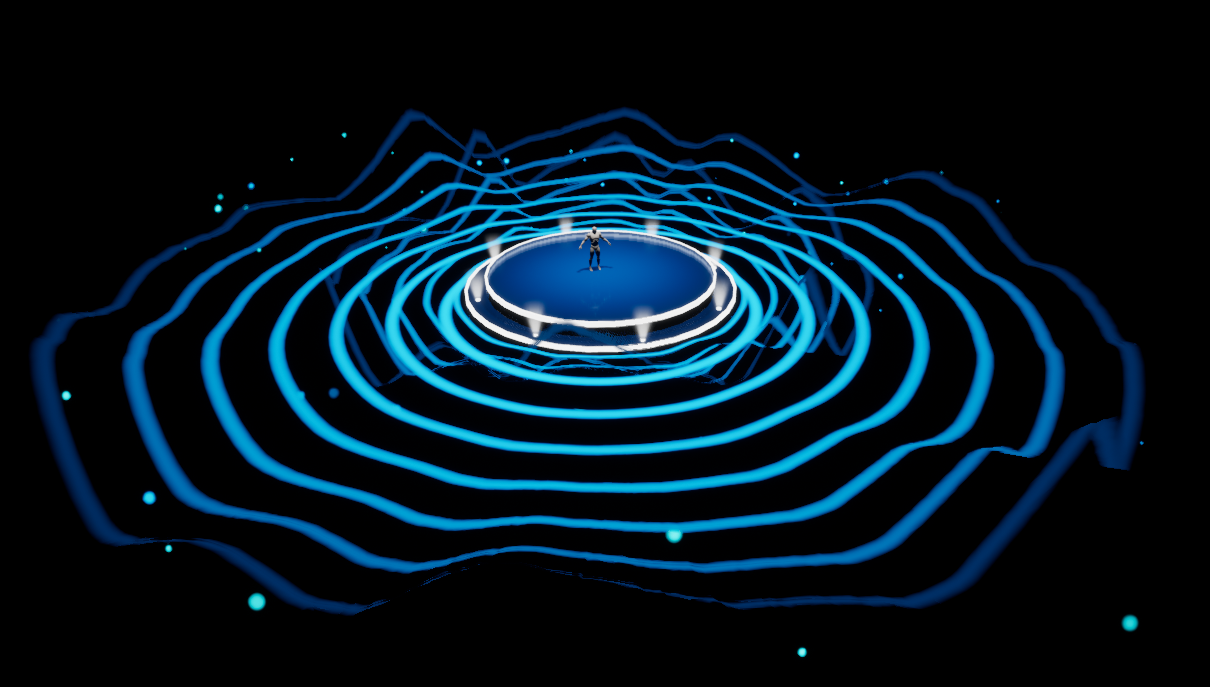
    <content type="html"><![CDATA[<p>使用顶点动画材质的跳动线条效果，以及制作环形VFX的一个小技巧。</p><p>预览：</p><img src="/assets/blogimg/UEMat_DancingLines.png" title="DancingLines"><a id="more"></a><p><img src="DancingLines.gif" alt="DancingLines"></p><p>视频来自B站，Youtube请戳 <a href="https://youtu.be/lytFmqqbp9k" target="_blank" rel="noopener">https://youtu.be/lytFmqqbp9k</a></p><div style="position: relative; width: 100%; height: 0; padding-bottom: 75%;">    <iframe src="//player.bilibili.com/player.html?aid=752725177&bvid=BV1uk4y1R7Hq&cid=174549644&page=1" scrolling="no" border="0" frameborder="no" framespacing="0" allowfullscreen="true" style="position: absolute; width: 100%; height: 100%; left: 0; top: 0;">    </iframe></div><p>跳动线条材质全图，点击查看大图：</p><p><img src="DancingLines_ScreenShot.png" alt="跳动线条材质全图"></p>]]></content>
    
    <summary type="html">
    
      &lt;p&gt;使用顶点动画材质的跳动线条效果，以及制作环形VFX的一个小技巧。&lt;/p&gt;
&lt;p&gt;预览：&lt;/p&gt;
&lt;img src=&quot;/assets/blogimg/UEMat_DancingLines.png&quot; title=&quot;DancingLines&quot;&gt;
    
    </summary>
    
      <category term="TechArt" scheme="http://vegabeyond.com/categories/TechArt/"/>
    
    
      <category term="UE4" scheme="http://vegabeyond.com/tags/UE4/"/>
    
      <category term="Shader" scheme="http://vegabeyond.com/tags/Shader/"/>
    
      <category term="Subsurface" scheme="http://vegabeyond.com/tags/Subsurface/"/>
    
  </entry>
  
  <entry>
    <title>Unreal Shaders - Ice and Crystal 冰块与水晶</title>
    <link href="http://vegabeyond.com/2020/03/28/UEMaterial-IceAndCrystal/"/>
    <id>http://vegabeyond.com/2020/03/28/UEMaterial-IceAndCrystal/</id>
    <published>2020-03-29T02:37:58.000Z</published>
    <updated>2020-04-05T00:52:49.994Z</updated>
    
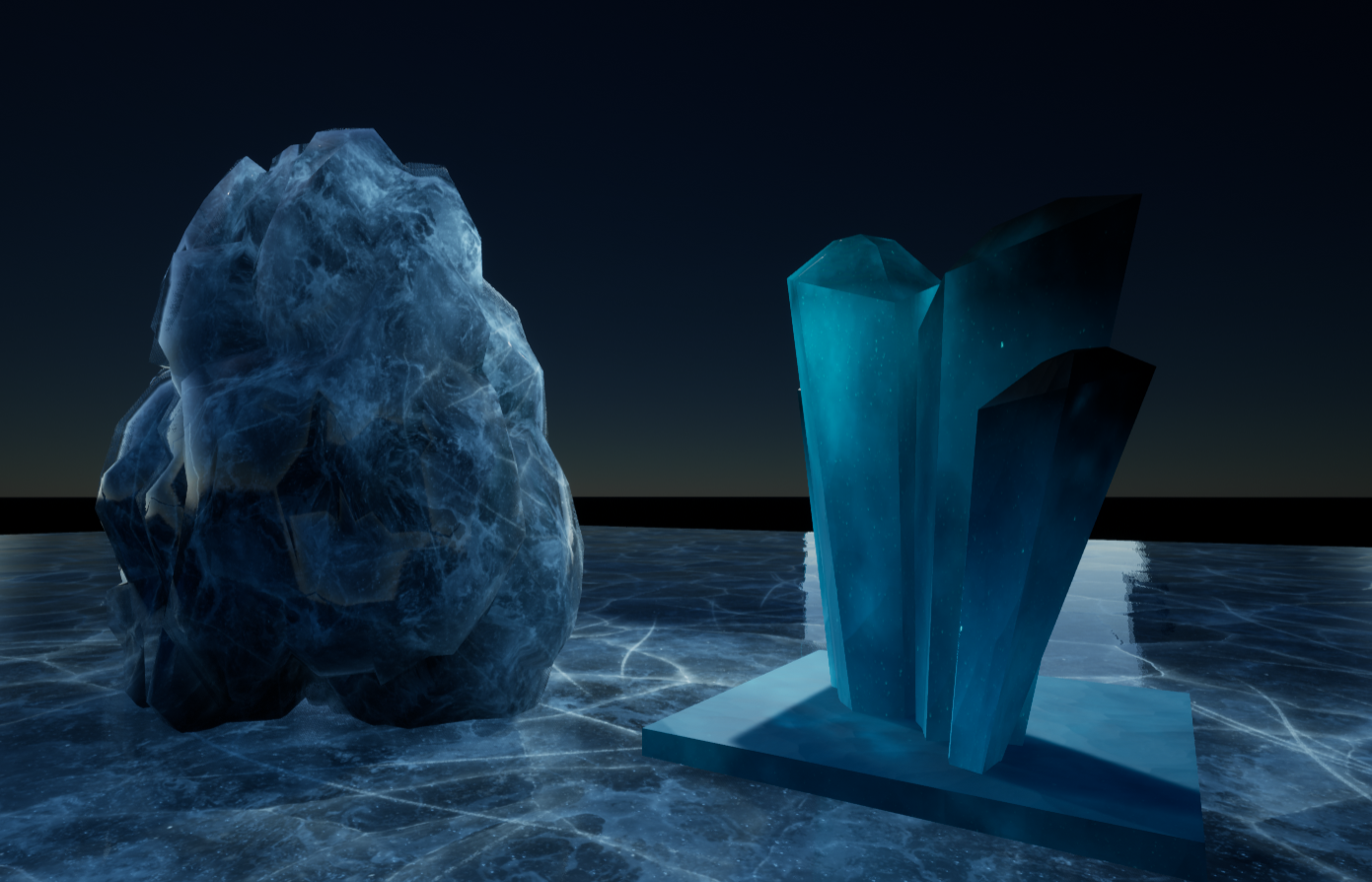
    <content type="html"><![CDATA[<p>学习制作星空宝石效果，因此把相关的次表面Subsurface，Bump贴图和常见的冰块效果一起学习了。</p><p>预览：</p><img src="/assets/blogimg/UEMat_IceAndCrystal.png" title="IceAndCrystal"><a id="more"></a><p><img src="IceAndCrystal.gif" alt="IceAndCrystal"></p><p>视频来自B站，Youtube请戳 <a href="https://youtu.be/_nkGncZxtww" target="_blank" rel="noopener">https://youtu.be/_nkGncZxtww</a></p><div style="position: relative; width: 100%; height: 0; padding-bottom: 75%;">    <iframe src="//player.bilibili.com/player.html?aid=925005344&bvid=BV1ZT4y1V7qt&cid=171030547&page=1" scrolling="no" border="0" frameborder="no" framespacing="0" allowfullscreen="true" style="position: absolute; width: 100%; height: 100%; left: 0; top: 0;">    </iframe></div><p>冰材质全图，点击查看大图：</p><p><img src="Ice_Screenshot.png" alt="冰材质全图"></p><p>星空水晶材质全图，点击查看大图：</p><p><img src="Crystal_Screenshot.png" alt="星空水晶材质全图"></p>]]></content>
    
    <summary type="html">
    
      &lt;p&gt;学习制作星空宝石效果，因此把相关的次表面Subsurface，Bump贴图和常见的冰块效果一起学习了。&lt;/p&gt;
&lt;p&gt;预览：&lt;/p&gt;
&lt;img src=&quot;/assets/blogimg/UEMat_IceAndCrystal.png&quot; title=&quot;IceAndCrystal&quot;&gt;
    
    </summary>
    
      <category term="TechArt" scheme="http://vegabeyond.com/categories/TechArt/"/>
    
    
      <category term="UE4" scheme="http://vegabeyond.com/tags/UE4/"/>
    
      <category term="Shader" scheme="http://vegabeyond.com/tags/Shader/"/>
    
      <category term="Subsurface" scheme="http://vegabeyond.com/tags/Subsurface/"/>
    
  </entry>
  
  <entry>
    <title>Unreal Shaders - Inner Energy 能量涌动</title>
    <link href="http://vegabeyond.com/2020/03/21/UEMaterial-InnerEnergy/"/>
    <id>http://vegabeyond.com/2020/03/21/UEMaterial-InnerEnergy/</id>
    <published>2020-03-21T15:30:11.000Z</published>
    <updated>2020-03-29T03:21:31.131Z</updated>
    
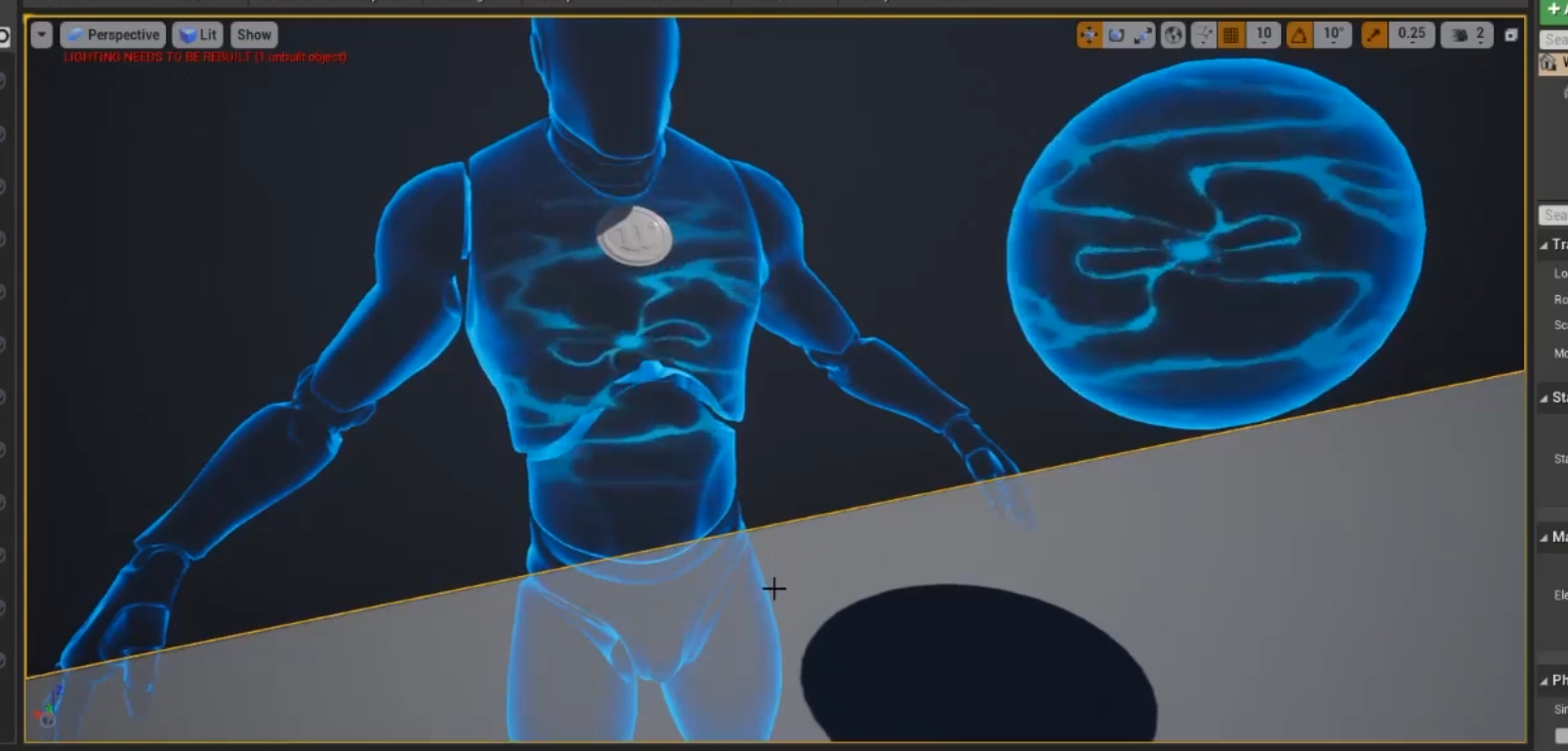
    <content type="html"><![CDATA[<p>尝试实现一个类似辉光球的内部能量涌动效果，仅使用UE材质。可以应用在任何物体上。</p><p>预览：</p><img src="/assets/blogimg/UEMat_InnerEnergy1.PNG" title="InnerEnergy1"><a id="more"></a><p><img src="InnerEnergy.GIF" alt="InnerEnergy_Gif"></p><p><img src="InnerEnergy2.PNG" alt="InnerEnergy2"></p><p>视频来自B站，Youtube请戳 <a href="https://youtu.be/K0qudPjWKLI" target="_blank" rel="noopener">https://youtu.be/K0qudPjWKLI</a></p><div style="position: relative; width: 100%; height: 0; padding-bottom: 75%;">    <iframe src="//player.bilibili.com/player.html?aid=98387481&bvid=&cid=167945405&page=1" scrolling="no" border="0" frameborder="no" framespacing="0" allowfullscreen="true" style="position: absolute; width: 100%; height: 100%; left: 0; top: 0;">    </iframe></div><p>材质全图，点击查看大图：</p><p><img src="UEMat_InnerEnergy_ScreenShot.png" alt="材质全图"></p>]]></content>
    
    <summary type="html">
    
      &lt;p&gt;尝试实现一个类似辉光球的内部能量涌动效果，仅使用UE材质。可以应用在任何物体上。&lt;/p&gt;
&lt;p&gt;预览：&lt;/p&gt;
&lt;img src=&quot;/assets/blogimg/UEMat_InnerEnergy1.PNG&quot; title=&quot;InnerEnergy1&quot;&gt;
    
    </summary>
    
      <category term="TechArt" scheme="http://vegabeyond.com/categories/TechArt/"/>
    
    
      <category term="UE4" scheme="http://vegabeyond.com/tags/UE4/"/>
    
      <category term="Shader" scheme="http://vegabeyond.com/tags/Shader/"/>
    
  </entry>
  
  <entry>
    <title>ShaderJam - 泡泡材质</title>
    <link href="http://vegabeyond.com/2019/04/01/ShaderJam-Bubble/"/>
    <id>http://vegabeyond.com/2019/04/01/ShaderJam-Bubble/</id>
    <published>2019-04-02T06:59:59.000Z</published>
    <updated>2020-10-26T05:42:13.645Z</updated>
    
    <content type="html"><![CDATA[<p>把别人家的需求盗过来了～～</p><p>要求是做个泡泡材质，能够表现泡泡厚度，并且有上下高光，如图：</p><a id="more"></a><p><img src="Shader_Bubble0.png" alt="参考图"></p><p><img src="Shader_Bubble0_1.png" alt="参考图"></p><p>这么鲜艳的色彩、一致的pattern，应该是p的图，不过看着确实挺好看挺合理的。。</p><ul><li>边缘厚度，使用fresnel进行一定计算生成。</li><li>上下的高光，我认为光源在上方，上方的高光是光源照射上方内表面的反光，下方的光则是下方泡泡内表面的反光。Shader里使用向量LightDir表示虚拟光源，水平向下flip表示下方的虚拟光源，计算反光。</li><li>使用cubemap表示环境反光。</li><li>使用一张水波normal图，在世界坐标下计算模型vertices的位移，使泡泡变形。</li></ul><p>使用UE 4.22 Preview7：</p><p><img src="Shader_Bubble1.png" alt="材质预览"></p><p><img src="Shader_Bubble2.png" alt="材质连线图"></p><button onclick="window.open('/assets/blogfile/M_Bubble.uasset')" style="background-color: #4CAF50; border: none; color: white; padding: 15px 32px; text-align: center; text-decoration: none; display: inline-block; font-size: 16px; margin: 4px 2px; cursor: pointer; ">Download</button><p>Welcome any thoughts :D</p>]]></content>
    
    <summary type="html">
    
      &lt;p&gt;把别人家的需求盗过来了～～&lt;/p&gt;
&lt;p&gt;要求是做个泡泡材质，能够表现泡泡厚度，并且有上下高光，如图：&lt;/p&gt;
    
    </summary>
    
      <category term="TechArt" scheme="http://vegabeyond.com/categories/TechArt/"/>
    
    
      <category term="UE4" scheme="http://vegabeyond.com/tags/UE4/"/>
    
      <category term="Shader" scheme="http://vegabeyond.com/tags/Shader/"/>
    
  </entry>
  
  <entry>
    <title>GDC 2019 EXPO见闻</title>
    <link href="http://vegabeyond.com/2019/03/26/GDC2019EXPO/"/>
    <id>http://vegabeyond.com/2019/03/26/GDC2019EXPO/</id>
    <published>2019-03-27T06:59:00.000Z</published>
    <updated>2019-03-27T07:51:06.356Z</updated>
    
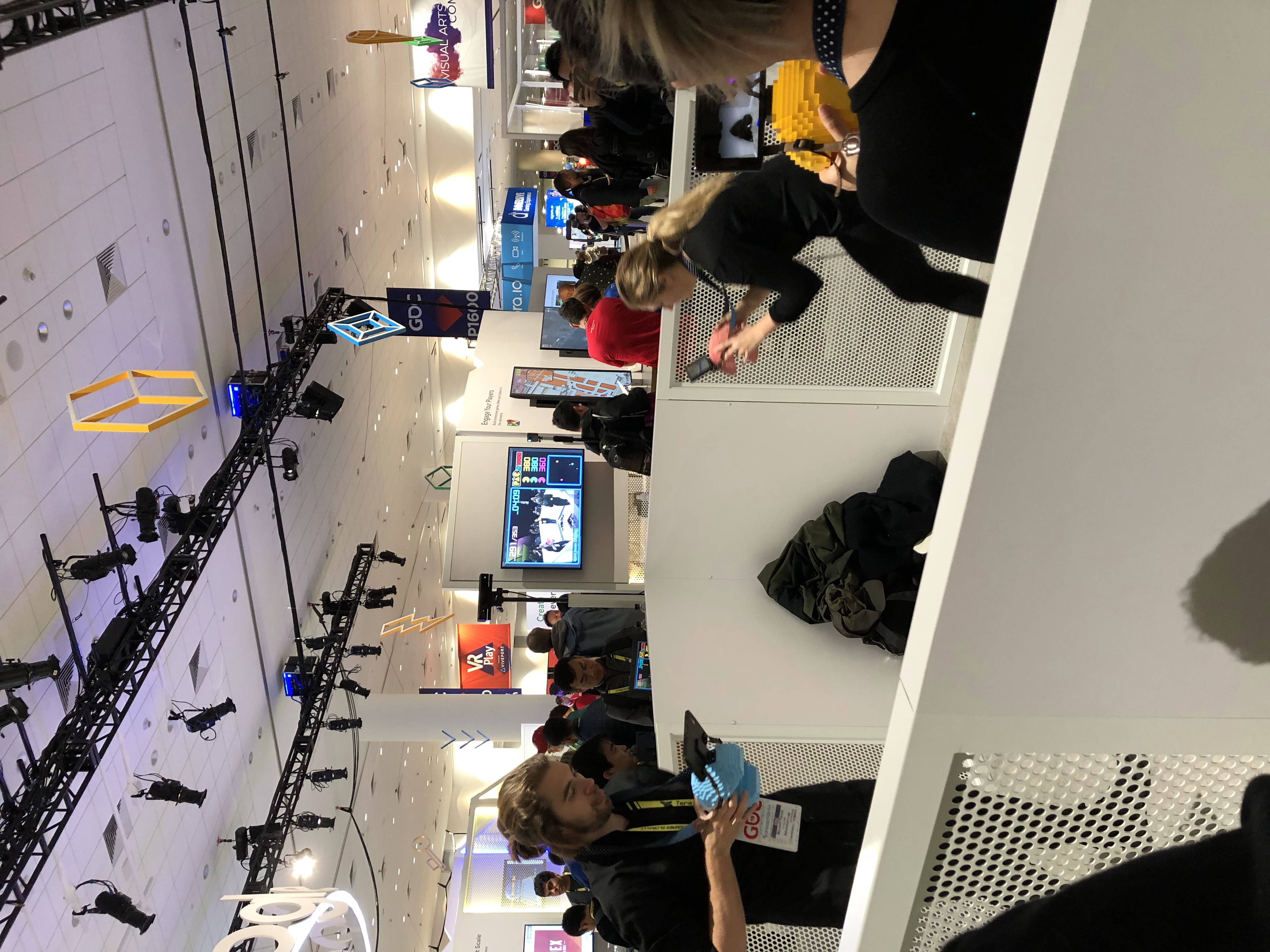
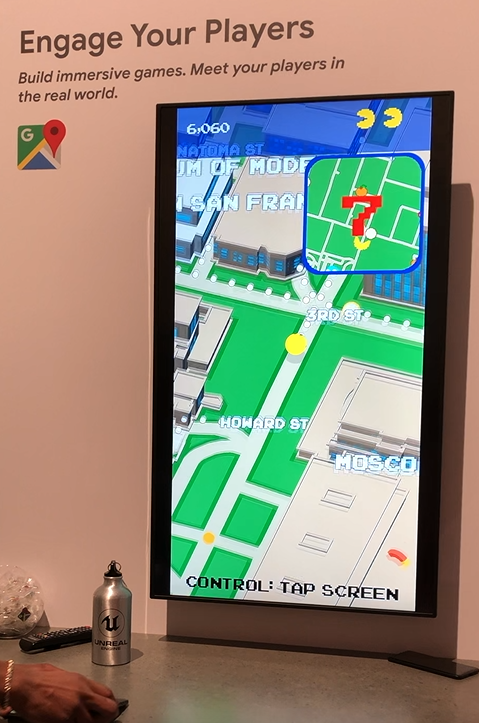
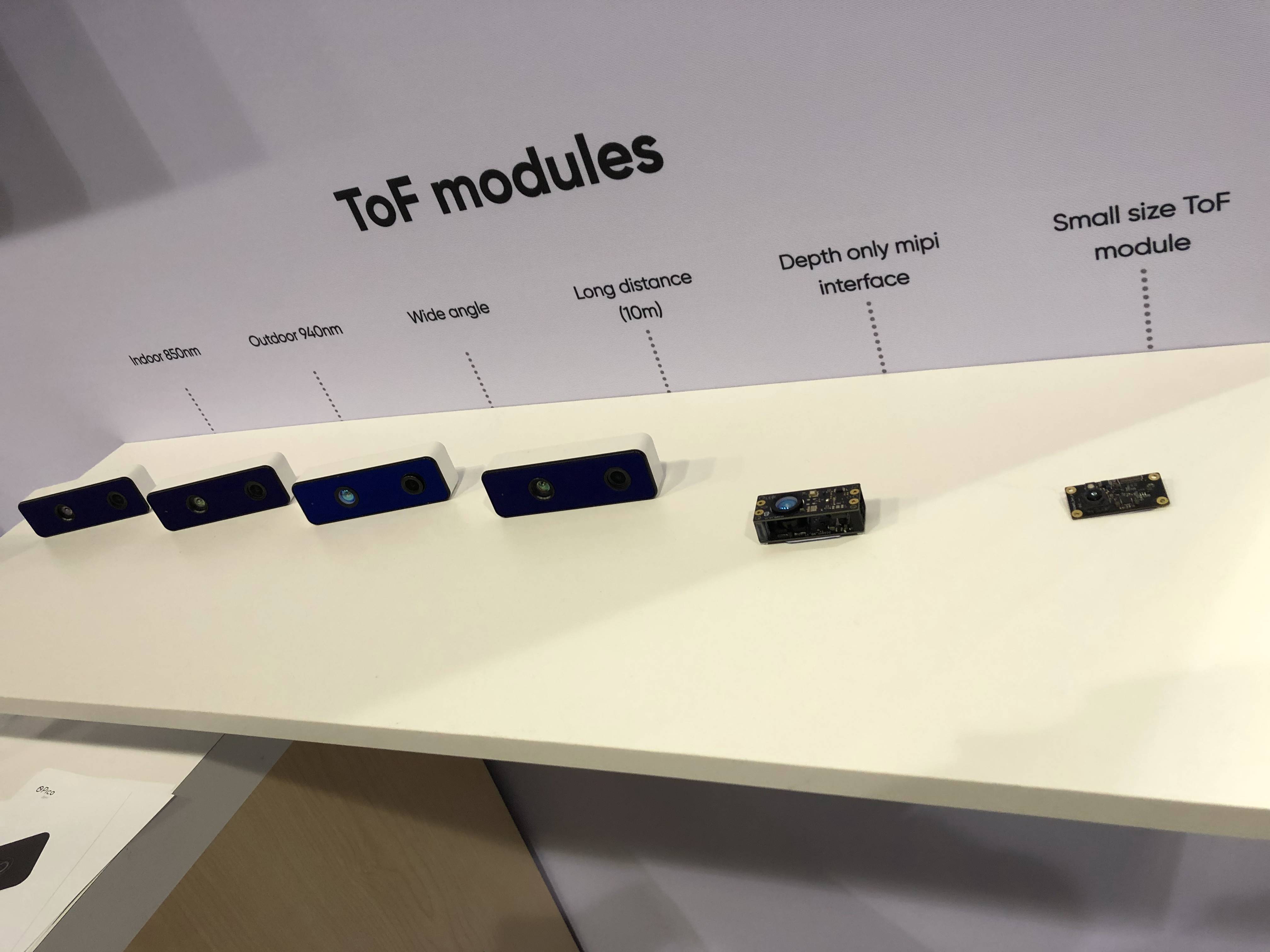
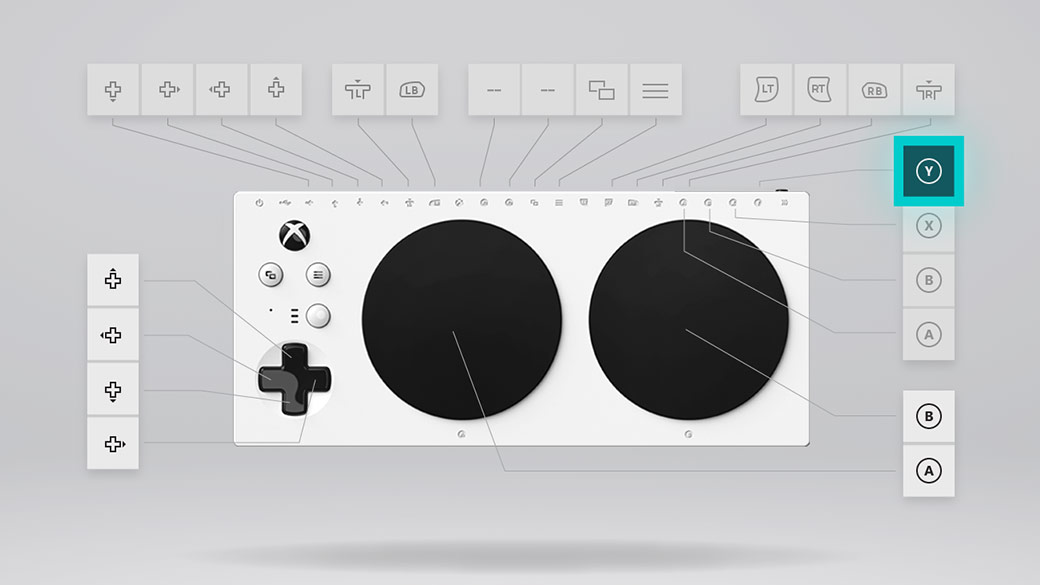
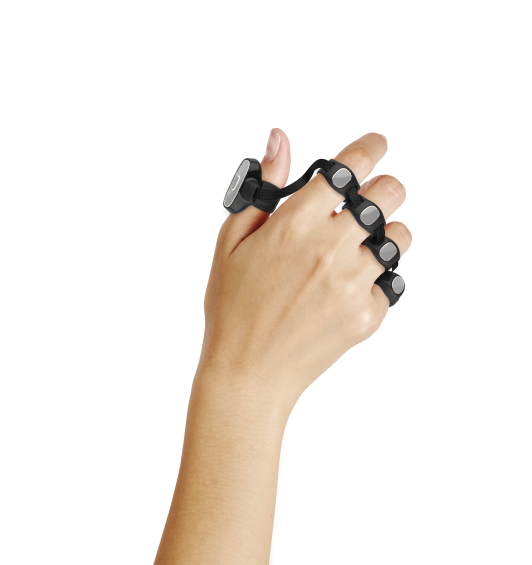
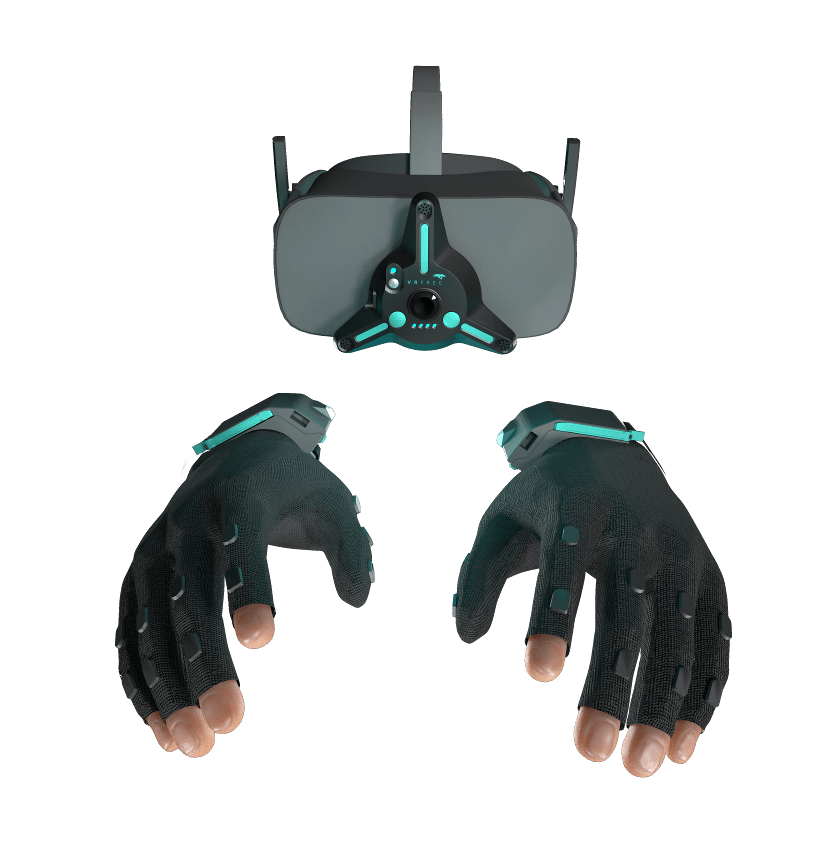
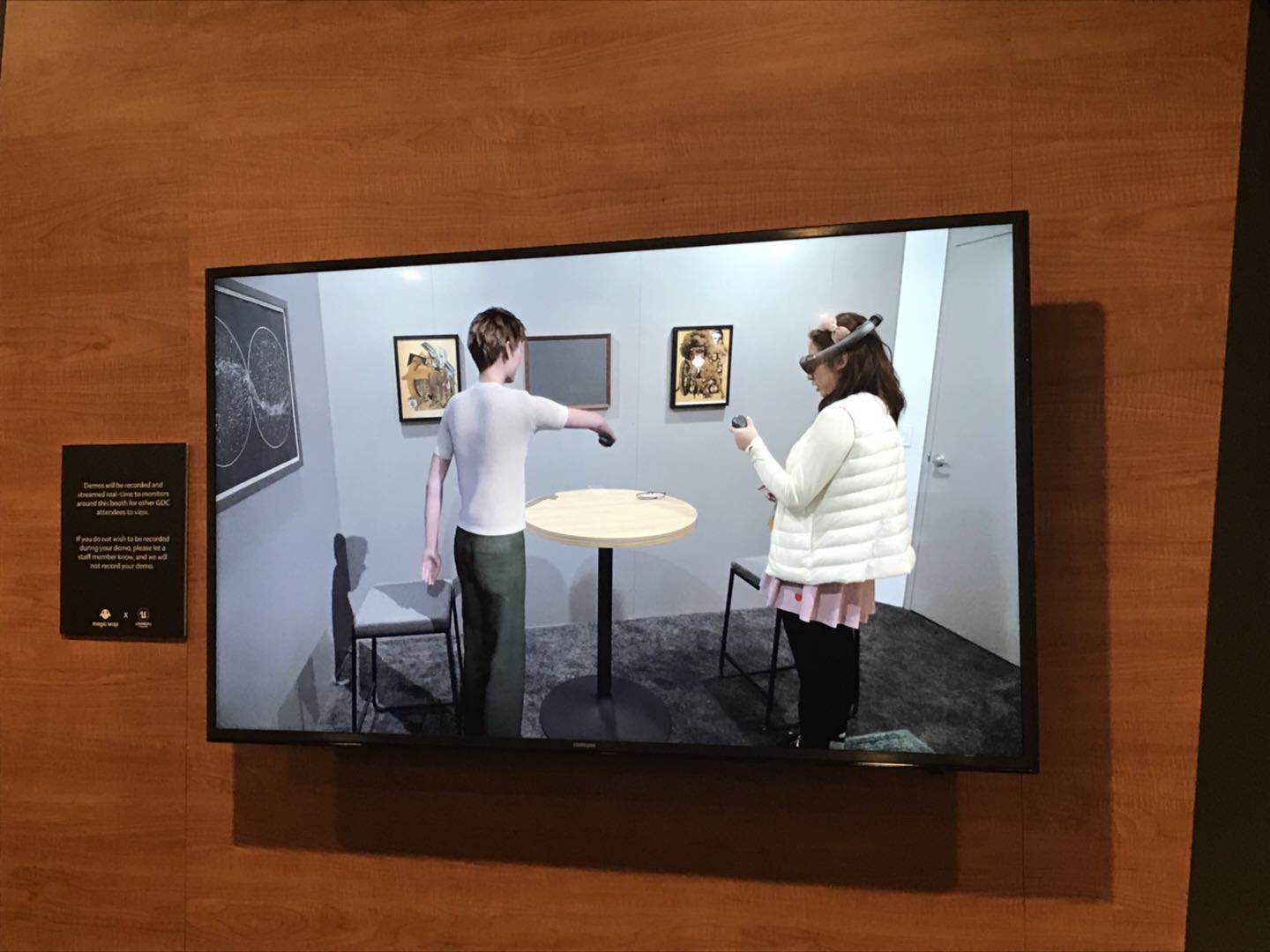
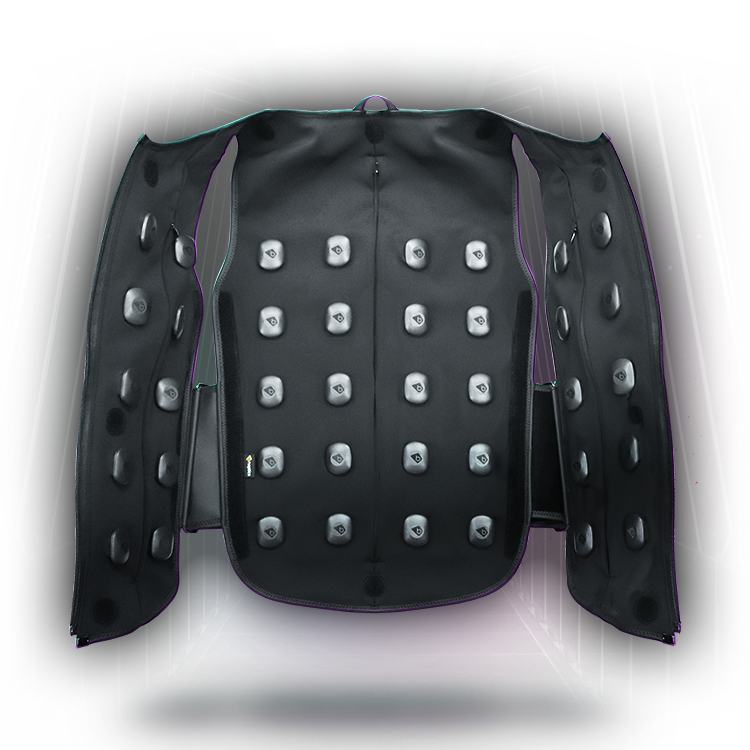
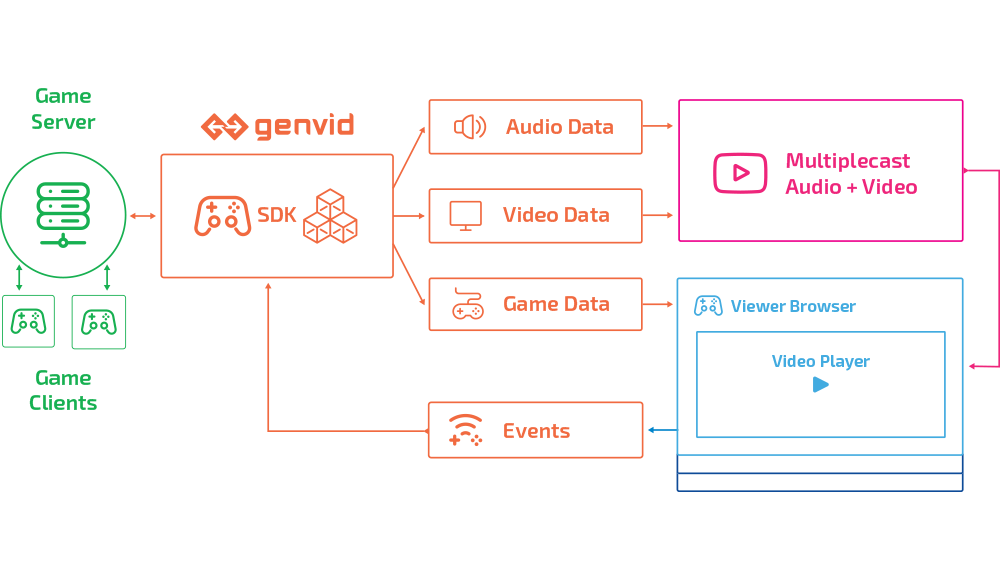
    <content type="html"><![CDATA[<p>每年最大的展台无非就是那几个，Unity，Epic，Microsoft，PlayStation，前年Lumberyard发布后亚马逊也开始疯狂占位，今年Google也加入了（好吧其实之前也在但今年比较重磅）</p><p><strong>开发技术系列</strong></p><a id="more"></a><ol><li><p>Epic Unreal <a href="https://www.unrealengine.com/en-US/blog/epic-games-launches-epic-megagrants-new-unreal-engine-technology-and-epic-online-services-at-gdc-2019" target="_blank" rel="noopener">https://www.unrealengine.com/en-US/blog/epic-games-launches-epic-megagrants-new-unreal-engine-technology-and-epic-online-services-at-gdc-2019</a></p><ul><li><p>UE 4.22已经支持Nvidia RTX开发。 </p></li><li><p>实时渲染堪比影视了解一下，运用了RTX <a href="https://youtu.be/Qjt_MqEOcGM" target="_blank" rel="noopener">https://youtu.be/Qjt_MqEOcGM</a> </p></li><li><p>Epic Games store <a href="https://www.epicgames.com/" target="_blank" rel="noopener">https://www.epicgames.com/</a> 也不是新闻了 </p></li><li><p>炫耀大规模物理模拟的一个Demo <a href="https://youtu.be/fnuWG2I2QCY" target="_blank" rel="noopener">https://youtu.be/fnuWG2I2QCY</a> ，该系统将在4.23发布测试版。 </p></li><li><p>上面这个视频现场使用6个还是8个屏幕拼接而成的大屏游戏体验，然而问了几个员工好像并不知道是不是用的新的nDisplay。。。 </p></li></ul></li><li><p>Unity <a href="https://blogs.unity3d.com/2019/03/19/the-heretic-megacity-release-real-time-ray-tracing-and-more-news-from-gdc-2019/" target="_blank" rel="noopener">https://blogs.unity3d.com/2019/03/19/the-heretic-megacity-release-real-time-ray-tracing-and-more-news-from-gdc-2019/</a></p><ul><li>RTX, shader graph, new VFX system, …</li></ul></li><li><p>Google Stadia <a href="https://store.google.com/magazine/stadia" target="_blank" rel="noopener">https://store.google.com/magazine/stadia</a></p><ul><li><p>云游戏，不需要再专门去买PS4等主机，即可玩主机大作 </p></li><li><p>YouTube互动接口 </p></li><li><p>Style Transfer，利用机器学习，将一张图片的风格实时应用到游戏中。 <img src="/assets/blogimg/GDC2019_GoogleStadia.png" title="Style Transfer"></p></li><li><p>Google的展台有AR的吃豆人，一种是基于现实地图将道路作为吃豆人的路径，另一种是4个人在一个方形区域内将手机作为吃豆人角色吃空中的豆子躲空中的怪。 </p></li><li><img src="/assets/blogimg/GDC2019_GooglePacman.JPG" title="AR Pacman"><img src="/assets/blogimg/GDC2019_GooglePacman2.JPG" title="AR Pacman2"></li><li>还有AR密室逃脱，使用的是手机，传递信息，然后屋内特定物品的图案在手机中会显示不同的结果。 </li><li>记得还有一个大型多人破坏游戏。。。建造很像是玩家一号，然而目前只有一种玩法就是破坏。。能实时看到别人的破坏。没找到照片记录O.O </li></ul></li><li><p>Microsoft Game Stack <a href="https://developer.microsoft.com/en-us/games" target="_blank" rel="noopener">https://developer.microsoft.com/en-us/games</a>，80%的展台都是关于Data&amp;AI，并看不懂。。有一个讲Graphics的，貌似是对游戏针对相应显卡进行加速优化。</p></li><li><p>Intel Odyssey <a href="https://gameplay.intel.com/?odyssey=True" target="_blank" rel="noopener">https://gameplay.intel.com/?odyssey=True</a> </p><ul><li>未来图形与视觉计算。英特尔好像将要发布自家的独显了。 </li></ul></li><li><p>Simplygon <a href="https://www.simplygon.com/" target="_blank" rel="noopener">https://www.simplygon.com/</a> </p><ul><li>LOD生成与减面神器，现场演示把几十万面的模型树生成卡片树，只有千面</li><li>今儿跟美术小伙伴试了一下，对于物体的剪影保持还是很不错的 </li></ul></li><li><p>InstaLOD <a href="https://instalod.com/" target="_blank" rel="noopener">https://instalod.com/</a> </p><ul><li>各种场景模型游戏流程优化工具 </li></ul></li><li><p>Substance Alchemist <a href="https://www.allegorithmic.com/products/substance-alchemist" target="_blank" rel="noopener">https://www.allegorithmic.com/products/substance-alchemist</a> </p><ul><li>比Substance Designer更简单，还能直接根据照片生成相应贴图。 </li></ul></li><li><p>亚马逊的Lumberyard <a href="https://aws.amazon.com/lumberyard/downloads/" target="_blank" rel="noopener">https://aws.amazon.com/lumberyard/downloads/</a> </p><ul><li>今年感觉带来了惊喜，三年下来从当初连做个prototype都被嫌弃的引擎，到现在看上去功能方便了不少，感叹亚马逊的耐心。三年来一直无法跟主流引擎相提并论，硬是靠亚马逊的强大的宣传和坚持不懈追赶上来。不过还没有实际用过，不敢说真的追赶上来了。。 </li><li>很早该引擎就有跟Twitch的结合，直播观看者可以投票为直播玩家做出游戏内选择。</li><li>种菜系统留下了深刻印象。。</li></ul></li></ol><p><strong>输入系列</strong></p><ol><li><p>Ultrahaptics <a href="https://www.ultrahaptics.com/" target="_blank" rel="noopener">https://www.ultrahaptics.com/</a> </p><ul><li><p>传感器追踪手的gesture，利用超声波在空气中形成触摸到物体的一种技术。 </p></li><li><p>有unity的plugin，做了UE的intergration但没有完整plugin。</p></li><li>他们的体验是将VR游戏相结合，有两种，一种是就人站在机器前不动的故事体验，所有互动都在一个机器上进行；一种是叫cave，在里面定点布置一些产品，然后在VR里玩家可以走到不同位置体验水流、火烧、火魔法球等。 </li><li>触摸感很像电流扰动，因此体验内容也偏向于魔法球、水流、火焰的感受。有一幕将手穿越魔法门的感觉也特别好。</li><li>离形成smooth surface的触摸感还有一段距离。</li></ul></li><li><p>Pico Zense <a href="https://www.pico-interactive.com/zense" target="_blank" rel="noopener">https://www.pico-interactive.com/zense</a> </p><ul><li>TOF深度相机，有各种大小模块可集成，最远检测距离10米 <img src="/assets/blogimg/GDC2019_PicoZenseTOF.jpg" title="Pico Zense TOF Camera"></li><li>Pico air light 互动投影，可以与特定实物互动，也可以作为屏幕投影所有安卓app。<img src="/assets/blogimg/GDC2019_PicoAirLight.png" title="Pico Air Light Interactive Projection"></li></ul></li><li><p>Vuelosophy <a href="http://vuelosophy.io/" target="_blank" rel="noopener">http://vuelosophy.io/</a> </p><ul><li>较小巧的眼动追踪，便携版本据说比Tobii Eye便宜很多。 </li></ul></li><li><p>Microsoft Xbox Adaptive Controller <a href="https://www.xbox.com/en-US/xbox-one/accessories/controllers/xbox-adaptive-controller" target="_blank" rel="noopener">https://www.xbox.com/en-US/xbox-one/accessories/controllers/xbox-adaptive-controller</a> </p><ul><li>最上面有一排接口，可以把市面上常用的手柄插在对应的位置，这个Adaptive手柄就会自动帮忙map相应的手柄键。这两个大大的圆可以map到A/B, X/Y, …  <img src="/assets/blogimg/GDC2019_XBoxAdaptiveController.jpg" title="XBox Adaptive Controller"></li></ul></li><li><p>Tap <a href="https://www.tapwithus.com/" target="_blank" rel="noopener">https://www.tapwithus.com/</a> </p><ul><li>一款戴在手上的键盘，通过敲击不同的手指或手指组合，输入对应的字母，也可以自定义输入键。 <img src="/assets/blogimg/GDC2019_Tap.png" title="Tap"></li><li>不禁想起了几年前的Myo臂环，穿在胳膊上利用肌肉运动识别手势的，然而去搜了一下发现18年10月起该公司就停止生产和销售Myo了，略有可惜，期待他们的新产品。</li></ul></li><li><p>Sensoryx VR手套 <a href="http://www.sensoryx.com/" target="_blank" rel="noopener">http://www.sensoryx.com/</a> </p><ul><li>仅需在头显前加一个传感器，带上特制手套，就能在VR游戏中识别双手。 <img src="/assets/blogimg/GDC2019_VRfree_Front_LQ.png" title="VR Free Glove"></li></ul></li><li><p>VICON 动作捕捉 <a href="https://www.vicon.com/products/camera-systems/vantage" target="_blank" rel="noopener">https://www.vicon.com/products/camera-systems/vantage</a> </p><ul><li><p>动捕软件 <a href="https://www.vicon.com/products/software/shogun" target="_blank" rel="noopener">https://www.vicon.com/products/software/shogun</a></p></li><li><p>可实时捕捉到游戏中，立即作出评分反馈等 </p></li></ul></li><li><p>Optitrack <a href="https://optitrack.com/" target="_blank" rel="noopener">https://optitrack.com/</a> </p><ul><li>老牌动捕系统 </li></ul></li><li><p>还有Xsens，骑自行车的VR等 </p></li></ol><p><strong>其他</strong></p><ol><li><p>Magic Leap <a href="https://www.magicleap.com/" target="_blank" rel="noopener">https://www.magicleap.com/</a></p><ul><li>在Unity与UE区域分别有两个体验区，一开馆就得去排队。。排了UE区的体验。体验内容是跟一个虚拟妹子一起做贴画。</li><li><img src="/assets/blogimg/GDC2019_MagicLeap.jpg" title="Magic Leap"></li><li>感觉很适合虚拟管家或虚拟女友，人物距离感挺不错。</li><li>就是视野感觉小，出了眼前的方形显示屏就没有画面的，虚拟人或物必须在正前方才容易看见。</li><li>略微有彩虹纹，貌似是浮雕光栅成像原理的因素。</li></ul></li><li><p>bHaptics <a href="https://www.bhaptics.com/" target="_blank" rel="noopener">https://www.bhaptics.com/</a> </p><ul><li>Tactsuit体感衣，在VR FPS中如果身上部位被击中，该部位会产生震动。 <img src="/assets/blogimg/GDC2019_bHaptics.png" title="bHaptics Tacsuit"></li><li>跟小伙伴稍微yy了一下，未来这些sensor应该会更加精细与密集，并且能够制造一定压力，才能做出玩家一号那种体感衣吧。</li><li>做出来以后，应用最广的应该不是游戏业。。。</li></ul></li><li><p>Genvid, Interactive Streaming Engine <a href="https://www.genvidtech.com/" target="_blank" rel="noopener">https://www.genvidtech.com/</a> </p><ul><li>互动直播观战引擎，在游戏开发时添加相应SDK，比如添加过个观战摄像机，在直播间的观众们就可以选择想要观看的摄像机。也能尝试点击游戏中的各种信息，实时查看游戏数据。 <img src="/assets/blogimg/GDC2019_Genvid.png" title="Genvid How It Works"></li><li>目前支持引擎Unity和Unreal，直播平台Twitch和YouTube。 </li><li>记得英雄联盟S8的直播就启用了互动观赛系统，应该是一类的。 </li></ul></li><li><p>imvu <a href="https://secure.imvu.com/welcome/ftux/" target="_blank" rel="noopener">https://secure.imvu.com/welcome/ftux/</a> </p><ul><li><p>看上去像一个类似第二人生的在线多人虚拟社区？玩家可以自己上传角色模型、衣物模型贴图、场景等，然后标价卖给别的玩家，并且货币可以与真是货币兑换。 </p></li><li><p>貌似有手机app。那么渲染质量就十分有限了，看宣传上觉得不如第二人生。不过很高兴看到类似社区正在涌现。 <img src="/assets/blogimg/GDC2019_IMVU.jpg" title="IMVU"></p></li><li>小伙伴推荐了一个叫Zepeto的app，同样的手机在线虚拟社区。</li><li>那么趁机安利一下Sansar，多人VR在线虚拟社区 <a href="https://www.sansar.com/" target="_blank" rel="noopener">https://www.sansar.com/</a></li></ul></li><li><p>Pico VR <a href="https://www.pico-interactive.com/g2-4k" target="_blank" rel="noopener">https://www.pico-interactive.com/g2-4k</a> </p><ul><li>4K的便携式VR头显。在5G来临的时代，我觉得会是一个VR设备和体验的大爆发，尤其是便携VR将会疯狂涌现，相应的应用也会得到大幅发展。 </li></ul></li><li><p>3D Avatar SDK from a single selfie <a href="https://avatarsdk.com/" target="_blank" rel="noopener">https://avatarsdk.com/</a> </p><ul><li>从一张照片建立3D人物模型，还能自动补偿后背的发型。 </li></ul></li><li><p>Deep Motion Neuron <a href="https://deepmotion.com/neuron" target="_blank" rel="noopener">https://deepmotion.com/neuron</a> </p><ul><li>自动化动画生成工具，将实时视频转换为模型动画的工具。免费试用30天：GDC19 </li></ul></li><li><p>小小牛 WanderPainter <a href="https://wonderpainter.net/" target="_blank" rel="noopener">https://wonderpainter.net/</a> </p><ul><li>可以将画的任何封闭图形进行二维rig，并添加基础动画走、跑、跳等，可以快速将自制角色应用于游戏中。 </li></ul></li><li><p>Kronos Workstation Ciara <a href="https://ciaratech.com/products/workstations/" target="_blank" rel="noopener">https://ciaratech.com/products/workstations/</a> </p><ul><li>贼贵的电脑。。但网页打不开 </li><li><img src="/assets/blogimg/GDC2019_KronosPC.png" title="Kronos PC"></li></ul></li></ol>]]></content>
    
    <summary type="html">
    
      &lt;p&gt;每年最大的展台无非就是那几个，Unity，Epic，Microsoft，PlayStation，前年Lumberyard发布后亚马逊也开始疯狂占位，今年Google也加入了（好吧其实之前也在但今年比较重磅）&lt;/p&gt;
&lt;p&gt;&lt;strong&gt;开发技术系列&lt;/strong&gt;&lt;/p&gt;
    
    </summary>
    
      <category term="Notes" scheme="http://vegabeyond.com/categories/Notes/"/>
    
    
      <category term="AR" scheme="http://vegabeyond.com/tags/AR/"/>
    
      <category term="GDC" scheme="http://vegabeyond.com/tags/GDC/"/>
    
      <category term="RTX" scheme="http://vegabeyond.com/tags/RTX/"/>
    
      <category term="VR" scheme="http://vegabeyond.com/tags/VR/"/>
    
  </entry>
  
  <entry>
    <title>欢迎来到Vega的世界</title>
    <link href="http://vegabeyond.com/2018/06/12/Welcome/"/>
    <id>http://vegabeyond.com/2018/06/12/Welcome/</id>
    <published>2018-06-13T06:18:49.000Z</published>
    <updated>2019-03-01T06:11:20.087Z</updated>
    
    <content type="html"><![CDATA[<p>这是我尝试将之前我各处的信息综合一下的地方。<br>也是第一次这么折腾建站 XD<br>这里会发我想发的所有东西（当然是不会侵权的那些），上一次还是在10年前在已经关闭的百度空间。<br>感谢Github，Hexo，还有Yilia主题的制作者Litten。</p><p>这篇之前时间的post都是搬运之前的博客，保留了时间戳。虽然看着当时做的东西很挫。。。不过也是成长的见证吧！留下了！～</p>]]></content>
    
    <summary type="html">


        &lt;p&gt;这是我尝试将之前我各处的信息综合一下的地方。&lt;br&gt;也是第一次这么折腾建站 XD&lt;br&gt;这里会发我想发的所有东西（当然是不会侵权的那些），上一次还是在10年前在已经关闭的百度空间。&lt;br&gt;感谢Github，Hexo，还有Yilia主题的制作者Litten。&lt;/p&gt;
&lt;p&gt;这
      
    
    </summary>
    
      <category term="Notes" scheme="http://vegabeyond.com/categories/Notes/"/>
    
    
  </entry>
  
  <entry>
    <title>Unreal Shaders - Sun</title>
    <link href="http://vegabeyond.com/2017/06/18/UnrealShaders_Sun/"/>
    <id>http://vegabeyond.com/2017/06/18/UnrealShaders_Sun/</id>
    <published>2017-06-19T03:18:49.000Z</published>
    <updated>2019-03-01T06:14:35.509Z</updated>
    
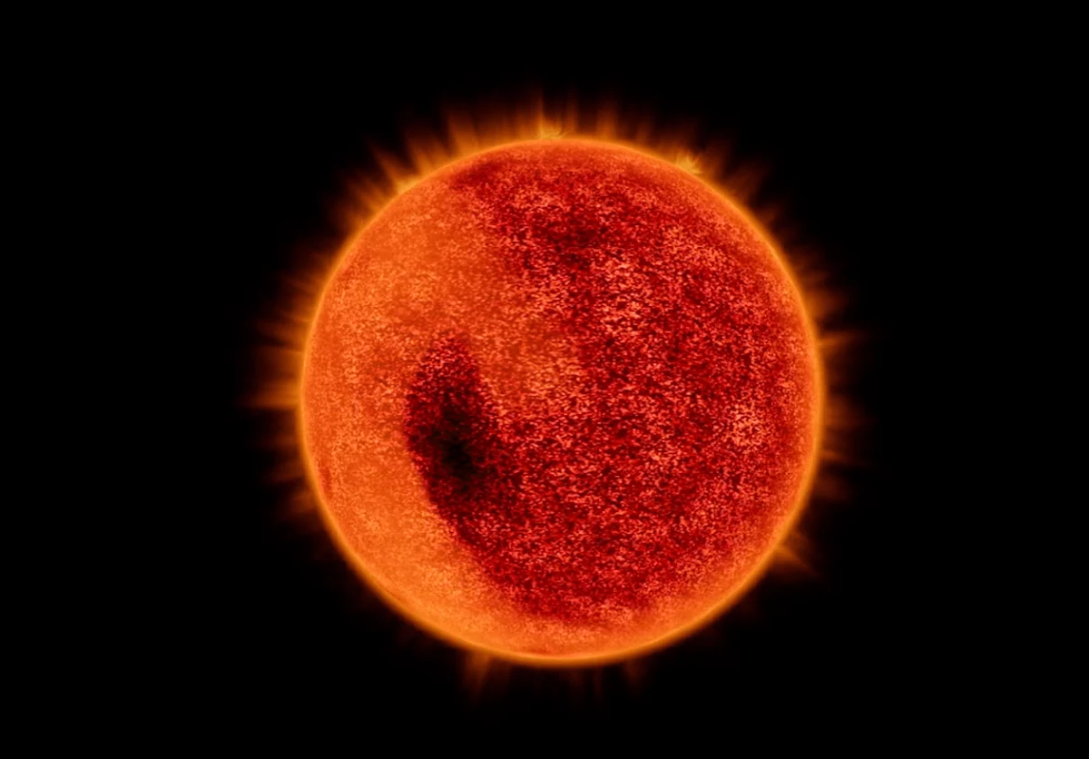
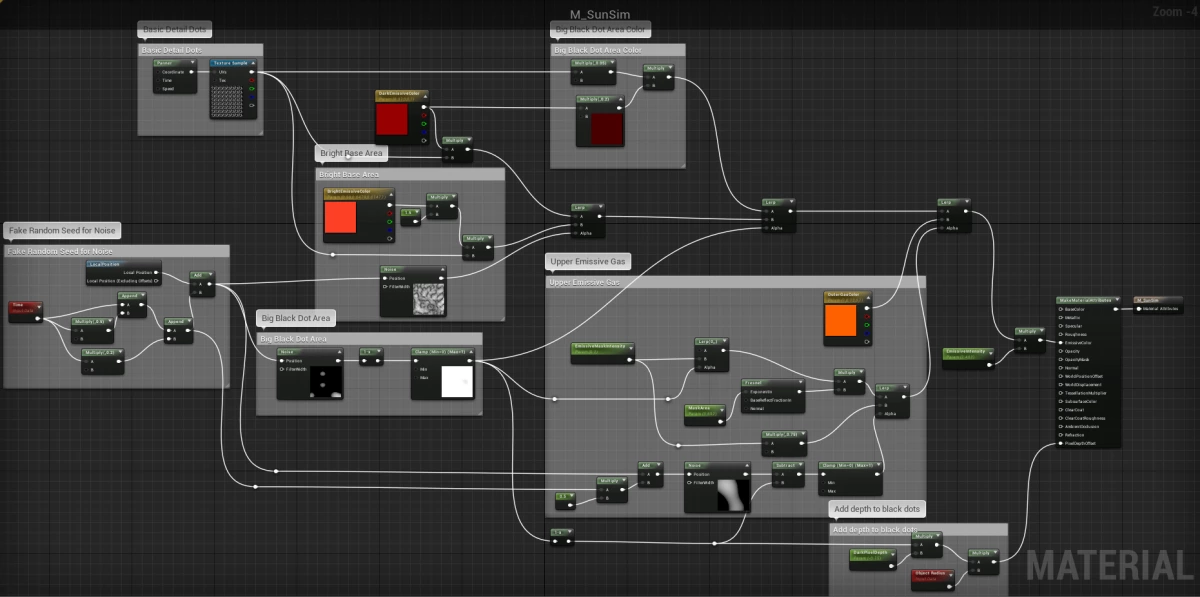
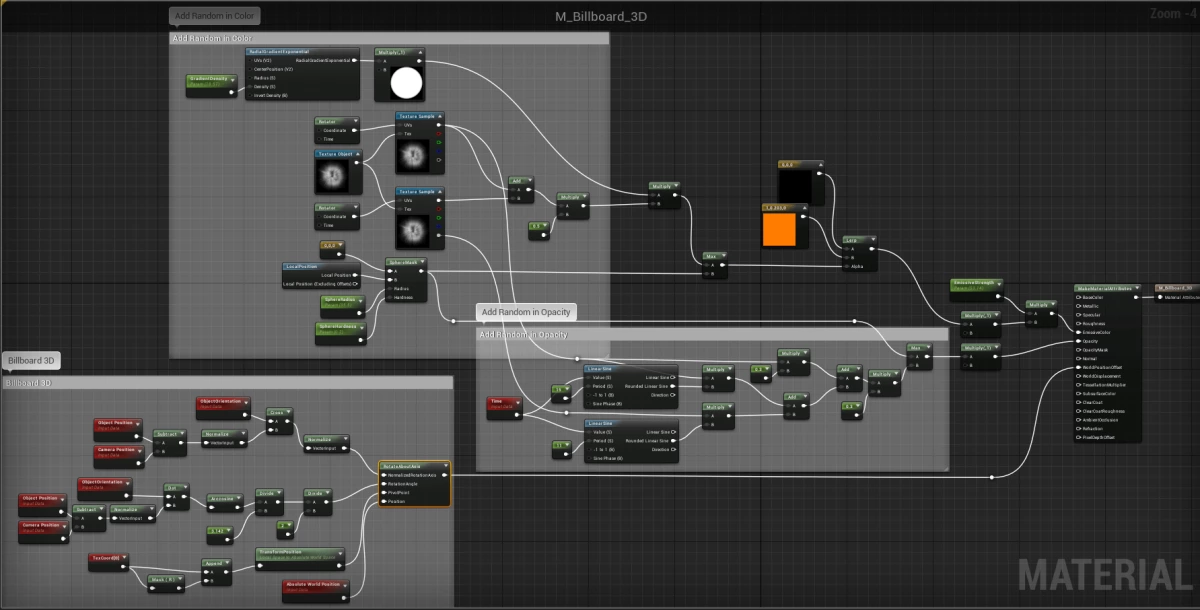
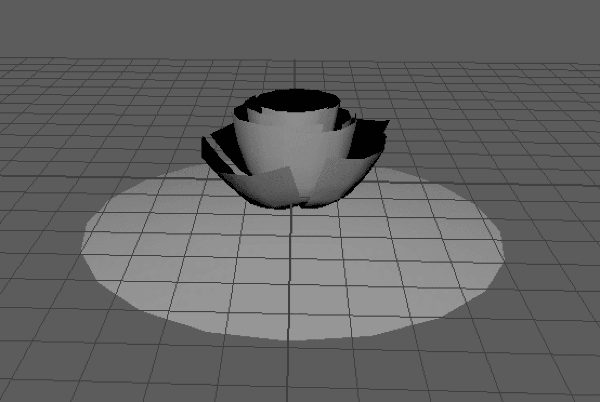
    <content type="html"><![CDATA[<p>Tried to make a Sun animation in Unreal Engine 4.16.1. Welcome any advice and suggestions :D</p><div class="video-container"><iframe src="//www.youtube.com/embed/Pk-Z6pmeZ5o" frameborder="0" allowfullscreen></iframe></div><a id="more"></a><p>(Adding ‘not real Sun’ is to prevent if any misusage in science related things)</p><img src="/assets/blogimg/SunSim1.png"><img src="/assets/blogimg/SunSim2.png"><p>No particles used.</p><p>There are two separated Meshes: the sun sphere and a plane. No vertex animation. The quad plane performs the atmosphere. It splits the Sun from the center and is set to billboard inside the material. Below is the material snapshots for reference.</p><p>The Sun sphere:</p><img src="/assets/blogimg/SunSim3.png"><p>Three Noise nodes are used to make the basic bright area, black dots, and upper bright gas. Noise are based on local position and time to get some change overtime. To make it less consume I’m considering using noise maps instead of Noise node, but currently wondering how to deal with the uv arrangement of sphere to make the noise textures looks seamless when changing.</p><p>The Plane:</p><img src="/assets/blogimg/SunSim4.png"><p>It is a simple solution that I rotated one texture by two different directions and speeds, and used sine function for different changing opacities.</p><img src="/assets/blogimg/SunSim5.png"><p>Sometimes you can see very bright storm appear – this is controlled by a blueprint to randomly place a small storm mesh at the surface of the sun sphere, in order to make a bright storm and looks 3D.</p><p>Welcome any thoughts :D</p>]]></content>
    
    <summary type="html">
    
      &lt;p&gt;Tried to make a Sun animation in Unreal Engine 4.16.1. Welcome any advice and suggestions :D&lt;/p&gt;
&lt;div class=&quot;video-container&quot;&gt;&lt;iframe src=&quot;//www.youtube.com/embed/Pk-Z6pmeZ5o&quot; frameborder=&quot;0&quot; allowfullscreen&gt;&lt;/iframe&gt;&lt;/div&gt;
    
    </summary>
    
      <category term="TechArt" scheme="http://vegabeyond.com/categories/TechArt/"/>
    
    
      <category term="UE4" scheme="http://vegabeyond.com/tags/UE4/"/>
    
      <category term="Shader" scheme="http://vegabeyond.com/tags/Shader/"/>
    
  </entry>
  
  <entry>
    <title>Unreal Shaders - Lava Flow</title>
    <link href="http://vegabeyond.com/2017/03/07/UnrealShaders_Lava/"/>
    <id>http://vegabeyond.com/2017/03/07/UnrealShaders_Lava/</id>
    <published>2017-03-08T07:18:49.000Z</published>
    <updated>2019-03-01T06:14:18.097Z</updated>
    
    <content type="html"><![CDATA[<p>3D lava flow made in UE 4.14.3. Using blendshape for the lava shape in Maya, and animated materials in UE.</p><div class="video-container"><iframe src="//www.youtube.com/embed/iX6D_dPgqI4" frameborder="0" allowfullscreen></iframe></div>]]></content>
    
    <summary type="html">


        &lt;p&gt;3D lava flow made in UE 4.14.3. Using blendshape for the lava shape in Maya, and animated materials in UE.&lt;/p&gt;
&lt;div class=&quot;video-containe
      
    
    </summary>
    
      <category term="TechArt" scheme="http://vegabeyond.com/categories/TechArt/"/>
    
    
      <category term="UE4" scheme="http://vegabeyond.com/tags/UE4/"/>
    
      <category term="Shader" scheme="http://vegabeyond.com/tags/Shader/"/>
    
  </entry>
  
  <entry>
    <title>Unreal Shaders - for game Deliriant</title>
    <link href="http://vegabeyond.com/2017/03/07/UnrealShaders_Deliriant/"/>
    <id>http://vegabeyond.com/2017/03/07/UnrealShaders_Deliriant/</id>
    <published>2017-03-08T04:18:49.000Z</published>
    <updated>2019-03-01T06:14:27.000Z</updated>
    
    <content type="html"><![CDATA[<p>Using UE 4.14.3 - 4.15. </p><div class="video-container"><iframe src="//www.youtube.com/embed/T5X5DyBOVU8" frameborder="0" allowfullscreen></iframe></div>]]></content>
    
    <summary type="html">


        &lt;p&gt;Using UE 4.14.3 - 4.15. &lt;/p&gt;
&lt;div class=&quot;video-container&quot;&gt;&lt;iframe src=&quot;//www.youtube.com/embed/T5X5DyBOVU8&quot; frameborder=&quot;0&quot; allowfullscre
      
    
    </summary>
    
      <category term="TechArt" scheme="http://vegabeyond.com/categories/TechArt/"/>
    
    
      <category term="UE4" scheme="http://vegabeyond.com/tags/UE4/"/>
    
      <category term="Shader" scheme="http://vegabeyond.com/tags/Shader/"/>
    
  </entry>
  
  <entry>
    <title>Animation with Game Engine</title>
    <link href="http://vegabeyond.com/2017/02/19/AnimationWithGameEngine/"/>
    <id>http://vegabeyond.com/2017/02/19/AnimationWithGameEngine/</id>
    <published>2017-02-20T07:18:49.000Z</published>
    <updated>2019-03-01T06:14:09.184Z</updated>
    
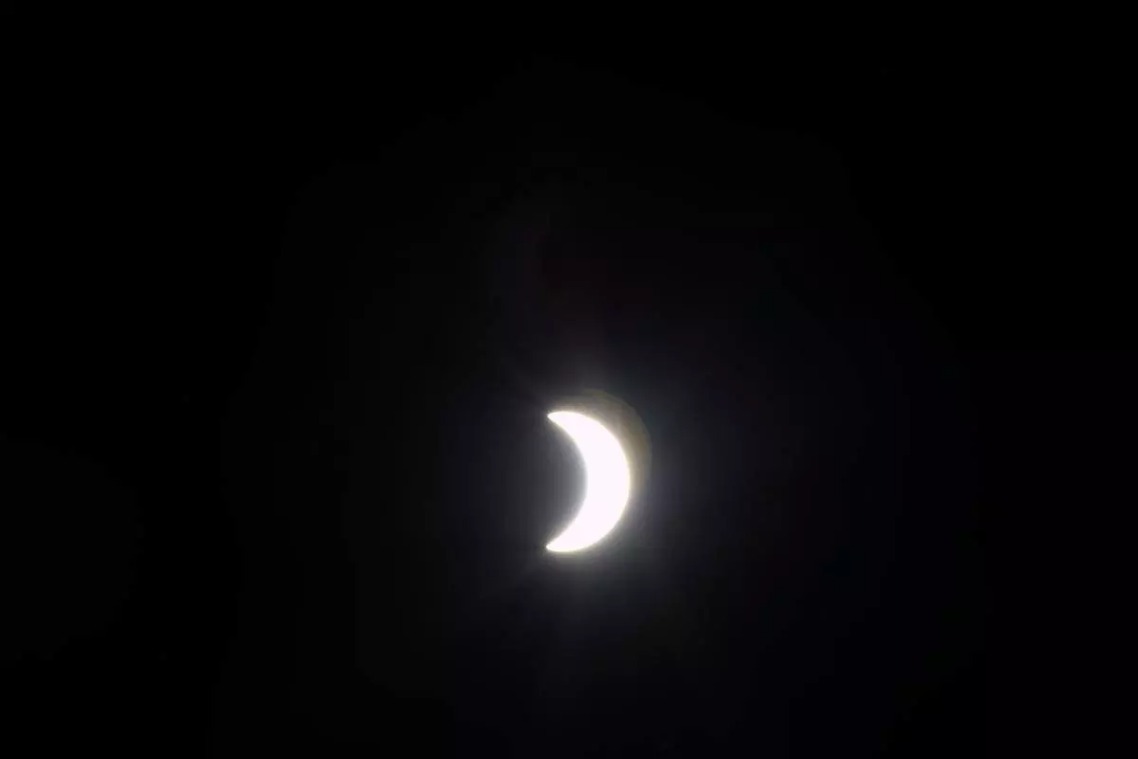
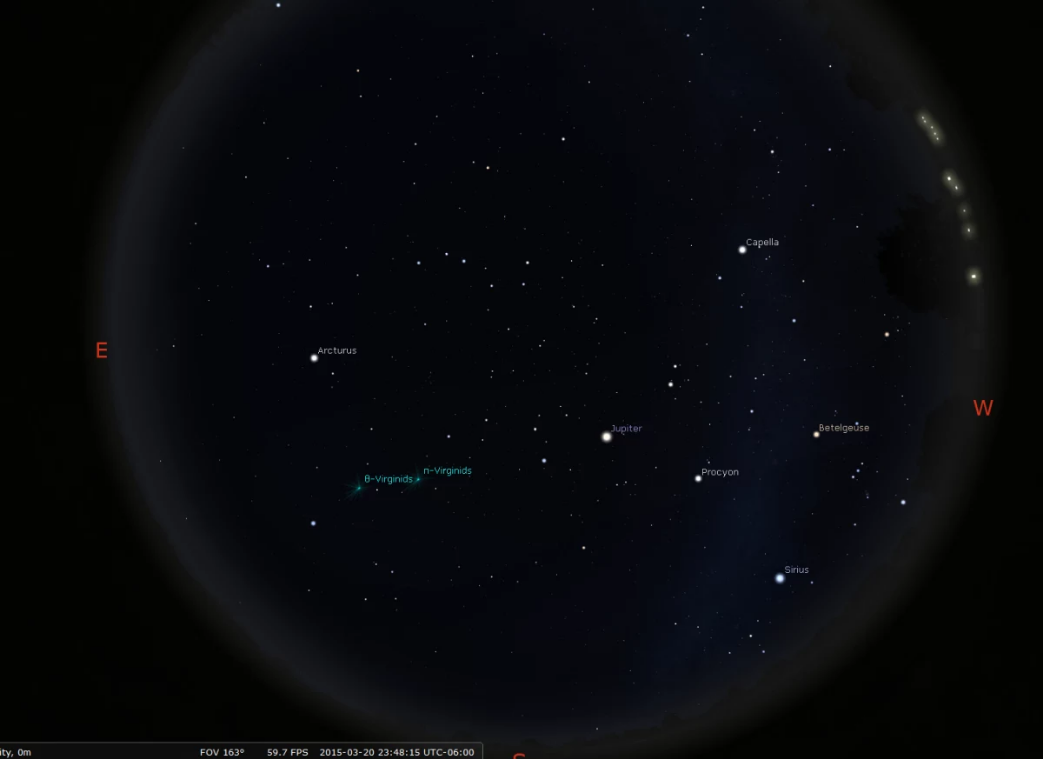
    <content type="html"><![CDATA[<p>Below is an animation I made specially for <em>NASA Science Animation Fellowship</em> application. Mainly made with Unreal game engine, with the help of Adobe Premiere and Houdini. Map data and models of ISS collected from NASA’s website.</p><p>Do you know what day was it?</p><div class="video-container"><iframe src="//www.youtube.com/embed/BEUbKqd5_Dc" frameborder="0" allowfullscreen></iframe></div><a id="more"></a><p>It’s March 20, 2015. A solar eclipse happened on that day, and astronaut Samantha Cristoforetti on the International Space Station took the following picture. So that’s why I put ISS there in the video. Did you see the black shadow dot on earth by the moon?</p><img src="/assets/blogimg/NASAAnim1.jpg"><p>Also that day was the Spring Equinox, the stars’ position is also according to the date.</p><img src="/assets/blogimg/NASAAnim2.png">]]></content>
    
    <summary type="html">
    
      &lt;p&gt;Below is an animation I made specially for &lt;em&gt;NASA Science Animation Fellowship&lt;/em&gt; application. Mainly made with Unreal game engine, with the help of Adobe Premiere and Houdini. Map data and models of ISS collected from NASA’s website.&lt;/p&gt;
&lt;p&gt;Do you know what day was it?&lt;/p&gt;
&lt;div class=&quot;video-container&quot;&gt;&lt;iframe src=&quot;//www.youtube.com/embed/BEUbKqd5_Dc&quot; frameborder=&quot;0&quot; allowfullscreen&gt;&lt;/iframe&gt;&lt;/div&gt;
    
    </summary>
    
      <category term="TechArt" scheme="http://vegabeyond.com/categories/TechArt/"/>
    
    
      <category term="Cinematic" scheme="http://vegabeyond.com/tags/Cinematic/"/>
    
      <category term="UE4" scheme="http://vegabeyond.com/tags/UE4/"/>
    
  </entry>
  
  <entry>
    <title>Basic OpenGL Renderer</title>
    <link href="http://vegabeyond.com/2016/12/19/BasicOpenGLRenderer/"/>
    <id>http://vegabeyond.com/2016/12/19/BasicOpenGLRenderer/</id>
    <published>2016-12-20T07:18:49.000Z</published>
    <updated>2019-03-01T06:14:01.599Z</updated>
    
    <content type="html"><![CDATA[<div class="video-container"><iframe src="//www.youtube.com/embed/4HiD9UrlmpI" frameborder="0" allowfullscreen></iframe></div><p><a href="https://github.com/VegaBai/GraphicsTA" target="_blank" rel="noopener">Git repo</a></p><p>This is an in-class solo project in Shader Development class, using OpenGL.</p><a id="more"></a><p>Basic structure:</p><ul><li><p>Mainer.cpp</p></li><li><p>VertexShaderTest.glsl</p></li><li><p>VertexShaderCodeNoLight.glsl</p></li><li><p>FragmentShaderTest.glsl</p></li><li><p>FragmentShaderCodeNoLight.glsl</p></li><li><p>Camera.h</p></li><li><p>Camera.cpp</p></li><li><p>Primitives</p><ul><li><p>ShapeData.h</p></li><li><p>ShapeGenerator.h</p></li><li><p>ShapeGenerator.cpp</p></li><li><p>Vertex.h</p></li><li><p>TeapotData.h</p></li></ul></li><li><p>Renderer</p><ul><li>BufferInfo.h</li><li>Geometry.h</li><li>Geometry.cpp</li><li>MeRenderer.h</li><li>MeRenderer.cpp</li><li>Renderable.h</li><li>Renderable.cpp</li><li>ShaderProgramInfo.h</li></ul></li></ul>]]></content>
    
    <summary type="html">
    
      &lt;div class=&quot;video-container&quot;&gt;&lt;iframe src=&quot;//www.youtube.com/embed/4HiD9UrlmpI&quot; frameborder=&quot;0&quot; allowfullscreen&gt;&lt;/iframe&gt;&lt;/div&gt;
&lt;p&gt;&lt;a href=&quot;https://github.com/VegaBai/GraphicsTA&quot; target=&quot;_blank&quot; rel=&quot;noopener&quot;&gt;Git repo&lt;/a&gt;&lt;/p&gt;
&lt;p&gt;This is an in-class solo project in Shader Development class, using OpenGL.&lt;/p&gt;
    
    </summary>
    
      <category term="TechArt" scheme="http://vegabeyond.com/categories/TechArt/"/>
    
    
      <category term="Renderer" scheme="http://vegabeyond.com/tags/Renderer/"/>
    
      <category term="Shader" scheme="http://vegabeyond.com/tags/Shader/"/>
    
      <category term="OpenGL" scheme="http://vegabeyond.com/tags/OpenGL/"/>
    
      <category term="GLSL" scheme="http://vegabeyond.com/tags/GLSL/"/>
    
  </entry>
  
  <entry>
    <title>Post Mortem - Cyber Force</title>
    <link href="http://vegabeyond.com/2015/12/16/PostMortemCyberForce/"/>
    <id>http://vegabeyond.com/2015/12/16/PostMortemCyberForce/</id>
    <published>2015-12-17T07:18:49.000Z</published>
    <updated>2020-07-16T18:43:07.797Z</updated>
    
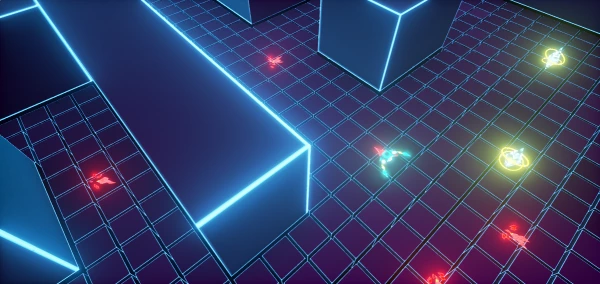
    <content type="html"><![CDATA[<p><em>Cyber Force</em> is a game that players perform as an ethical hacker hunting bugs in programs. Players enforce justice in the cyber world. The core mechanic is to find out the bugs among programs but the player need to be careful with his power – abuse will cause a domino effect and more bugs.</p><img src="/assets/blogimg/CyberForce1.png" title="Cyber Force"><a id="more"></a><div class="video-container"><iframe src="//www.youtube.com/embed/t-AF88MKcA8" frameborder="0" allowfullscreen></iframe></div><blockquote><p><em>Platform: PC</em></p><p><em>Engine (given): Unreal</em></p><p><em>Theme: Iteration on Brute Force</em></p><p><em>Audience: Gamers 20-40</em></p></blockquote><h2 id="My-contribution-to-the-project"><a href="#My-contribution-to-the-project" class="headerlink" title="My contribution to the project"></a>My contribution to the project</h2><p>In this project I perdormed as a Technical Artist. At first I was the only artist, and my team decided to use the minimal art style so that I can work more on tech-art things. After the personnel change we got another artist Cody, so after that I mainly focus on the effects inside the game. Specific works I have done are showed as follow:</p><ul><li>Growing effects and particle effects inside the game</li><li>Map build</li><li>UI assets</li><li>HowToPlay video (together with Ray)</li><li>Help publish the game</li></ul><img src="/assets/blogimg/CyberForce2.png" title="Cyber Force"><img src="/assets/blogimg/CyberForce3.png" title="Cyber Force"><h2 id="Different-things-to-do-next-time"><a href="#Different-things-to-do-next-time" class="headerlink" title="Different things to do next time"></a>Different things to do next time</h2><p>This time I really worked as a tech artist. I’m not very good at art work compare to other artists, but this time I found out what role is the most suitable for me. I forcused on the effects of arts, use program methods to make it better. These are still basic tech-art things, but they really enlightened me. So next time I should try more tech-art things to help the artists work better. I am really happy when doing my work.</p><h2 id="Things-I-learned-from-participating-in-this-process"><a href="#Things-I-learned-from-participating-in-this-process" class="headerlink" title="Things I learned from participating in this process"></a>Things I learned from participating in this process</h2><h3 id="Positive-lessons"><a href="#Positive-lessons" class="headerlink" title="Positive lessons:"></a>Positive lessons:</h3><p>The first thing is of course my attribution of Tech-Artist. I can apply the knowledge I got from my tech-art class to our game, and try to figure out how a tech-artist can do in a real game project. I didn’t need to do the art things I’m not familiar with, but help to make the art work better. That’s the best thing.</p><p>Second is the great communication between team members. This time our team got a good communication with each other. We had clear feature lists, and clear assignments for each member. Due to the great efficiency, we had playable version in every sprint, and discussed together what we could do better in the next version. That a very awesome experience.</p><p>Third is that our game got good number of downloads. Though not the most among all the groups, this still gave us confidence. Some downloaders also gave us feedbacks on the gameplay and art styles. Then we found that our game still need many improvement. So it is very important to test our game by normal players so that we can found some problems that we take for granted.</p><h3 id="Negative-lessons"><a href="#Negative-lessons" class="headerlink" title="Negative lessons:"></a>Negative lessons:</h3><p>First is that we lose a team member. This is a terrible feeling that we lost one of our main programmers. In real world we may not be such lucky to find another great programmer. It’s really bad feeling.</p><p>Second is that, as a technical artist, I still failed to implement the skeleton animation from Maya to Unreal. Finally due to time limitation, we decide to not use it.</p><p>Third is that we seemed to have some AI misunderstanding during our development. This is maybe because of our language expression. But finally we all got them done.</p>]]></content>
    
    <summary type="html">
    
      &lt;p&gt;&lt;em&gt;Cyber Force&lt;/em&gt; is a game that players perform as an ethical hacker hunting bugs in programs. Players enforce justice in the cyber world. The core mechanic is to find out the bugs among programs but the player need to be careful with his power – abuse will cause a domino effect and more bugs.&lt;/p&gt;
&lt;img src=&quot;/assets/blogimg/CyberForce1.png&quot; title=&quot;Cyber Force&quot;&gt;
    
    </summary>
    
      <category term="GameDev" scheme="http://vegabeyond.com/categories/GameDev/"/>
    
    
      <category term="UE4" scheme="http://vegabeyond.com/tags/UE4/"/>
    
      <category term="Prototype" scheme="http://vegabeyond.com/tags/Prototype/"/>
    
  </entry>
  
  <entry>
    <title>Snowy Scene Generator(Maya, Python)</title>
    <link href="http://vegabeyond.com/2015/11/18/SnowySceneGenerator/"/>
    <id>http://vegabeyond.com/2015/11/18/SnowySceneGenerator/</id>
    <published>2015-11-19T07:18:49.000Z</published>
    <updated>2020-10-26T06:15:08.393Z</updated>
    
    <content type="html"><![CDATA[<p>The second project I decided to generate a snowy scene in Maya. At first I tried to emulate the scene using codes myself, but found it too complicated. Ian, our teacher, suggested me to use the particle system. So finally it’s down using particles.</p><p>Scene preview:</p><img src="/assets/blogimg/SnowyScene1.png" title="Generated scene preview"><a id="more"></a><p>User interface:</p><img src="/assets/blogimg/SnowyScene2.png" title="tool UI"><h2 id="See-how-it-works-on-Youtube"><a href="#See-how-it-works-on-Youtube" class="headerlink" title="See how it works on Youtube:"></a>See how it works on Youtube:</h2><div class="video-container"><iframe src="//www.youtube.com/embed/NDKFskKH8Nk" frameborder="0" allowfullscreen></iframe></div><h2 id="Python-scripts-sample"><a href="#Python-scripts-sample" class="headerlink" title="Python scripts sample:"></a>Python scripts sample:</h2><figure class="highlight python hljs"><figcaption><span>SnowWorld.py from:32 to:186</span><a href="/downloads/code/SnowWorld.py">view raw</a></figcaption><table><tr><td class="gutter"><pre><span class="line">1</span><br><span class="line">2</span><br><span class="line">3</span><br><span class="line">4</span><br><span class="line">5</span><br><span class="line">6</span><br><span class="line">7</span><br><span class="line">8</span><br><span class="line">9</span><br><span class="line">10</span><br><span class="line">11</span><br><span class="line">12</span><br><span class="line">13</span><br><span class="line">14</span><br><span class="line">15</span><br><span class="line">16</span><br><span class="line">17</span><br><span class="line">18</span><br><span class="line">19</span><br><span class="line">20</span><br><span class="line">21</span><br><span class="line">22</span><br><span class="line">23</span><br><span class="line">24</span><br><span class="line">25</span><br><span class="line">26</span><br><span class="line">27</span><br><span class="line">28</span><br><span class="line">29</span><br><span class="line">30</span><br><span class="line">31</span><br><span class="line">32</span><br><span class="line">33</span><br><span class="line">34</span><br><span class="line">35</span><br><span class="line">36</span><br><span class="line">37</span><br><span class="line">38</span><br><span class="line">39</span><br><span class="line">40</span><br><span class="line">41</span><br><span class="line">42</span><br><span class="line">43</span><br><span class="line">44</span><br><span class="line">45</span><br><span class="line">46</span><br><span class="line">47</span><br><span class="line">48</span><br><span class="line">49</span><br><span class="line">50</span><br><span class="line">51</span><br><span class="line">52</span><br><span class="line">53</span><br><span class="line">54</span><br><span class="line">55</span><br><span class="line">56</span><br><span class="line">57</span><br><span class="line">58</span><br><span class="line">59</span><br><span class="line">60</span><br><span class="line">61</span><br><span class="line">62</span><br><span class="line">63</span><br><span class="line">64</span><br><span class="line">65</span><br><span class="line">66</span><br><span class="line">67</span><br><span class="line">68</span><br><span class="line">69</span><br><span class="line">70</span><br><span class="line">71</span><br><span class="line">72</span><br><span class="line">73</span><br><span class="line">74</span><br><span class="line">75</span><br><span class="line">76</span><br><span class="line">77</span><br><span class="line">78</span><br><span class="line">79</span><br><span class="line">80</span><br><span class="line">81</span><br><span class="line">82</span><br><span class="line">83</span><br><span class="line">84</span><br><span class="line">85</span><br><span class="line">86</span><br><span class="line">87</span><br><span class="line">88</span><br><span class="line">89</span><br><span class="line">90</span><br><span class="line">91</span><br><span class="line">92</span><br><span class="line">93</span><br><span class="line">94</span><br><span class="line">95</span><br><span class="line">96</span><br><span class="line">97</span><br><span class="line">98</span><br><span class="line">99</span><br><span class="line">100</span><br><span class="line">101</span><br><span class="line">102</span><br><span class="line">103</span><br><span class="line">104</span><br><span class="line">105</span><br><span class="line">106</span><br><span class="line">107</span><br><span class="line">108</span><br><span class="line">109</span><br><span class="line">110</span><br><span class="line">111</span><br><span class="line">112</span><br><span class="line">113</span><br><span class="line">114</span><br><span class="line">115</span><br><span class="line">116</span><br><span class="line">117</span><br><span class="line">118</span><br><span class="line">119</span><br><span class="line">120</span><br><span class="line">121</span><br><span class="line">122</span><br><span class="line">123</span><br><span class="line">124</span><br><span class="line">125</span><br><span class="line">126</span><br><span class="line">127</span><br><span class="line">128</span><br><span class="line">129</span><br><span class="line">130</span><br><span class="line">131</span><br><span class="line">132</span><br><span class="line">133</span><br><span class="line">134</span><br><span class="line">135</span><br><span class="line">136</span><br><span class="line">137</span><br><span class="line">138</span><br><span class="line">139</span><br><span class="line">140</span><br><span class="line">141</span><br><span class="line">142</span><br><span class="line">143</span><br><span class="line">144</span><br><span class="line">145</span><br><span class="line">146</span><br><span class="line">147</span><br><span class="line">148</span><br><span class="line">149</span><br><span class="line">150</span><br><span class="line">151</span><br><span class="line">152</span><br><span class="line">153</span><br><span class="line">154</span><br><span class="line">155</span><br><span class="line">156</span><br><span class="line">157</span><br><span class="line">158</span><br><span class="line">159</span><br><span class="line">160</span><br><span class="line">161</span><br><span class="line">162</span><br><span class="line">163</span><br><span class="line">164</span><br><span class="line">165</span><br><span class="line">166</span><br><span class="line">167</span><br><span class="line">168</span><br><span class="line">169</span><br><span class="line">170</span><br><span class="line">171</span><br><span class="line">172</span><br><span class="line">173</span><br><span class="line">174</span><br><span class="line">175</span><br><span class="line">176</span><br><span class="line">177</span><br><span class="line">178</span><br><span class="line">179</span><br><span class="line">180</span><br><span class="line">181</span><br><span class="line">182</span><br><span class="line">183</span><br><span class="line">184</span><br><span class="line">185</span><br><span class="line">186</span><br><span class="line">187</span><br><span class="line">188</span><br><span class="line">189</span><br><span class="line">190</span><br><span class="line">191</span><br><span class="line">192</span><br><span class="line">193</span><br><span class="line">194</span><br><span class="line">195</span><br><span class="line">196</span><br><span class="line">197</span><br><span class="line">198</span><br><span class="line">199</span><br><span class="line">200</span><br><span class="line">201</span><br><span class="line">202</span><br><span class="line">203</span><br><span class="line">204</span><br><span class="line">205</span><br><span class="line">206</span><br><span class="line">207</span><br><span class="line">208</span><br><span class="line">209</span><br><span class="line">210</span><br><span class="line">211</span><br><span class="line">212</span><br><span class="line">213</span><br><span class="line">214</span><br><span class="line">215</span><br><span class="line">216</span><br><span class="line">217</span><br><span class="line">218</span><br><span class="line">219</span><br><span class="line">220</span><br><span class="line">221</span><br><span class="line">222</span><br><span class="line">223</span><br><span class="line">224</span><br><span class="line">225</span><br><span class="line">226</span><br><span class="line">227</span><br><span class="line">228</span><br><span class="line">229</span><br><span class="line">230</span><br><span class="line">231</span><br><span class="line">232</span><br><span class="line">233</span><br><span class="line">234</span><br><span class="line">235</span><br><span class="line">236</span><br><span class="line">237</span><br><span class="line">238</span><br><span class="line">239</span><br><span class="line">240</span><br><span class="line">241</span><br><span class="line">242</span><br><span class="line">243</span><br><span class="line">244</span><br><span class="line">245</span><br><span class="line">246</span><br><span class="line">247</span><br><span class="line">248</span><br><span class="line">249</span><br><span class="line">250</span><br><span class="line">251</span><br><span class="line">252</span><br><span class="line">253</span><br><span class="line">254</span><br><span class="line">255</span><br><span class="line">256</span><br><span class="line">257</span><br><span class="line">258</span><br><span class="line">259</span><br><span class="line">260</span><br><span class="line">261</span><br><span class="line">262</span><br><span class="line">263</span><br><span class="line">264</span><br><span class="line">265</span><br><span class="line">266</span><br><span class="line">267</span><br><span class="line">268</span><br><span class="line">269</span><br><span class="line">270</span><br><span class="line">271</span><br><span class="line">272</span><br><span class="line">273</span><br><span class="line">274</span><br><span class="line">275</span><br><span class="line">276</span><br><span class="line">277</span><br><span class="line">278</span><br><span class="line">279</span><br><span class="line">280</span><br><span class="line">281</span><br><span class="line">282</span><br><span class="line">283</span><br><span class="line">284</span><br><span class="line">285</span><br><span class="line">286</span><br><span class="line">287</span><br><span class="line">288</span><br><span class="line">289</span><br><span class="line">290</span><br><span class="line">291</span><br><span class="line">292</span><br><span class="line">293</span><br><span class="line">294</span><br><span class="line">295</span><br><span class="line">296</span><br><span class="line">297</span><br><span class="line">298</span><br><span class="line">299</span><br><span class="line">300</span><br><span class="line">301</span><br><span class="line">302</span><br><span class="line">303</span><br><span class="line">304</span><br><span class="line">305</span><br><span class="line">306</span><br><span class="line">307</span><br><span class="line">308</span><br><span class="line">309</span><br><span class="line">310</span><br><span class="line">311</span><br><span class="line">312</span><br><span class="line">313</span><br><span class="line">314</span><br><span class="line">315</span><br><span class="line">316</span><br><span class="line">317</span><br><span class="line">318</span><br><span class="line">319</span><br><span class="line">320</span><br><span class="line">321</span><br><span class="line">322</span><br><span class="line">323</span><br><span class="line">324</span><br><span class="line">325</span><br><span class="line">326</span><br><span class="line">327</span><br><span class="line">328</span><br><span class="line">329</span><br><span class="line">330</span><br><span class="line">331</span><br><span class="line">332</span><br><span class="line">333</span><br><span class="line">334</span><br><span class="line">335</span><br><span class="line">336</span><br><span class="line">337</span><br><span class="line">338</span><br><span class="line">339</span><br><span class="line">340</span><br><span class="line">341</span><br><span class="line">342</span><br><span class="line">343</span><br><span class="line">344</span><br><span class="line">345</span><br><span class="line">346</span><br><span class="line">347</span><br><span class="line">348</span><br><span class="line">349</span><br><span class="line">350</span><br><span class="line">351</span><br><span class="line">352</span><br><span class="line">353</span><br><span class="line">354</span><br><span class="line">355</span><br><span class="line">356</span><br><span class="line">357</span><br><span class="line">358</span><br><span class="line">359</span><br><span class="line">360</span><br><span class="line">361</span><br><span class="line">362</span><br><span class="line">363</span><br><span class="line">364</span><br><span class="line">365</span><br><span class="line">366</span><br><span class="line">367</span><br><span class="line">368</span><br><span class="line">369</span><br><span class="line">370</span><br><span class="line">371</span><br><span class="line">372</span><br><span class="line">373</span><br><span class="line">374</span><br><span class="line">375</span><br><span class="line">376</span><br><span class="line">377</span><br><span class="line">378</span><br><span class="line">379</span><br><span class="line">380</span><br><span class="line">381</span><br><span class="line">382</span><br><span class="line">383</span><br><span class="line">384</span><br><span class="line">385</span><br><span class="line">386</span><br><span class="line">387</span><br><span class="line">388</span><br><span class="line">389</span><br><span class="line">390</span><br><span class="line">391</span><br><span class="line">392</span><br><span class="line">393</span><br><span class="line">394</span><br><span class="line">395</span><br><span class="line">396</span><br><span class="line">397</span><br><span class="line">398</span><br><span class="line">399</span><br><span class="line">400</span><br><span class="line">401</span><br><span class="line">402</span><br><span class="line">403</span><br><span class="line">404</span><br><span class="line">405</span><br><span class="line">406</span><br><span class="line">407</span><br><span class="line">408</span><br><span class="line">409</span><br><span class="line">410</span><br><span class="line">411</span><br><span class="line">412</span><br><span class="line">413</span><br><span class="line">414</span><br><span class="line">415</span><br><span class="line">416</span><br><span class="line">417</span><br><span class="line">418</span><br><span class="line">419</span><br><span class="line">420</span><br><span class="line">421</span><br><span class="line">422</span><br><span class="line">423</span><br><span class="line">424</span><br><span class="line">425</span><br><span class="line">426</span><br><span class="line">427</span><br><span class="line">428</span><br><span class="line">429</span><br><span class="line">430</span><br><span class="line">431</span><br><span class="line">432</span><br><span class="line">433</span><br><span class="line">434</span><br><span class="line">435</span><br><span class="line">436</span><br><span class="line">437</span><br><span class="line">438</span><br><span class="line">439</span><br><span class="line">440</span><br><span class="line">441</span><br><span class="line">442</span><br><span class="line">443</span><br><span class="line">444</span><br><span class="line">445</span><br><span class="line">446</span><br><span class="line">447</span><br><span class="line">448</span><br><span class="line">449</span><br><span class="line">450</span><br><span class="line">451</span><br><span class="line">452</span><br><span class="line">453</span><br><span class="line">454</span><br><span class="line">455</span><br><span class="line">456</span><br><span class="line">457</span><br><span class="line">458</span><br><span class="line">459</span><br><span class="line">460</span><br><span class="line">461</span><br><span class="line">462</span><br><span class="line">463</span><br><span class="line">464</span><br><span class="line">465</span><br><span class="line">466</span><br><span class="line">467</span><br><span class="line">468</span><br><span class="line">469</span><br><span class="line">470</span><br><span class="line">471</span><br><span class="line">472</span><br><span class="line">473</span><br><span class="line">474</span><br><span class="line">475</span><br><span class="line">476</span><br><span class="line">477</span><br><span class="line">478</span><br><span class="line">479</span><br><span class="line">480</span><br><span class="line">481</span><br><span class="line">482</span><br><span class="line">483</span><br><span class="line">484</span><br><span class="line">485</span><br><span class="line">486</span><br><span class="line">487</span><br><span class="line">488</span><br><span class="line">489</span><br><span class="line">490</span><br><span class="line">491</span><br><span class="line">492</span><br><span class="line">493</span><br><span class="line">494</span><br><span class="line">495</span><br></pre></td><td class="code"><pre><span class="line"><span class="hljs-string">"""</span></span><br><span class="line"><span class="hljs-string">SnowWorld.py</span></span><br><span class="line"><span class="hljs-string"></span></span><br><span class="line"><span class="hljs-string">Using particles to generate a beautiful snowy scene.</span></span><br><span class="line"><span class="hljs-string"></span></span><br><span class="line"><span class="hljs-string">__author__ = "Vega Bai"</span></span><br><span class="line"><span class="hljs-string">__copyright__ = "Copyright 2015, Vega Bai"</span></span><br><span class="line"><span class="hljs-string">__version__ = "1.0.5"</span></span><br><span class="line"><span class="hljs-string">__maintainer__ = "Vega Bai"</span></span><br><span class="line"><span class="hljs-string">__email__ = "vegabeyond@gmail.com"</span></span><br><span class="line"><span class="hljs-string">__status__ = "Updating"</span></span><br><span class="line"><span class="hljs-string"></span></span><br><span class="line"><span class="hljs-string">logs: </span></span><br><span class="line"><span class="hljs-string">    v1.0.5: 12-19-2015, add error captions</span></span><br><span class="line"><span class="hljs-string">    v1.0.4: 12-19-2015, add collisions; delete animation length option</span></span><br><span class="line"><span class="hljs-string">    v1.0.3: 12-16-2015, add particle render type - cloud</span></span><br><span class="line"><span class="hljs-string">    v1.0.2: 12-9-2015, add texture sequence</span></span><br><span class="line"><span class="hljs-string">    v1.0.1: 12-2-2015, add log function</span></span><br><span class="line"><span class="hljs-string">    </span></span><br><span class="line"><span class="hljs-string">instructions:</span></span><br><span class="line"><span class="hljs-string">    1. click on the plane</span></span><br><span class="line"><span class="hljs-string">    2. click 'Select Start Plane' button</span></span><br><span class="line"><span class="hljs-string">    3. if you want to use a specific image as snowflake texture, browse and select the image, then turn on the 'Use file as texture' checkbox. if you don't turn on the checkbox, the particle will be rendered as white cloud type</span></span><br><span class="line"><span class="hljs-string">    4. if you want to use more than one image to texture different particles, then turn on the 'Use file Sequence' checkbox. then the file browsered just now will be set as the start of the file sequence. make sure to name the textures in 'image.n' format. for example, 'snow.1'</span></span><br><span class="line"><span class="hljs-string">    5. set values of 'Average Size', 'Density', 'MaxHeight'</span></span><br><span class="line"><span class="hljs-string">    6. set values of 'Direction Vector'</span></span><br><span class="line"><span class="hljs-string">    7. if you want to make collisions between other objects and the particles, select those objects and then click 'Select Object Collide With' button, and turn on 'Make Collision' checkbox </span></span><br><span class="line"><span class="hljs-string">    8. click 'Run' to start generating the snowy scene</span></span><br><span class="line"><span class="hljs-string"></span></span><br><span class="line"><span class="hljs-string">"""</span></span><br><span class="line"></span><br><span class="line"><span class="hljs-keyword">import</span> pymel.core <span class="hljs-keyword">as</span> pm</span><br><span class="line"><span class="hljs-keyword">import</span> random</span><br><span class="line"><span class="hljs-keyword">import</span> logging</span><br><span class="line"><span class="hljs-keyword">import</span> os</span><br><span class="line"></span><br><span class="line">FILE_PATH_OV = <span class="hljs-string">'filePathOv'</span>  <span class="hljs-comment"># save the file path</span></span><br><span class="line">snowPath = <span class="hljs-string">''</span></span><br><span class="line"></span><br><span class="line"><span class="hljs-comment"># setup a logger</span></span><br><span class="line">logger = logging.getLogger(__name__)</span><br><span class="line">hdlr = logging.handlers.RotatingFileHandler(<span class="hljs-string">'SnowWorldLog.txt'</span>, maxBytes = <span class="hljs-number">100000</span>)</span><br><span class="line">hdlr.setLevel(logging.DEBUG)</span><br><span class="line">format = (<span class="hljs-string">'%(asctime)s, module=%(module)s, message=%(message)s'</span>)</span><br><span class="line">formatter = logging.Formatter(format)</span><br><span class="line">hdlr.setFormatter(formatter)</span><br><span class="line">logger.addHandler(hdlr)</span><br><span class="line"></span><br><span class="line"></span><br><span class="line"><span class="hljs-function"><span class="hljs-keyword">def</span> <span class="hljs-title">run</span><span class="hljs-params">(sliderSize, sliderDensity, sliderHeight, textSequence, ckboxTexture, ckboxSequence, ckboxCover, directionX, directionY, directionZ, snowPieceBrowser)</span>:</span></span><br><span class="line">    <span class="hljs-string">'''</span></span><br><span class="line"><span class="hljs-string">    This function is the main function to generate the snowy scene.</span></span><br><span class="line"><span class="hljs-string">    </span></span><br><span class="line"><span class="hljs-string">    Args:</span></span><br><span class="line"><span class="hljs-string">        avgSize from sliderSize: The average size of all snow piece</span></span><br><span class="line"><span class="hljs-string">        density from sliderDensity: The density of the snow</span></span><br><span class="line"><span class="hljs-string">        maxDistance from sliderHeight: The highest distance the user want the snow to fall</span></span><br><span class="line"><span class="hljs-string">        snowTexture from ckboxTexture: Whether using the texture for snowflakes</span></span><br><span class="line"><span class="hljs-string">        snowSequence from textSequence: The length of the sequence of images as texture</span></span><br><span class="line"><span class="hljs-string">        directionX: directionX of gravity field</span></span><br><span class="line"><span class="hljs-string">        directionY: directionX of gravity field</span></span><br><span class="line"><span class="hljs-string">        directionZ: directionX of gravity field</span></span><br><span class="line"><span class="hljs-string">        </span></span><br><span class="line"><span class="hljs-string">        coverFlag(coverObj) from ckboxCover: Decide whether the snow will cover the models and which models to cover</span></span><br><span class="line"><span class="hljs-string">        windFlag(windDirection, windStrength): Decide whether there are winds and the directions and strength</span></span><br><span class="line"><span class="hljs-string">        </span></span><br><span class="line"><span class="hljs-string">    GLobal variables used:</span></span><br><span class="line"><span class="hljs-string">        startArea: The surface area the user want the snow fall from</span></span><br><span class="line"><span class="hljs-string">        snowPath: The file path of the snowflake texture</span></span><br><span class="line"><span class="hljs-string">        coverObj: The objects the particles will make collision with</span></span><br><span class="line"><span class="hljs-string">        </span></span><br><span class="line"><span class="hljs-string">    Result: </span></span><br><span class="line"><span class="hljs-string">        a generated snowy scene animation</span></span><br><span class="line"><span class="hljs-string">        </span></span><br><span class="line"><span class="hljs-string">    Return: </span></span><br><span class="line"><span class="hljs-string">        none</span></span><br><span class="line"><span class="hljs-string">    </span></span><br><span class="line"><span class="hljs-string">    '''</span></span><br><span class="line">    <span class="hljs-comment">## check whether the user has selected the start Area    </span></span><br><span class="line">    <span class="hljs-keyword">if</span> isset(<span class="hljs-string">'startArea'</span>) == <span class="hljs-number">0</span>:        </span><br><span class="line">        logger.error(<span class="hljs-string">'Please choose a plane to start snow!'</span>)</span><br><span class="line">        pm.PopupError(<span class="hljs-string">'Please choose a plane to start snow!'</span>)</span><br><span class="line">        <span class="hljs-keyword">return</span></span><br><span class="line">    <span class="hljs-comment">## check whether the user has selected the objects to make collision with</span></span><br><span class="line">    <span class="hljs-keyword">if</span> ckboxCover.getValue():</span><br><span class="line">        <span class="hljs-keyword">if</span> isset(<span class="hljs-string">'coverObj'</span>) == <span class="hljs-number">0</span>:</span><br><span class="line">            logger.error(<span class="hljs-string">'Please select the objects to make collision with!'</span>)</span><br><span class="line">            pm.PopupError(<span class="hljs-string">'Please select the objects to make collision with!'</span>)</span><br><span class="line">            <span class="hljs-keyword">return</span></span><br><span class="line">    <span class="hljs-comment">## check whether the user has selected files for textures</span></span><br><span class="line">    snowPath = snowPieceBrowser.getText()</span><br><span class="line">    <span class="hljs-keyword">if</span> ckboxTexture.getValue():</span><br><span class="line">        <span class="hljs-keyword">if</span> snowPath == <span class="hljs-string">''</span>:            </span><br><span class="line">            logger.error(<span class="hljs-string">'Please select the images for textures!'</span>)</span><br><span class="line">            pm.PopupError(<span class="hljs-string">'Please select the images for textures!'</span>)</span><br><span class="line">            <span class="hljs-keyword">return</span>            </span><br><span class="line">        </span><br><span class="line">    logger.info(<span class="hljs-string">'Start generating the snowy scene'</span>)</span><br><span class="line"></span><br><span class="line">    snowSize = sliderSize.getValue()</span><br><span class="line">    snowDensity = sliderDensity.getValue()</span><br><span class="line">    snowHeight = sliderHeight.getValue()</span><br><span class="line">    </span><br><span class="line">    snowTexture = ckboxTexture.getValue()</span><br><span class="line">    snowSequenceTmp = textSequence.getText()</span><br><span class="line">    snowSequence = int(snowSequenceTmp)</span><br><span class="line">    gdXs = directionX.getText()</span><br><span class="line">    gdYs = directionY.getText()</span><br><span class="line">    gdZs = directionZ.getText()</span><br><span class="line">    </span><br><span class="line">    gdX = float(gdXs)</span><br><span class="line">    gdY = float(gdYs)</span><br><span class="line">    gdZ = float(gdZs)</span><br><span class="line"></span><br><span class="line">    pm.playbackOptions(ps = <span class="hljs-number">0.4</span>)</span><br><span class="line">    </span><br><span class="line">    offsetSize = snowSize * <span class="hljs-number">0.3</span></span><br><span class="line">    minSize = snowSize - offsetSize</span><br><span class="line">    maxSize = snowSize + offsetSize</span><br><span class="line">    </span><br><span class="line">    </span><br><span class="line">    startFace = startArea</span><br><span class="line">    emitter1 = pm.emitter(startFace, sro = <span class="hljs-keyword">True</span>, type = <span class="hljs-string">'surface'</span>, rate = snowDensity, minDistance = <span class="hljs-number">0.5</span>, mxd = <span class="hljs-number">1</span>)</span><br><span class="line">    particle_snow2 = pm.particle()</span><br><span class="line">    pm.connectDynamic(particle_snow2, em = emitter1)</span><br><span class="line">    </span><br><span class="line">    <span class="hljs-comment">## using image textures for particles</span></span><br><span class="line">    <span class="hljs-keyword">if</span> ckboxTexture.getValue():</span><br><span class="line">        logger.info(<span class="hljs-string">' particle render type: sprite '</span>)</span><br><span class="line">        pm.setAttr(<span class="hljs-string">'%s.particleRenderType'</span>%particle_snow2[<span class="hljs-number">0</span>], <span class="hljs-number">5</span>)</span><br><span class="line">        pm.addAttr(particle_snow2[<span class="hljs-number">1</span>], internalSet = <span class="hljs-keyword">True</span>, longName = <span class="hljs-string">'spriteTwist'</span>, attributeType = <span class="hljs-string">'float'</span>, minValue = <span class="hljs-number">-180</span>, maxValue = <span class="hljs-number">180</span>, defaultValue = <span class="hljs-number">0.0</span>)</span><br><span class="line">        pm.addAttr(particle_snow2[<span class="hljs-number">1</span>], internalSet = <span class="hljs-keyword">True</span>, ln = <span class="hljs-string">'spriteScaleX'</span>, dv = <span class="hljs-number">0.2</span>)</span><br><span class="line">        pm.addAttr(particle_snow2[<span class="hljs-number">1</span>], internalSet = <span class="hljs-keyword">True</span>, ln = <span class="hljs-string">'spriteScaleY'</span>, dv = <span class="hljs-number">0.2</span>)</span><br><span class="line">        pm.addAttr(particle_snow2[<span class="hljs-number">1</span>], internalSet = <span class="hljs-keyword">True</span>, ln = <span class="hljs-string">'spriteNum'</span>, at = <span class="hljs-string">'long'</span>, dv = <span class="hljs-number">1</span>)</span><br><span class="line">        pm.addAttr(particle_snow2[<span class="hljs-number">1</span>], internalSet = <span class="hljs-keyword">True</span>, ln = <span class="hljs-string">'useLighting'</span>, at = <span class="hljs-string">'bool'</span>,dv = <span class="hljs-keyword">False</span>)</span><br><span class="line">    </span><br><span class="line">        shader2 = pm.shadingNode(<span class="hljs-string">'lambert'</span>, asShader = <span class="hljs-keyword">True</span>)</span><br><span class="line">        file_node2 = pm.shadingNode(<span class="hljs-string">'file'</span>, asTexture = <span class="hljs-keyword">True</span>)</span><br><span class="line">        pm.setAttr(<span class="hljs-string">'%s.fileTextureName'</span>%file_node2, snowPath, type = <span class="hljs-string">'string'</span>)</span><br><span class="line">        shading_group2 = pm.sets(renderable = <span class="hljs-keyword">True</span>, noSurfaceShader = <span class="hljs-keyword">True</span>, empty = <span class="hljs-keyword">True</span>)</span><br><span class="line">        pm.setAttr(<span class="hljs-string">'%s.ambientColor'</span>%shader2, <span class="hljs-number">1.0</span>, <span class="hljs-number">1.0</span>, <span class="hljs-number">1.0</span>, type = <span class="hljs-string">'double3'</span>)</span><br><span class="line">        pm.connectAttr(<span class="hljs-string">'%s.outColor'</span>%shader2, <span class="hljs-string">'%s.surfaceShader'</span>%shading_group2, force = <span class="hljs-keyword">True</span>)</span><br><span class="line">        pm.connectAttr(<span class="hljs-string">'%s.outColor'</span>%file_node2, <span class="hljs-string">'%s.color'</span>%shader2, force = <span class="hljs-keyword">True</span>)</span><br><span class="line">        pm.connectAttr(<span class="hljs-string">'%s.outTransparency'</span>%shader2, <span class="hljs-string">'%s.surfaceShader'</span>%shading_group2, force = <span class="hljs-keyword">True</span>)</span><br><span class="line">        pm.connectAttr(<span class="hljs-string">'%s.outTransparency'</span>%file_node2, <span class="hljs-string">'%s.transparency'</span>%shader2, force = <span class="hljs-keyword">True</span>)</span><br><span class="line">        pm.sets(shading_group2, e = <span class="hljs-keyword">True</span>, forceElement = <span class="hljs-string">'%s'</span>%particle_snow2[<span class="hljs-number">0</span>])</span><br><span class="line">        </span><br><span class="line">        <span class="hljs-keyword">if</span> ckboxSequence.getValue():</span><br><span class="line">            pm.setAttr(<span class="hljs-string">'%s.useFrameExtension'</span>%file_node2, <span class="hljs-number">1</span>)</span><br><span class="line">            pm.setAttr(<span class="hljs-string">'%s.useHardwareTextureCycling'</span>%file_node2, <span class="hljs-number">1</span>)</span><br><span class="line">            pm.setAttr(<span class="hljs-string">'%s.endCycleExtension'</span>%file_node2, snowSequence)</span><br><span class="line">         </span><br><span class="line">        pm.addAttr(particle_snow2[<span class="hljs-number">1</span>], dataType = <span class="hljs-string">'doubleArray'</span>, ln = <span class="hljs-string">'spriteScaleXPP'</span>)</span><br><span class="line">        pm.addAttr(particle_snow2[<span class="hljs-number">1</span>], dataType = <span class="hljs-string">'doubleArray'</span>, ln = <span class="hljs-string">'spriteScaleXPP0'</span>)</span><br><span class="line">        pm.addAttr(particle_snow2[<span class="hljs-number">1</span>], dataType = <span class="hljs-string">'doubleArray'</span>, ln = <span class="hljs-string">'spriteScaleYPP'</span>)</span><br><span class="line">        pm.addAttr(particle_snow2[<span class="hljs-number">1</span>], dataType = <span class="hljs-string">'doubleArray'</span>, ln = <span class="hljs-string">'spriteScaleYPP0'</span>)</span><br><span class="line">        pm.addAttr(particle_snow2[<span class="hljs-number">1</span>], dataType = <span class="hljs-string">'doubleArray'</span>, ln = <span class="hljs-string">'spriteTwistPP'</span>)</span><br><span class="line">        pm.addAttr(particle_snow2[<span class="hljs-number">1</span>], dataType = <span class="hljs-string">'doubleArray'</span>, ln = <span class="hljs-string">'spriteTwistPP0'</span>) </span><br><span class="line">        pm.dynExpression(particle_snow2[<span class="hljs-number">1</span>], s = <span class="hljs-string">'spriteScaleXPP = rand(%f,%f);\nspriteScaleYPP = spriteScaleXPP;\nspriteTwistPP = rand(0,30);'</span>%(minSize, maxSize), c = <span class="hljs-keyword">True</span>)</span><br><span class="line">        </span><br><span class="line">        <span class="hljs-keyword">if</span> ckboxSequence.getValue():</span><br><span class="line">            pm.addAttr(particle_snow2[<span class="hljs-number">1</span>], dataType = <span class="hljs-string">'doubleArray'</span>, ln = <span class="hljs-string">'spriteNumPP'</span>)</span><br><span class="line">            pm.addAttr(particle_snow2[<span class="hljs-number">1</span>], dataType = <span class="hljs-string">'doubleArray'</span>, ln = <span class="hljs-string">'spriteNumPP0'</span>)</span><br><span class="line">            pm.dynExpression(particle_snow2[<span class="hljs-number">1</span>], s = <span class="hljs-string">'spriteScaleXPP = rand(%f,%f);\nspriteScaleYPP = spriteScaleXPP;\nspriteTwistPP = rand(0,30);\nspriteNumPP = rand(0,%f);\nspriteNumPP = (spriteNumPP+1)%%%f;'</span>%(minSize, maxSize, snowSequence, snowSequence+<span class="hljs-number">1</span>), c = <span class="hljs-keyword">True</span>) </span><br><span class="line">    <span class="hljs-comment">## don't using textures</span></span><br><span class="line">    <span class="hljs-keyword">else</span>:</span><br><span class="line">        logger.info(<span class="hljs-string">' particle render type: cloud '</span>)</span><br><span class="line">        pm.setAttr(<span class="hljs-string">'%s.particleRenderType'</span>%particle_snow2[<span class="hljs-number">0</span>], <span class="hljs-number">8</span>)</span><br><span class="line">        pm.addAttr(particle_snow2[<span class="hljs-number">1</span>], dataType = <span class="hljs-string">'doubleArray'</span>, ln = <span class="hljs-string">'radiusPP'</span>)</span><br><span class="line">        pm.addAttr(particle_snow2[<span class="hljs-number">1</span>], dataType = <span class="hljs-string">'doubleArray'</span>, ln = <span class="hljs-string">'radiusPP0'</span>)</span><br><span class="line">        pm.addAttr(particle_snow2[<span class="hljs-number">1</span>], dataType = <span class="hljs-string">'vectorArray'</span>, ln = <span class="hljs-string">'rgbPP'</span>)</span><br><span class="line">        pm.addAttr(particle_snow2[<span class="hljs-number">1</span>], dataType = <span class="hljs-string">'vectorArray'</span>, ln = <span class="hljs-string">'rgbPP0'</span>)        </span><br><span class="line">        pm.dynExpression(particle_snow2[<span class="hljs-number">1</span>], s = <span class="hljs-string">'radiusPP = rand(%f,%f);\nrgbPP = &lt;&lt;1,1,1&gt;&gt;;'</span>%(minSize, maxSize), c = <span class="hljs-keyword">True</span>)</span><br><span class="line">    </span><br><span class="line">    <span class="hljs-comment">## if make collision</span></span><br><span class="line">    <span class="hljs-keyword">if</span> ckboxCover.getValue():</span><br><span class="line">        <span class="hljs-keyword">for</span> j <span class="hljs-keyword">in</span> range(len(coverObj)):</span><br><span class="line">            pm.collision(coverObj[j], particle_snow2[<span class="hljs-number">1</span>], r = <span class="hljs-number">0</span>, f = <span class="hljs-number">1</span>)</span><br><span class="line">    </span><br><span class="line">    <span class="hljs-comment">## add gravity</span></span><br><span class="line">    snowGravity = pm.gravity(<span class="hljs-string">'%s'</span>%particle_snow2[<span class="hljs-number">0</span>], dx = gdX, dy = gdY, dz = gdZ, magnitude = <span class="hljs-number">1.0</span>)</span><br><span class="line">    pm.connectDynamic(<span class="hljs-string">'%s'</span>%particle_snow2[<span class="hljs-number">0</span>], f = snowGravity)    </span><br><span class="line">    </span><br><span class="line">    </span><br><span class="line">    logger.info(<span class="hljs-string">'Scene generation finished!'</span>)</span><br><span class="line">    <span class="hljs-keyword">return</span></span><br><span class="line"></span><br><span class="line"><span class="hljs-function"><span class="hljs-keyword">def</span>  <span class="hljs-title">isset</span><span class="hljs-params">(v)</span>:</span></span><br><span class="line">    <span class="hljs-string">'''</span></span><br><span class="line"><span class="hljs-string">    This function is for check whether a variable is available.</span></span><br><span class="line"><span class="hljs-string">    </span></span><br><span class="line"><span class="hljs-string">    Args:</span></span><br><span class="line"><span class="hljs-string">        v: the string name of the variable</span></span><br><span class="line"><span class="hljs-string">    Returns:</span></span><br><span class="line"><span class="hljs-string">        0: the variable is not set</span></span><br><span class="line"><span class="hljs-string">        1: the variable is set</span></span><br><span class="line"><span class="hljs-string">    '''</span></span><br><span class="line">    <span class="hljs-keyword">try</span> :  </span><br><span class="line">        <span class="hljs-keyword">if</span> (eval(v)):</span><br><span class="line">            logger.info(<span class="hljs-string">'%s defined correctly.'</span>%v)</span><br><span class="line">    <span class="hljs-keyword">except</span> NameError:  </span><br><span class="line">        <span class="hljs-keyword">return</span>   <span class="hljs-number">0</span>   </span><br><span class="line">    <span class="hljs-keyword">else</span> :  </span><br><span class="line">        <span class="hljs-keyword">return</span>   <span class="hljs-number">1</span> </span><br><span class="line"></span><br><span class="line"><span class="hljs-function"><span class="hljs-keyword">def</span> <span class="hljs-title">selectObj</span><span class="hljs-params">(selType)</span>:</span></span><br><span class="line">    <span class="hljs-string">'''</span></span><br><span class="line"><span class="hljs-string">    This function gets the selected object.</span></span><br><span class="line"><span class="hljs-string">    </span></span><br><span class="line"><span class="hljs-string">    Args:</span></span><br><span class="line"><span class="hljs-string">        selType: decide which kind of object the function will return</span></span><br><span class="line"><span class="hljs-string">            0 - object name</span></span><br><span class="line"><span class="hljs-string">            1 - select start area</span></span><br><span class="line"><span class="hljs-string">            2 - select cover objects</span></span><br><span class="line"><span class="hljs-string">    </span></span><br><span class="line"><span class="hljs-string">    Returns:</span></span><br><span class="line"><span class="hljs-string">        object: the name of the selected object</span></span><br><span class="line"><span class="hljs-string">    </span></span><br><span class="line"><span class="hljs-string">    Raises:</span></span><br><span class="line"><span class="hljs-string">        ValueError: will return nothing</span></span><br><span class="line"><span class="hljs-string">    '''</span></span><br><span class="line">    <span class="hljs-keyword">global</span> snowPiece</span><br><span class="line">    <span class="hljs-keyword">global</span> startArea</span><br><span class="line">    <span class="hljs-keyword">global</span> startAreaIndex</span><br><span class="line">    <span class="hljs-keyword">global</span> coverObj</span><br><span class="line"></span><br><span class="line">    selObj = pm.selected()</span><br><span class="line">    </span><br><span class="line">    <span class="hljs-comment">### judge if there is object selected</span></span><br><span class="line">    <span class="hljs-keyword">if</span> <span class="hljs-keyword">not</span> selObj:</span><br><span class="line">        pm.PopupError(<span class="hljs-string">"No object selected!"</span>)</span><br><span class="line">        logger.error(<span class="hljs-string">'No object selected!'</span>)</span><br><span class="line">        <span class="hljs-keyword">return</span></span><br><span class="line">    </span><br><span class="line">    <span class="hljs-comment">### select object</span></span><br><span class="line">    <span class="hljs-keyword">if</span> selType == <span class="hljs-number">0</span>:</span><br><span class="line">        snowObj = selObj</span><br><span class="line">        logger.info(<span class="hljs-string">'obj OK: %s'</span> %snowObj)</span><br><span class="line">        <span class="hljs-keyword">return</span> snowObj</span><br><span class="line"></span><br><span class="line">    <span class="hljs-comment">### select plane that the snow starts</span></span><br><span class="line">    <span class="hljs-keyword">elif</span> selType == <span class="hljs-number">1</span>:</span><br><span class="line">        startArea = selObj[<span class="hljs-number">0</span>]</span><br><span class="line">        logger.info(<span class="hljs-string">'plane OK: %s'</span> % startArea)</span><br><span class="line">        <span class="hljs-keyword">return</span> startArea</span><br><span class="line">    </span><br><span class="line">    <span class="hljs-comment">### select objects that the particle would collide with</span></span><br><span class="line">    <span class="hljs-keyword">elif</span> selType == <span class="hljs-number">2</span>:</span><br><span class="line">        coverObj = selObj</span><br><span class="line">        logger.info(<span class="hljs-string">'cover objects OK: %s'</span> % coverObj)</span><br><span class="line">        <span class="hljs-keyword">return</span> coverObj</span><br><span class="line">    </span><br><span class="line">    <span class="hljs-keyword">return</span></span><br><span class="line">    </span><br><span class="line"><span class="hljs-comment">## two dunctions for browser the file    </span></span><br><span class="line"><span class="hljs-function"><span class="hljs-keyword">def</span> <span class="hljs-title">getPath</span><span class="hljs-params">(control)</span>:</span></span><br><span class="line">    <span class="hljs-string">'''</span></span><br><span class="line"><span class="hljs-string">    This function is to get the file path of a file from the file browser.</span></span><br><span class="line"><span class="hljs-string">    </span></span><br><span class="line"><span class="hljs-string">    Results:</span></span><br><span class="line"><span class="hljs-string">        If success, run updatePath()</span></span><br><span class="line"><span class="hljs-string">        If failure, return None</span></span><br><span class="line"><span class="hljs-string">            </span></span><br><span class="line"><span class="hljs-string">    Returns:</span></span><br><span class="line"><span class="hljs-string">        None</span></span><br><span class="line"><span class="hljs-string">            </span></span><br><span class="line"><span class="hljs-string">    '''</span>    </span><br><span class="line">    source = pm.fileDialog2(fileMode = <span class="hljs-number">1</span>,</span><br><span class="line">                            fileFilter = <span class="hljs-string">'*.png'</span>,</span><br><span class="line">                            caption = <span class="hljs-string">'Pick A File To Import'</span></span><br><span class="line">                            )</span><br><span class="line">    <span class="hljs-keyword">if</span> source:</span><br><span class="line">        <span class="hljs-comment"># put browsed path into field</span></span><br><span class="line">        control.setFileName(source[<span class="hljs-number">0</span>])</span><br><span class="line">        </span><br><span class="line">        <span class="hljs-comment"># run update on field</span></span><br><span class="line">        updatePath(control)</span><br><span class="line">    <span class="hljs-keyword">else</span>:</span><br><span class="line">        <span class="hljs-keyword">return</span> <span class="hljs-keyword">None</span></span><br><span class="line">    </span><br><span class="line"><span class="hljs-function"><span class="hljs-keyword">def</span> <span class="hljs-title">updatePath</span><span class="hljs-params">(control)</span>:</span></span><br><span class="line">    <span class="hljs-string">'''</span></span><br><span class="line"><span class="hljs-string">    This function gets the updated the file path.</span></span><br><span class="line"><span class="hljs-string">    </span></span><br><span class="line"><span class="hljs-string">    Results:</span></span><br><span class="line"><span class="hljs-string">        save the new file path to optionVar[FILE_PATH_OV]</span></span><br><span class="line"><span class="hljs-string">        </span></span><br><span class="line"><span class="hljs-string">    Returns:</span></span><br><span class="line"><span class="hljs-string">        none</span></span><br><span class="line"><span class="hljs-string">        </span></span><br><span class="line"><span class="hljs-string">    '''</span>       </span><br><span class="line">    <span class="hljs-comment"># get the value of the field</span></span><br><span class="line">    text = control.getText()</span><br><span class="line">    path = text</span><br><span class="line">    </span><br><span class="line">    <span class="hljs-comment"># save the optionVar</span></span><br><span class="line">    pm.optionVar[FILE_PATH_OV] = path</span><br><span class="line">    </span><br><span class="line">    logger.info(<span class="hljs-string">'FIle path loaded: %s'</span>%path)</span><br><span class="line">        </span><br><span class="line"><span class="hljs-function"><span class="hljs-keyword">def</span> <span class="hljs-title">ui</span><span class="hljs-params">()</span>:</span></span><br><span class="line">    <span class="hljs-string">'''</span></span><br><span class="line"><span class="hljs-string">    This is the main ui function of generating the snowy scene.</span></span><br><span class="line"><span class="hljs-string">        </span></span><br><span class="line"><span class="hljs-string">    Returns:</span></span><br><span class="line"><span class="hljs-string">        none</span></span><br><span class="line"><span class="hljs-string">        </span></span><br><span class="line"><span class="hljs-string">    '''</span>   </span><br><span class="line">    winTitle = <span class="hljs-string">'Snow World'</span></span><br><span class="line">    winName = <span class="hljs-string">'winSnowWorld'</span></span><br><span class="line">    winWidth = <span class="hljs-number">300</span></span><br><span class="line">    winHeight = <span class="hljs-number">260</span></span><br><span class="line">    </span><br><span class="line">    <span class="hljs-keyword">if</span> pm.window(winName, exists = <span class="hljs-keyword">True</span>):</span><br><span class="line">        pm.deleteUI(winName)</span><br><span class="line">    </span><br><span class="line">    snowWin = pm.window(winName,</span><br><span class="line">                       title = winTitle,</span><br><span class="line">                       widthHeight = (winWidth, winHeight)</span><br><span class="line">                       )</span><br><span class="line">    colLayoutMain = pm.columnLayout(adj = <span class="hljs-keyword">True</span>)</span><br><span class="line">    </span><br><span class="line"></span><br><span class="line">    <span class="hljs-comment">### select start area button</span></span><br><span class="line">    buttonSelArea = pm.button(label = <span class="hljs-string">'Select Start Plane'</span>,</span><br><span class="line">                              width = <span class="hljs-number">100</span>,</span><br><span class="line">                              command = pm.Callback(selectObj, <span class="hljs-number">1</span>)</span><br><span class="line">                              )</span><br><span class="line">    <span class="hljs-comment">### select single snow piece model dialog</span></span><br><span class="line">    snowPieceBrowser = pm.textFieldButtonGrp(buttonLabel = <span class="hljs-string">'Browser'</span>,</span><br><span class="line">                                             label = <span class="hljs-string">'Snow Piece to import:'</span>,</span><br><span class="line">                                             columnWidth3 = (<span class="hljs-number">110</span>, <span class="hljs-number">50</span>, <span class="hljs-number">50</span>),</span><br><span class="line">                                             adj = <span class="hljs-number">2</span>,</span><br><span class="line">                                             ann = <span class="hljs-string">'Enter A File Path'</span></span><br><span class="line">                                             )</span><br><span class="line">    snowPieceBrowser.buttonCommand(pm.Callback(getPath, snowPieceBrowser))</span><br><span class="line">    snowPieceBrowser.changeCommand(pm.Callback(updatePath, snowPieceBrowser))</span><br><span class="line">    snowPiecePath = <span class="hljs-string">''</span></span><br><span class="line">    <span class="hljs-keyword">if</span> FILE_PATH_OV <span class="hljs-keyword">in</span> pm.optionVar:</span><br><span class="line">        snowPiecePath = pm.optionVar[FILE_PATH_OV]    </span><br><span class="line">    <span class="hljs-keyword">if</span> snowPiecePath:</span><br><span class="line">        snowPieceBrowser.setFileName(snowPiecePath)</span><br><span class="line">    </span><br><span class="line">    <span class="hljs-comment">### layout for texture checkbox</span></span><br><span class="line">    rowLayoutCkBox = pm.rowLayout(nc = <span class="hljs-number">2</span>,</span><br><span class="line">                                  cw2 = (<span class="hljs-number">120</span>, <span class="hljs-number">30</span>),</span><br><span class="line">                                  co2 = (<span class="hljs-number">20</span>, <span class="hljs-number">20</span>),</span><br><span class="line">                                  parent = colLayoutMain</span><br><span class="line">                                  )     </span><br><span class="line">    pm.text(label = <span class="hljs-string">' '</span>,</span><br><span class="line">            font = <span class="hljs-string">'fixedWidthFont'</span>,</span><br><span class="line">            parent = rowLayoutCkBox</span><br><span class="line">            )    </span><br><span class="line">    <span class="hljs-comment">#### checkbox for whether to use textures for snow pieces</span></span><br><span class="line">    ckboxTexture = pm.checkBox(label = <span class="hljs-string">'Use file as texture'</span>,</span><br><span class="line">                               value= <span class="hljs-keyword">True</span>, </span><br><span class="line">                               parent = rowLayoutCkBox</span><br><span class="line">                               )   </span><br><span class="line">    </span><br><span class="line">    <span class="hljs-comment">### layout for texture sequence checkbox</span></span><br><span class="line">    rowLayoutCkBox2 = pm.rowLayout(nc = <span class="hljs-number">3</span>,</span><br><span class="line">                                    cw3 = (<span class="hljs-number">120</span>, <span class="hljs-number">40</span>, <span class="hljs-number">30</span>),</span><br><span class="line">                                    co3 = (<span class="hljs-number">20</span>, <span class="hljs-number">20</span>, <span class="hljs-number">20</span>),</span><br><span class="line">                                    parent = colLayoutMain</span><br><span class="line">                                    ) </span><br><span class="line">    pm.text(label = <span class="hljs-string">'Number of Files:'</span>,</span><br><span class="line">            font = <span class="hljs-string">'fixedWidthFont'</span>,</span><br><span class="line">            parent = rowLayoutCkBox2</span><br><span class="line">            )</span><br><span class="line">    textSequence = pm.textField(<span class="hljs-string">'Input'</span>,</span><br><span class="line">                              tx = <span class="hljs-string">'1'</span>,</span><br><span class="line">                              font = <span class="hljs-string">'fixedWidthFont'</span>,</span><br><span class="line">                              backgroundColor = (<span class="hljs-number">0</span>, <span class="hljs-number">0</span>, <span class="hljs-number">0</span>),</span><br><span class="line">                              parent = rowLayoutCkBox2</span><br><span class="line">                              )</span><br><span class="line">    <span class="hljs-comment">#### checkbox for whether to use textures sequences</span></span><br><span class="line">    ckboxSequence = pm.checkBox(label = <span class="hljs-string">'Use file sequence'</span>,</span><br><span class="line">                                value= <span class="hljs-keyword">True</span>, </span><br><span class="line">                                parent = rowLayoutCkBox2</span><br><span class="line">                                )      </span><br><span class="line">    </span><br><span class="line">    <span class="hljs-comment">### slider for average size of snowpiece</span></span><br><span class="line">    sliderSize = pm.floatSliderGrp(label = <span class="hljs-string">'Avg Size'</span>,</span><br><span class="line">                                   field = <span class="hljs-keyword">True</span>,</span><br><span class="line">                                   minValue = <span class="hljs-number">0.01</span>,</span><br><span class="line">                                   maxValue = <span class="hljs-number">10.0</span>,</span><br><span class="line">                                   fieldMinValue = <span class="hljs-number">0.01</span>,</span><br><span class="line">                                   fieldMaxValue = <span class="hljs-number">10.0</span>,</span><br><span class="line">                                   value = <span class="hljs-number">1</span>,</span><br><span class="line">                                   cw3 = (<span class="hljs-number">60</span>, <span class="hljs-number">40</span>, <span class="hljs-number">200</span>),</span><br><span class="line">                                   adj = <span class="hljs-number">3</span>,</span><br><span class="line">                                   parent = colLayoutMain</span><br><span class="line">                                   )</span><br><span class="line">    </span><br><span class="line">    <span class="hljs-comment">### slider for density of snow</span></span><br><span class="line">    sliderDensity = pm.floatSliderGrp(label = <span class="hljs-string">'Density'</span>,</span><br><span class="line">                                      field = <span class="hljs-keyword">True</span>,</span><br><span class="line">                                      minValue = <span class="hljs-number">0.1</span>,</span><br><span class="line">                                      maxValue = <span class="hljs-number">5.0</span>,</span><br><span class="line">                                      fieldMinValue = <span class="hljs-number">0.1</span>,</span><br><span class="line">                                      fieldMaxValue = <span class="hljs-number">5.0</span>,</span><br><span class="line">                                      value = <span class="hljs-number">1</span>,</span><br><span class="line">                                      cw3 = (<span class="hljs-number">60</span>, <span class="hljs-number">40</span>, <span class="hljs-number">200</span>),</span><br><span class="line">                                      adj = <span class="hljs-number">3</span>,</span><br><span class="line">                                      parent = colLayoutMain</span><br><span class="line">                                      )</span><br><span class="line">    <span class="hljs-comment">### slider dor max height</span></span><br><span class="line">    sliderHeight = pm.floatSliderGrp(label = <span class="hljs-string">'Max Height'</span>,</span><br><span class="line">                                     field = <span class="hljs-keyword">True</span>,</span><br><span class="line">                                     minValue = <span class="hljs-number">1</span>,</span><br><span class="line">                                     maxValue = <span class="hljs-number">100</span>,</span><br><span class="line">                                     fieldMinValue = <span class="hljs-number">1</span>,</span><br><span class="line">                                     fieldMaxValue = <span class="hljs-number">100</span>,</span><br><span class="line">                                     value = <span class="hljs-number">10</span>,</span><br><span class="line">                                     cw3 = (<span class="hljs-number">60</span>, <span class="hljs-number">40</span>, <span class="hljs-number">200</span>),</span><br><span class="line">                                     adj = <span class="hljs-number">3</span>,</span><br><span class="line">                                     parent = colLayoutMain</span><br><span class="line">                                     )</span><br><span class="line">    <span class="hljs-comment">### select the snow direction</span></span><br><span class="line">    rowLayoutAngle = pm.rowLayout(nc = <span class="hljs-number">6</span>,</span><br><span class="line">                                  cw6 = (<span class="hljs-number">110</span>, <span class="hljs-number">45</span>, <span class="hljs-number">20</span>, <span class="hljs-number">45</span>, <span class="hljs-number">20</span>, <span class="hljs-number">45</span>),</span><br><span class="line">                                  co6 = (<span class="hljs-number">0</span>, <span class="hljs-number">0</span>, <span class="hljs-number">0</span>, <span class="hljs-number">0</span>, <span class="hljs-number">0</span>, <span class="hljs-number">0</span>),</span><br><span class="line">                                  parent = colLayoutMain</span><br><span class="line">                                  )</span><br><span class="line">    pm.text(label = <span class="hljs-string">'Direction Vector:       X'</span>,</span><br><span class="line">            parent = rowLayoutAngle</span><br><span class="line">            )</span><br><span class="line"></span><br><span class="line">    directionX = pm.textField(<span class="hljs-string">'DVX'</span>,</span><br><span class="line">                              tx = <span class="hljs-string">'0.000'</span>,</span><br><span class="line">                              parent = rowLayoutAngle</span><br><span class="line">                              )</span><br><span class="line">    pm.text(label = <span class="hljs-string">'   Y'</span>,</span><br><span class="line">            parent = rowLayoutAngle</span><br><span class="line">            )</span><br><span class="line">    directionY = pm.textField(<span class="hljs-string">'DVY'</span>,</span><br><span class="line">                              tx = <span class="hljs-string">'-1.000'</span>,</span><br><span class="line">                              parent = rowLayoutAngle</span><br><span class="line">                              )    </span><br><span class="line">    pm.text(label = <span class="hljs-string">'   Z'</span>,</span><br><span class="line">            parent = rowLayoutAngle</span><br><span class="line">            )</span><br><span class="line">    directionZ = pm.textField(<span class="hljs-string">'DVZ'</span>,</span><br><span class="line">                              tx = <span class="hljs-string">'0.000'</span>,</span><br><span class="line">                              parent = rowLayoutAngle</span><br><span class="line">                              )    </span><br><span class="line"></span><br><span class="line">    <span class="hljs-comment">### layout for cover objects options</span></span><br><span class="line">    rowLayoutCover = pm.rowLayout(nc = <span class="hljs-number">2</span>,</span><br><span class="line">                                  cw2 = (<span class="hljs-number">150</span>, <span class="hljs-number">150</span>),</span><br><span class="line">                                  co2 = (<span class="hljs-number">20</span>, <span class="hljs-number">20</span>),</span><br><span class="line">                                  parent = colLayoutMain</span><br><span class="line">                                  )</span><br><span class="line">    buttonCover = pm.button(label = <span class="hljs-string">'Select Objects Collide With'</span>,</span><br><span class="line">                            width = <span class="hljs-number">150</span>,</span><br><span class="line">                            command = pm.Callback(selectObj, <span class="hljs-number">2</span>),</span><br><span class="line">                            parent = rowLayoutCover</span><br><span class="line">                            )</span><br><span class="line">    ckboxCover = pm.checkBox(label = <span class="hljs-string">'Make Collision'</span>,</span><br><span class="line">                             value= <span class="hljs-keyword">True</span>, </span><br><span class="line">                             parent = rowLayoutCover</span><br><span class="line">                             )    </span><br><span class="line">    </span><br><span class="line">    <span class="hljs-comment">### layout for start generation button and cancel button</span></span><br><span class="line">    rowLayoutButton = pm.rowLayout(nc = <span class="hljs-number">2</span>,</span><br><span class="line">                                   cw2 = ((winWidth/<span class="hljs-number">2</span>), (winWidth/<span class="hljs-number">2</span>)),</span><br><span class="line">                                   co2 = (<span class="hljs-number">40</span>, <span class="hljs-number">20</span>),</span><br><span class="line">                                   parent = colLayoutMain</span><br><span class="line">                                   )</span><br><span class="line">    buttonStart = pm.button(label = <span class="hljs-string">'Start Snow!'</span>,</span><br><span class="line">                            width = <span class="hljs-number">100</span></span><br><span class="line">                            )</span><br><span class="line">    buttonStart.setCommand(pm.Callback(run,</span><br><span class="line">                                       sliderSize = sliderSize,</span><br><span class="line">                                       sliderDensity = sliderDensity,</span><br><span class="line">                                       sliderHeight = sliderHeight,</span><br><span class="line">                                       textSequence = textSequence,</span><br><span class="line">                                       ckboxTexture = ckboxTexture,</span><br><span class="line">                                       ckboxSequence = ckboxSequence,</span><br><span class="line">                                       ckboxCover = ckboxCover,</span><br><span class="line">                                       directionX = directionX,</span><br><span class="line">                                       directionY = directionY,</span><br><span class="line">                                       directionZ = directionZ,</span><br><span class="line">                                       snowPieceBrowser = snowPieceBrowser</span><br><span class="line">                                       )</span><br><span class="line">                           )</span><br><span class="line">    buttonCancel = pm.button(label = <span class="hljs-string">'Cancel'</span>,</span><br><span class="line">                             width = <span class="hljs-number">100</span>,</span><br><span class="line">                             command = pm.Callback(snowWin.delete)</span><br><span class="line">                             )</span><br><span class="line">    snowWin.show()</span><br><span class="line">    snowWin.setWidthHeight((winWidth, winHeight))</span><br><span class="line">                            </span><br><span class="line">    logger.info(<span class="hljs-string">'UI launched'</span>)</span><br><span class="line">    <span class="hljs-keyword">return</span></span><br></pre></td></tr></table></figure> <h3 id="instructions"><a href="#instructions" class="headerlink" title="instructions:"></a>instructions:</h3><ol><li>click on the plane</li><li>click ‘Select Start Plane’ button</li><li>if you want to use a specific image as snowflake texture, browse and select the image, then turn on the ‘Use file as texture’ checkbox. if you don’t turn on the checkbox, the particle will be rendered as white cloud type</li><li>if you want to use more than one image to texture different particles, then turn on the ‘Use file Sequence’ checkbox. then the file browsered just now will be set as the start of the file sequence. make sure to name the textures in ‘image.n’ format. for example, ‘snow.1’</li><li>set values of ‘Average Size’, ‘Density’, ‘MaxHeight’</li><li>set values of ‘Direction Vector’</li><li>if you want to make collisions between other objects and the particles, select those objects and then click ‘Select Object Collide With’ button, and turn on ‘Make Collision’ checkbox </li><li>click ‘Run’ to start generating the snowy scene</li></ol><p>logs:<br>v1.0.5: 12-19-2015, add error captions<br>v1.0.4: 12-19-2015, add collisions; delete animation length option<br>v1.0.3: 12-16-2015, add particle render type - cloud<br>v1.0.2: 12-9-2015, add texture sequence<br>v1.0.1: 12-2-2015, add log function</p><button onclick="window.open('/downloads/code/SnowWorld.py')" style="background-color: #4CAF50; border: none; color: white; padding: 15px 32px; text-align: center; text-decoration: none; display: inline-block; font-size: 16px; margin: 4px 2px; cursor: pointer; ">Download</button>]]></content>
    
    <summary type="html">
    
      &lt;p&gt;The second project I decided to generate a snowy scene in Maya. At first I tried to emulate the scene using codes myself, but found it too complicated. Ian, our teacher, suggested me to use the particle system. So finally it’s down using particles.&lt;/p&gt;
&lt;p&gt;Scene preview:&lt;/p&gt;
&lt;img src=&quot;/assets/blogimg/SnowyScene1.png&quot; title=&quot;Generated scene preview&quot;&gt;
    
    </summary>
    
      <category term="TechArt" scheme="http://vegabeyond.com/categories/TechArt/"/>
    
    
      <category term="Tools" scheme="http://vegabeyond.com/tags/Tools/"/>
    
      <category term="Maya" scheme="http://vegabeyond.com/tags/Maya/"/>
    
      <category term="PyMel" scheme="http://vegabeyond.com/tags/PyMel/"/>
    
  </entry>
  
  <entry>
    <title>Post Mortem - The Modus Room</title>
    <link href="http://vegabeyond.com/2015/11/17/PostMortemTheModusRoom/"/>
    <id>http://vegabeyond.com/2015/11/17/PostMortemTheModusRoom/</id>
    <published>2015-11-18T07:18:49.000Z</published>
    <updated>2020-07-16T18:42:56.195Z</updated>
    
    <content type="html"><![CDATA[<p><em>The Modus Room</em> is a first-person puzzle game in which the player uses their mobile device to look and move around a room to examine and pick up objects in search for clues. When the players discovers a clues, they use the clues as solutions for the puzzles in order to find the key to the next rooms where more puzzles await.</p><img src="/assets/blogimg/ModusRoom1.png" title="The Modus Room"><a id="more"></a><div class="video-container"><iframe src="//www.youtube.com/embed/Jkd6VGNnWok" frameborder="0" allowfullscreen></iframe></div><blockquote><p><em>Platform(Given): Mobile</em></p><p><em>Engine(Given): Unity</em></p><p><em>Theme(Given): Film-Noir, Totalitarian, Dystopian, Tyrannical (Kim Jong-Un)</em></p><p><em>Audience(Given): Inter-city youth</em></p></blockquote><p>This time the process is not smooth as previous games. At first we tried to make a shooting game that the main character hold a gun walking on a dark street, and kill enemies who are selling guns and drugs and wanted to kill him. We even finished the core gameplay mechanic. But when the first pitch we got advice from others that since our audience is inner city youth - teenagers without educated and easily attracted by violence and drugs - which may cause bad influence in the real world, we considered to change our main gameplay. We originally have two weeks, but then we have only one week - actually less than 5 days to finish <em>The Modus Room</em>.</p><h2 id="My-contribution-to-the-project"><a href="#My-contribution-to-the-project" class="headerlink" title="My contribution to the project"></a>My contribution to the project</h2><p>In this project I perform as the only artist in our team. Yes it’s the same team as the previous game. My major contributin is the art works of the game. Specific aet works are showed as follow:</p><ul><li>UI including start screen background, buttons(some of them were not put in the final version due to the lack of time)</li><li>The house, including the building and furnitures inside</li><li>Trailer animation</li><li>Also a character with animation for our first idea, but dropped</li></ul><p>I also took part in our discussion on the two ideas we had, and voted for escape room the second time.</p><img src="/assets/blogimg/ModusRoom2.png" title="The Modus Room"><img src="/assets/blogimg/ModusRoom3.png" title="The Modus Room"><h2 id="Different-things-to-do-next-time"><a href="#Different-things-to-do-next-time" class="headerlink" title="Different things to do next time"></a>Different things to do next time</h2><p>After three times of art work training, I’m now getting more and more familiar with art works in games. But I still need to improve a lot. I didn’t get professional art training, so sometimes lack the sense of combine colors, such as this time I finally found that I dark grey would look better than pure black. I think I have talked a lot with our teams this time, but I still need to communicate more next time.</p><p>Also about the idea change, members in the team should all think twice about whether the idea is feasible. We need to think critically about it next time, to avoid such things from happening again.</p><h2 id="Things-I-learned-from-participating-in-this-process"><a href="#Things-I-learned-from-participating-in-this-process" class="headerlink" title="Things I learned from participating in this process"></a>Things I learned from participating in this process</h2><p>This time many things left me deep impression.</p><h3 id="Positive-lessons"><a href="#Positive-lessons" class="headerlink" title="Positive lessons:"></a>Positive lessons:</h3><p>First thing is team running. We are the same team as the previous one, so we have known each other more. It seems that we communicate more free with each other this time. Also two of our programmers didn’t know unity very much last time, but they have got some idea about it this time, and that’s also why we can nearly finish the prototype in such a short time.</p><p>Second is our programmers’ hard work. They work very hard, and tried their best to finish the game in time. And they are very willing to communicate with the team.</p><p>Third is testing. This time the playable version came out more rapidly so we could see and test the game from time to time. I still have the test version installed on my phone.</p><h3 id="Negative-lessons"><a href="#Negative-lessons" class="headerlink" title="Negative lessons:"></a>Negative lessons:</h3><p>First is that we are more aware about the importance of team stay together. We were late to choose the seats, so we had to saperate to different places. So every meeting seems so pracious. And during the day we are always surrounded by different teams with their meetings. It’s not good for team works. And I think we didn’t handle it very good.</p><p>Second is that we are sometimes late for class. We always wanted to start meeting when the class is on, but often not all of us arrived including me for some reasons, so we just postponed the meeting. So after the meeting we usually didn’t have enough time in class. Though we had done better than before, this was still a big problem.</p><p>Third is that we didn’t have enough game design thing. We didn’t get agreed on the same ideas for puzzles to put in the game. Though our producer uploaded a design doc for puzzles for reference, we changed a lot in the final game without discussion, and so many of my assets were not used. Well this is actually still the problem of communication. We need someone to maintain the level things and design the puzzles carefully.</p>]]></content>
    
    <summary type="html">
    
      &lt;p&gt;&lt;em&gt;The Modus Room&lt;/em&gt; is a first-person puzzle game in which the player uses their mobile device to look and move around a room to examine and pick up objects in search for clues. When the players discovers a clues, they use the clues as solutions for the puzzles in order to find the key to the next rooms where more puzzles await.&lt;/p&gt;
&lt;img src=&quot;/assets/blogimg/ModusRoom1.png&quot; title=&quot;The Modus Room&quot;&gt;
    
    </summary>
    
      <category term="GameDev" scheme="http://vegabeyond.com/categories/GameDev/"/>
    
    
      <category term="Prototype" scheme="http://vegabeyond.com/tags/Prototype/"/>
    
      <category term="Unity" scheme="http://vegabeyond.com/tags/Unity/"/>
    
      <category term="Mobile" scheme="http://vegabeyond.com/tags/Mobile/"/>
    
      <category term="AR" scheme="http://vegabeyond.com/tags/AR/"/>
    
  </entry>
  
  <entry>
    <title>Fictive Context of NetRunner</title>
    <link href="http://vegabeyond.com/2015/11/09/FictiveContextof%20NetRunner/"/>
    <id>http://vegabeyond.com/2015/11/09/FictiveContextof NetRunner/</id>
    <published>2015-11-10T07:18:49.000Z</published>
    <updated>2019-03-01T06:13:29.124Z</updated>
    
    <content type="html"><![CDATA[<p><em>Android: NetRunner</em> is set in the fictional Android entertainment world. The whole world is a cyberpunk sci-fi world. How it works?</p><p>The word “punk” comes from punk rock, which is a rock music genre developed between 1974 and 1976. The term ”punk” was first used in relation to rock music by some American critics to describe garage bands and their devotees. Punk bands typically use short or fast-paced songs, with hard-edged melodies and singing style, stripped-sown instrumentation, so people use punk rock to express their emotions, and often with political, anti-establishment lyrics. They took root in local scenes that tended to reject association with the mainstream. So we can almost see what’s the feeling of “cyberpunk”. Cyberpunk is a subgenre of science fiction in a future setting, which often center on a conflict among artificial intelligences and megacorporations. That future is often called the antithesis of the generally utpian visions. Megacprporations, cyberspace and hackers are always the basic setting in such stories.</p><img src="/assets/blogimg/NetRunner3_1.jpg" title="Four Megacorporations"><a id="more"></a><p>So we can see that the world of Android inherited nearly all the elements of cyberpunk. Four megacorporation - Haas-Bioroid, Jinteki, NBN, and Weyland Consortium - dominate nearly all essential aspect of human life, and three groups of runners - Anarchs, Criminals, and Shapers - as hackers trying to hack in to the megacorporations’ servers and reveal their crimes. <em>Figure 2</em> shows three runners from the core game card set.</p><img src="/assets/blogimg/NetRunner3_2.jpg" title="Three Runners From Core Game Card Set"><p>Such cyberpunk setting fits the main topic of <em>Android: NetRunner</em> very well. The games is played in a cyberspace, which the runner make runs to the corporations’ servers. Runners use programs, varius, hardware resources to improve his hacking ability, while corporations upgrad and build ice outside to protect servers. It is exactly like what the corporations and hackers do in the real world. To some extent the story is also a hard sic-fi story, which means its settings are very accurate or have a lot of technical details. We can find many terms of professional like install programs, trace and icebreaker which are really used in the real world.</p><img src="/assets/blogimg/NetRunner3_3.png" title="Stories of the Runners in the Rule Book"><p>The story of the world of <em>Android</em> is very long, which uses five books including the identity trilogy to describe the whole world. I haven’t read them. But there are also background stories for each megacorporation and runner in the rule book as those cards publised. We can see that the three groups of runners has their own skill sets and goals to pursue. Also each runner in the same group is different characterized, which can be found in the following extension packs. Their skills also are related to their settings. Such as Noise, his skill is to trash the top card of R&amp;D of the Corp whenever he installs a virus program, just like his bold and uninhibited character in the story, he easily hacked into the Corp for a lot of times, but no one could find the evidence.</p><p>Some cards that are not the main runner character also has their own stories. Like showed in <em>Figure 4(a)</em>, Bernice Mai is a professional in NBN, who is pro at trace. Runners invading the server under her manage all risk the danger of being traced and locked. So on the card, she has the trace strength of 5 - a very high strength - that the runner has to pay a lot to upgrad his varius or just get locked and receive the damage.</p><img src="/assets/blogimg/NetRunner3_4.png" title="Stories of General Cards"><p>Some cards together can tell a whole story. <em>Figure 4(b)</em> is the identity card of a Shaper called Nasir Meidan. He is good at trading - to trade what he want with his hack skill. So his skill is to lose all credits in his credit pool but gain the credits equal to the rez cost of that ice that would be more valuable to him. The event card Social Engineering (<em>Figure 4(c)</em>) tells the story that he tried a very clever way and get the tickets through trading, to get into the Beanstalk, where he can travel to other places of the solar system through Challenger spaceships.</p><p>These are just some cards. I think that we can find many cards that make up the whole world of <em>Android</em>. The designers found out the point of each character, and give their cards the skills which just shows their personalization. This is a very great way to help illustrate the big scene of the main topic.</p><p>Besides, the art pictures on each card is also drawn in the style of cyberpunk. With clear bounded metal colors, and high-tech assets, we can nearly smell the taste of computers. They drawn every card differently, and made the picture related to the topic and background story. This is also very helpful to the players to get into the game very quickly.</p><img src="/assets/blogimg/NetRunner3_5.jpg" title="The Original Picture of the Professor"><p>After playing the game and enjoying the beautiful pictures, I’m now very interested in the whole Android world. I’ll try to read the whole story later.</p><img src="/assets/blogimg/NetRunner3_6.jpg" title="The Cover of Extension Pack Data snd Destiny">]]></content>
    
    <summary type="html">
    
      &lt;p&gt;&lt;em&gt;Android: NetRunner&lt;/em&gt; is set in the fictional Android entertainment world. The whole world is a cyberpunk sci-fi world. How it works?&lt;/p&gt;
&lt;p&gt;The word “punk” comes from punk rock, which is a rock music genre developed between 1974 and 1976. The term ”punk” was first used in relation to rock music by some American critics to describe garage bands and their devotees. Punk bands typically use short or fast-paced songs, with hard-edged melodies and singing style, stripped-sown instrumentation, so people use punk rock to express their emotions, and often with political, anti-establishment lyrics. They took root in local scenes that tended to reject association with the mainstream. So we can almost see what’s the feeling of “cyberpunk”. Cyberpunk is a subgenre of science fiction in a future setting, which often center on a conflict among artificial intelligences and megacorporations. That future is often called the antithesis of the generally utpian visions. Megacprporations, cyberspace and hackers are always the basic setting in such stories.&lt;/p&gt;
&lt;img src=&quot;/assets/blogimg/NetRunner3_1.jpg&quot; title=&quot;Four Megacorporations&quot;&gt;
    
    </summary>
    
      <category term="GameDev" scheme="http://vegabeyond.com/categories/GameDev/"/>
    
    
      <category term="NetRunner" scheme="http://vegabeyond.com/tags/NetRunner/"/>
    
      <category term="桌游" scheme="http://vegabeyond.com/tags/%E6%A1%8C%E6%B8%B8/"/>
    
      <category term="游戏设计" scheme="http://vegabeyond.com/tags/%E6%B8%B8%E6%88%8F%E8%AE%BE%E8%AE%A1/"/>
    
  </entry>
  
  <entry>
    <title>Post Mortem - EcoLand</title>
    <link href="http://vegabeyond.com/2015/11/03/PostMortemEcoLand/"/>
    <id>http://vegabeyond.com/2015/11/03/PostMortemEcoLand/</id>
    <published>2015-11-04T07:18:49.000Z</published>
    <updated>2020-07-16T18:42:33.367Z</updated>
    
    <content type="html"><![CDATA[<p>This time I was still in Team 8. Our game is EcoLand, a serious game about real-time strategy/management simulation in which the player controls an island populated by wild animals and growths of vegetation while managing factories that harvests the animals for meat. The goal is to wisely invest in resources to maintain animal population and plant life while keeping up with the meat supply demands of the industry over the course of one year.</p><img src="/assets/blogimg/EcoLand1.png" title="Ecoland1"><a id="more"></a><div class="video-container"><iframe src="//www.youtube.com/embed/uXP-dg2qenw" frameborder="0" allowfullscreen></iframe></div><h2 id="My-contribution-to-the-project"><a href="#My-contribution-to-the-project" class="headerlink" title="My contribution to the project"></a>My contribution to the project</h2><p>In this project I perform as the only artist in our team. So my major contribution is the art works of the game. Specific art works are showed as follow:</p><ul><li>Concept scene as the loading screen of the game</li><li>Assets such as factories, trees, and animals</li><li>User interface components</li><li>LOGO of the game</li><li>Trailer animations</li></ul><p>Besides the specific art works, I also discussed with my team together of the game concept.</p><img src="/assets/blogimg/EcoLand2.png" title="Ecoland LOGO"><h2 id="Different-things-to-do-next-time"><a href="#Different-things-to-do-next-time" class="headerlink" title="Different things to do next time"></a>Different things to do next time</h2><p>Next time we are still in the same team, and the art work is more challenging. I’ll need to design the characters. And for the game world will be bigger next time, I’ll need to talk about many more details with programers, so I need to communicate with my team more. Since we have the experience of the previous prototype, I think it will be easier next time.</p><h2 id="Things-I-learned-from-participating-in-this-process"><a href="#Things-I-learned-from-participating-in-this-process" class="headerlink" title="Things I learned from participating in this process"></a>Things I learned from participating in this process</h2><p>From each experience of making a prototype I can always benefit a lot. So does this time.</p><h3 id="Positive-lessons"><a href="#Positive-lessons" class="headerlink" title="Positive lessons:"></a>Positive lessons:</h3><p>First thing is Trello. This time we tried to use Trello to trace our works. Trello is a kind of online sticker board. This is a very good way to trace the process of our work. And it is very clear that every one has his own works. Like we have four programers, if I need to talk to someone of the art work he needs, I can simply check the trello stickers and find who is in charge of that part.</p><p>Second is seeking advice from experts. Because it is a serious game, we need to make sure what we showed is the correct information to the audience. Our producer Leigh contacted many experts in biological and environmental field, and finally we met an expert from environment school. He confirmed our idea, and gave us some great references. I think that we should always find some experts for advice, not only for pure serious games, because we always want to deliver the information exactly what we want, and they will really help a lot.</p><p>Well the last is about my work myself. This is the first time that I need to take in charge of all the art works in the team, and I’m not very good at the 3D modeling skill. I tried my best, learned modeling things through tutorials and asking the other artists, and finally I’m satisfied with my job. Thanks a lot to Kamchai, Cody, and Chloe. I’ve learnt that feel free to learn from others if you are really not that good.</p><h3 id="Negative-lessons"><a href="#Negative-lessons" class="headerlink" title="Negative lessons:"></a>Negative lessons:</h3><p>Well the first is about our team communication. I have to say that I didn’t know what the programers wanted to make what the game would look like until the last day I saw the nearly finished one. Though I made the concept picture, I didn’t tell them what I expect the game to look like before. And it was a bit late to modify that time. And when I finished some art assets, I think I need response from them, not only ‘You did good’. So I need to communicate with them more.</p><p>The second is about our meetings. Sometimes we cannot express us very clearly that we still have different understandings after the meetings. But this phenomenon is getting better and better as the time flows.</p>]]></content>
    
    <summary type="html">
    
      &lt;p&gt;This time I was still in Team 8. Our game is EcoLand, a serious game about real-time strategy/management simulation in which the player controls an island populated by wild animals and growths of vegetation while managing factories that harvests the animals for meat. The goal is to wisely invest in resources to maintain animal population and plant life while keeping up with the meat supply demands of the industry over the course of one year.&lt;/p&gt;
&lt;img src=&quot;/assets/blogimg/EcoLand1.png&quot; title=&quot;Ecoland1&quot;&gt;
    
    </summary>
    
      <category term="GameDev" scheme="http://vegabeyond.com/categories/GameDev/"/>
    
    
      <category term="Prototype" scheme="http://vegabeyond.com/tags/Prototype/"/>
    
      <category term="Unity" scheme="http://vegabeyond.com/tags/Unity/"/>
    
  </entry>
  
  <entry>
    <title>Business Model of NetRunner</title>
    <link href="http://vegabeyond.com/2015/11/02/BusinessModelOfNetRunner/"/>
    <id>http://vegabeyond.com/2015/11/02/BusinessModelOfNetRunner/</id>
    <published>2015-11-03T07:18:49.000Z</published>
    <updated>2019-03-01T06:13:13.465Z</updated>
    
    <content type="html"><![CDATA[<p>After I play more <em>NetRunner</em>, I started to go deep into the game. I was always mixing up the TCG, CCG, and LCGs. NetRunner is a LCG - Living Card Game, which means besides the core set of the deck you buy the first time, it will continuously sell a small pack of expansion every one or two month, with the specific and same cards in each expansion pack. It is a kind of CCG - Collecting Card Game, players need to collect more cards from expansions.</p><a id="more"></a><p>The main difference of LCG from CCG and TCG1 is that players know what they will get from each version of expansion. There is no randomize in cards. Expansions of most CCGs and TCGs have random cards in each card bag, including a few rare and strong cards, so players need to buy many the same version expansion to get the card they want. Or they can trading with the others in TCGs, buy the specific card of exchange with each other. Because of rareness, some good cards have a very high value in the market, for example, <em>Magic: The Gathering</em>. Pure CCGs like HearthStone are without trading system.</p><img src="/assets/blogimg/NetRunner2_1.png" title="The Genesis Cycle - Data Packs of NetRunner"><p>They are all different from regular card games, which has only one version of deck. And also different from DBG - Deck Building Game, of which the majority of the deck is built during the game instead of before the game. Like <em>Dominion</em>, players use their first version of deck to buy the card they want in the game. TCG, CCG, and LCG all have continuous expansions. They keep giving players new cards, help rebuilding their decks, give them new game experience. I think it’s a really good idea to expand the game’s life span. Dominion also have expansions, but not frequently as LCGs. For DBG and TCG, new expansion always mean new environment or new version.They usually cost one year or more for expansion, with many kinds of new cards.</p><p>More expansions means more profit. For TCG and CCG,they can also sell single rare cards for a very high expense1. But this would lead to bad experience that players with not very much money always do not have powerful decks, make the game unbalanced. That’s exactly what I heard frommany Magic player friends. But - yes, they are still Magic players. They also told me that <em>Magic</em> is such a good game with long time history, which make it a perfect system, a huge card pool, and good balanced. And the most important thing is, the tules are very simple to learn. The only thing that make some players give up is the price.</p><p>Compare to TCG, NetRunner seems to have a great advantage on price. Because of no rare cards, players, players just need spend some money to buy the cheap expansions they need. This help the balance not influenced very much by whether you have much money. And FFG can continuous profit from the cheap but large selling expansions. Also to some extent it is more friendly to new players. Since the profit-model on LCGs is driven by capturing new players rather than keeping players who have already “bought-in”, we can see that FFG is also tempting to push their talent towards different games and away from Netrunner.</p><p>Then, why apply LCG to <em>NetRunner</em>? I think there are several reasons. First,<em>NetRunner</em> do not have a theme with great background story. Those kind of cards are always TCGs or regular themed card games. Only the methods to play makes it easier to expand. Second, the theme cyberpunk comes from the developing technology today, so that it can always add in some new functions just as the real new technology applies. And third, <em>NetRunner</em> is not their first LCG, and won’t be the last. As is said before, FFG is trying to apply more LCGs in the future, to profit more.</p><p>Also this busness mode has impact on the game itself too. Because of choosing LCG, FFG won’t put all powerful cards in the same version of expansion. On forums we can always see some players introducing the best cards in each expansion. And under this mode, FFG can also expand every aspects of the game - the characters, funtions, and playing mode, etc. FFG has their won designers and artists, and their card games are famous for beautiful vision design and high quality components, which also apply to <em>NetRunner</em>.</p><p>Most kind of TCGs do not have a online version, because it may cause the phenomenon of sockpuppets all over the server in order to get and sell rare cards. But LCGs can have a online version. Till now the online game of <em>NetRunner</em> is still developped by players2. Online version is very convenient to get familiar with the rules and decks, and to test the decks.</p><img src="/assets/blogimg/NetRunner2_2.png" title="Jinteki - Online version of NetRunner developed by players">]]></content>
    
    <summary type="html">
    
      &lt;p&gt;After I play more &lt;em&gt;NetRunner&lt;/em&gt;, I started to go deep into the game. I was always mixing up the TCG, CCG, and LCGs. NetRunner is a LCG - Living Card Game, which means besides the core set of the deck you buy the first time, it will continuously sell a small pack of expansion every one or two month, with the specific and same cards in each expansion pack. It is a kind of CCG - Collecting Card Game, players need to collect more cards from expansions.&lt;/p&gt;
    
    </summary>
    
      <category term="GameDev" scheme="http://vegabeyond.com/categories/GameDev/"/>
    
    
      <category term="NetRunner" scheme="http://vegabeyond.com/tags/NetRunner/"/>
    
      <category term="桌游" scheme="http://vegabeyond.com/tags/%E6%A1%8C%E6%B8%B8/"/>
    
      <category term="游戏设计" scheme="http://vegabeyond.com/tags/%E6%B8%B8%E6%88%8F%E8%AE%BE%E8%AE%A1/"/>
    
  </entry>
  
  <entry>
    <title>Snowflake Making Tool(Maya, Python)</title>
    <link href="http://vegabeyond.com/2015/10/21/SnowFlakeGeneratingTool/"/>
    <id>http://vegabeyond.com/2015/10/21/SnowFlakeGeneratingTool/</id>
    <published>2015-10-22T06:18:49.000Z</published>
    <updated>2020-10-26T06:15:17.414Z</updated>
    
    <content type="html"><![CDATA[<p>This is my first tool on Technical Art class. I made a snowflake generate tool, use the given object from the user, to generate a beautiful piece of snowflake. This project is mainly for getting familiar with Python scripting in Maya.</p><img src="/assets/blogimg/SnowFlake1.png" title="Sample snow flake"><a id="more"></a><h2 id="User-interface"><a href="#User-interface" class="headerlink" title="User interface:"></a>User interface:</h2><img src="/assets/blogimg/SnowFlakeUI.png" title="tool UI"><h2 id="See-how-it-works-on-Youtube"><a href="#See-how-it-works-on-Youtube" class="headerlink" title="See how it works on Youtube:"></a>See how it works on Youtube:</h2><div class="video-container"><iframe src="//www.youtube.com/embed/KvMA5L8tkf8" frameborder="0" allowfullscreen></iframe></div><h2 id="Python-scripts-sample"><a href="#Python-scripts-sample" class="headerlink" title="Python scripts sample:"></a>Python scripts sample:</h2><figure class="highlight python hljs"><figcaption><span>SnowPiece.py from:15 to:92</span><a href="/downloads/code/SnowPiece.py">view raw</a></figcaption><table><tr><td class="gutter"><pre><span class="line">1</span><br><span class="line">2</span><br><span class="line">3</span><br><span class="line">4</span><br><span class="line">5</span><br><span class="line">6</span><br><span class="line">7</span><br><span class="line">8</span><br><span class="line">9</span><br><span class="line">10</span><br><span class="line">11</span><br><span class="line">12</span><br><span class="line">13</span><br><span class="line">14</span><br><span class="line">15</span><br><span class="line">16</span><br><span class="line">17</span><br><span class="line">18</span><br><span class="line">19</span><br><span class="line">20</span><br><span class="line">21</span><br><span class="line">22</span><br><span class="line">23</span><br><span class="line">24</span><br><span class="line">25</span><br><span class="line">26</span><br><span class="line">27</span><br><span class="line">28</span><br><span class="line">29</span><br><span class="line">30</span><br><span class="line">31</span><br><span class="line">32</span><br><span class="line">33</span><br><span class="line">34</span><br><span class="line">35</span><br><span class="line">36</span><br><span class="line">37</span><br><span class="line">38</span><br><span class="line">39</span><br><span class="line">40</span><br><span class="line">41</span><br><span class="line">42</span><br><span class="line">43</span><br><span class="line">44</span><br><span class="line">45</span><br><span class="line">46</span><br><span class="line">47</span><br><span class="line">48</span><br><span class="line">49</span><br><span class="line">50</span><br><span class="line">51</span><br><span class="line">52</span><br><span class="line">53</span><br><span class="line">54</span><br><span class="line">55</span><br><span class="line">56</span><br><span class="line">57</span><br><span class="line">58</span><br><span class="line">59</span><br><span class="line">60</span><br><span class="line">61</span><br><span class="line">62</span><br><span class="line">63</span><br><span class="line">64</span><br><span class="line">65</span><br><span class="line">66</span><br><span class="line">67</span><br><span class="line">68</span><br><span class="line">69</span><br><span class="line">70</span><br><span class="line">71</span><br><span class="line">72</span><br><span class="line">73</span><br><span class="line">74</span><br><span class="line">75</span><br><span class="line">76</span><br><span class="line">77</span><br><span class="line">78</span><br><span class="line">79</span><br><span class="line">80</span><br><span class="line">81</span><br><span class="line">82</span><br><span class="line">83</span><br><span class="line">84</span><br><span class="line">85</span><br><span class="line">86</span><br><span class="line">87</span><br><span class="line">88</span><br><span class="line">89</span><br><span class="line">90</span><br><span class="line">91</span><br><span class="line">92</span><br><span class="line">93</span><br><span class="line">94</span><br><span class="line">95</span><br><span class="line">96</span><br><span class="line">97</span><br><span class="line">98</span><br><span class="line">99</span><br><span class="line">100</span><br><span class="line">101</span><br><span class="line">102</span><br><span class="line">103</span><br><span class="line">104</span><br><span class="line">105</span><br><span class="line">106</span><br><span class="line">107</span><br><span class="line">108</span><br><span class="line">109</span><br><span class="line">110</span><br><span class="line">111</span><br><span class="line">112</span><br><span class="line">113</span><br><span class="line">114</span><br><span class="line">115</span><br><span class="line">116</span><br><span class="line">117</span><br><span class="line">118</span><br><span class="line">119</span><br><span class="line">120</span><br><span class="line">121</span><br><span class="line">122</span><br><span class="line">123</span><br><span class="line">124</span><br><span class="line">125</span><br><span class="line">126</span><br><span class="line">127</span><br><span class="line">128</span><br><span class="line">129</span><br><span class="line">130</span><br><span class="line">131</span><br><span class="line">132</span><br><span class="line">133</span><br><span class="line">134</span><br><span class="line">135</span><br><span class="line">136</span><br><span class="line">137</span><br><span class="line">138</span><br><span class="line">139</span><br><span class="line">140</span><br><span class="line">141</span><br><span class="line">142</span><br><span class="line">143</span><br><span class="line">144</span><br><span class="line">145</span><br><span class="line">146</span><br><span class="line">147</span><br><span class="line">148</span><br><span class="line">149</span><br><span class="line">150</span><br><span class="line">151</span><br><span class="line">152</span><br><span class="line">153</span><br><span class="line">154</span><br><span class="line">155</span><br><span class="line">156</span><br><span class="line">157</span><br><span class="line">158</span><br><span class="line">159</span><br><span class="line">160</span><br><span class="line">161</span><br><span class="line">162</span><br><span class="line">163</span><br><span class="line">164</span><br><span class="line">165</span><br><span class="line">166</span><br><span class="line">167</span><br><span class="line">168</span><br><span class="line">169</span><br><span class="line">170</span><br><span class="line">171</span><br><span class="line">172</span><br><span class="line">173</span><br><span class="line">174</span><br><span class="line">175</span><br><span class="line">176</span><br><span class="line">177</span><br><span class="line">178</span><br><span class="line">179</span><br><span class="line">180</span><br><span class="line">181</span><br><span class="line">182</span><br><span class="line">183</span><br><span class="line">184</span><br></pre></td><td class="code"><pre><span class="line"><span class="hljs-string">"""</span></span><br><span class="line"><span class="hljs-string">SnowPiece.py</span></span><br><span class="line"><span class="hljs-string"></span></span><br><span class="line"><span class="hljs-string">examples of proper usage of logging module</span></span><br><span class="line"><span class="hljs-string"></span></span><br><span class="line"><span class="hljs-string">__author__ = "Vega Bai"</span></span><br><span class="line"><span class="hljs-string">__copyright__ = "Copyright 2015, Vega Bai"</span></span><br><span class="line"><span class="hljs-string">__version__ = "1.0.1"</span></span><br><span class="line"><span class="hljs-string">__maintainer__ = "Vega Bai"</span></span><br><span class="line"><span class="hljs-string">__email__ = "vegabaixuan@gmail.com"</span></span><br><span class="line"><span class="hljs-string">__status__ = "Practise"</span></span><br><span class="line"><span class="hljs-string"></span></span><br><span class="line"><span class="hljs-string">"""</span></span><br><span class="line"></span><br><span class="line"><span class="hljs-keyword">import</span> pymel.core <span class="hljs-keyword">as</span> pm</span><br><span class="line"></span><br><span class="line"><span class="hljs-function"><span class="hljs-keyword">def</span> <span class="hljs-title">select_obj</span><span class="hljs-params">(selType)</span>:</span></span><br><span class="line">    <span class="hljs-comment">### global varibles</span></span><br><span class="line">    <span class="hljs-keyword">global</span> snow_obj</span><br><span class="line">    <span class="hljs-keyword">global</span> from_point</span><br><span class="line">    <span class="hljs-keyword">global</span> from_point_index</span><br><span class="line">    <span class="hljs-keyword">global</span> to_point</span><br><span class="line">    <span class="hljs-keyword">global</span> to_point_index</span><br><span class="line">    sel_obj = pm.selected()</span><br><span class="line">    </span><br><span class="line">    <span class="hljs-comment">### judge if there is object selected</span></span><br><span class="line">    <span class="hljs-keyword">if</span> <span class="hljs-keyword">not</span> sel_obj:</span><br><span class="line">        pm.PopupError(<span class="hljs-string">"No object selected!"</span>)</span><br><span class="line">        <span class="hljs-keyword">return</span></span><br><span class="line">    </span><br><span class="line">    <span class="hljs-comment">### select object</span></span><br><span class="line">    <span class="hljs-keyword">if</span> selType == <span class="hljs-number">0</span>:</span><br><span class="line">        snow_obj = sel_obj</span><br><span class="line">        <span class="hljs-keyword">print</span> <span class="hljs-string">'obj OK'</span></span><br><span class="line">        <span class="hljs-keyword">print</span> snow_obj</span><br><span class="line">        <span class="hljs-keyword">return</span> snow_obj</span><br><span class="line"></span><br><span class="line">    <span class="hljs-comment">### select destination point</span></span><br><span class="line">    <span class="hljs-keyword">elif</span> selType == <span class="hljs-number">2</span>:</span><br><span class="line">        to_point = sel_obj[<span class="hljs-number">0</span>]</span><br><span class="line">        to_point_index = to_point.index()</span><br><span class="line">        <span class="hljs-keyword">print</span> to_point_index</span><br><span class="line">        <span class="hljs-keyword">return</span> to_point_index</span><br><span class="line"></span><br><span class="line">    </span><br><span class="line"><span class="hljs-function"><span class="hljs-keyword">def</span> <span class="hljs-title">on_click_run</span><span class="hljs-params">(slider_scale, slider_angle, slider_level, snow_win)</span>:</span></span><br><span class="line">    <span class="hljs-comment">### get values from sliders</span></span><br><span class="line">    snow_scale = slider_scale.getValue()</span><br><span class="line">    snow_angle = slider_angle.getValue()</span><br><span class="line">    snow_level = slider_level.getValue()       </span><br><span class="line"></span><br><span class="line">    <span class="hljs-comment">### list for 1/6 snow piece</span></span><br><span class="line">    snow_list = []</span><br><span class="line">    snow_list.append(snow_obj)</span><br><span class="line">    </span><br><span class="line">    <span class="hljs-comment">### list for 6 parts of the snow piece</span></span><br><span class="line">    snow_joint_list = []</span><br><span class="line">    </span><br><span class="line">    <span class="hljs-comment">### rename the origin object</span></span><br><span class="line">    pm.rename(snow_obj, <span class="hljs-string">'s0'</span>)</span><br><span class="line"></span><br><span class="line">    <span class="hljs-comment">### draw 1/6 snow piece</span></span><br><span class="line">    <span class="hljs-keyword">for</span> i <span class="hljs-keyword">in</span> range(<span class="hljs-number">1</span>, snow_level):</span><br><span class="line">        tmp = pm.duplicate(snow_list[i<span class="hljs-number">-1</span>])</span><br><span class="line">        snow_list.append(tmp[<span class="hljs-number">0</span>])</span><br><span class="line">        pm.rotate(snow_list[i], <span class="hljs-number">0</span>, snow_angle, <span class="hljs-number">0</span>, r = <span class="hljs-keyword">True</span>)</span><br><span class="line">        pm.scale(snow_list[i], snow_scale, <span class="hljs-number">1</span>, snow_scale, r = <span class="hljs-keyword">True</span>)</span><br><span class="line">        pos = pm.xform(<span class="hljs-string">'%s.vtx[%d]'</span>%(snow_list[i], to_point_index), q = <span class="hljs-number">1</span>, t = <span class="hljs-number">1</span>, ws = <span class="hljs-number">1</span>)</span><br><span class="line">        pm.xform(snow_list[i], t = (pos[<span class="hljs-number">0</span>], <span class="hljs-number">0</span>, pos[<span class="hljs-number">2</span>]), ws = <span class="hljs-number">1</span>)</span><br><span class="line"></span><br><span class="line">    <span class="hljs-comment">### unite the 1/6 snow piece</span></span><br><span class="line">    tmpunit = snow_list[<span class="hljs-number">0</span>]</span><br><span class="line">    <span class="hljs-keyword">for</span> i <span class="hljs-keyword">in</span> range(<span class="hljs-number">1</span>, snow_level):</span><br><span class="line">        <span class="hljs-keyword">print</span> tmpunit, i</span><br><span class="line">        tmpunit = pm.polyUnite(tmpunit, snow_list[i])</span><br><span class="line">        </span><br><span class="line">    <span class="hljs-comment">### draw all 6 parts</span></span><br><span class="line">    snow_joint_list.append(tmpunit[<span class="hljs-number">0</span>])</span><br><span class="line">    <span class="hljs-keyword">for</span> i <span class="hljs-keyword">in</span> range(<span class="hljs-number">1</span>, <span class="hljs-number">6</span>):</span><br><span class="line">        tmp = pm.duplicate(tmpunit[<span class="hljs-number">0</span>])</span><br><span class="line">        snow_joint_list.append(tmp)</span><br><span class="line">        pm.rotate(tmp, <span class="hljs-number">0</span>, <span class="hljs-number">60</span>*i, <span class="hljs-number">0</span>, r = <span class="hljs-keyword">True</span>)     </span><br><span class="line">        </span><br><span class="line">    <span class="hljs-comment">### unite the whole snow piece</span></span><br><span class="line">    snow_final = snow_joint_list[<span class="hljs-number">0</span>]</span><br><span class="line">    <span class="hljs-keyword">for</span> i <span class="hljs-keyword">in</span> range(<span class="hljs-number">1</span>,<span class="hljs-number">6</span>):</span><br><span class="line">        snow_final = pm.polyUnite(snow_final, snow_joint_list[i])</span><br><span class="line">    </span><br><span class="line">    <span class="hljs-comment">### delete the menu window</span></span><br><span class="line">    snow_win.delete()</span><br><span class="line">    </span><br><span class="line">    <span class="hljs-keyword">return</span></span><br><span class="line"></span><br><span class="line"><span class="hljs-function"><span class="hljs-keyword">def</span> <span class="hljs-title">ui</span><span class="hljs-params">()</span>:</span></span><br><span class="line">    win_title = <span class="hljs-string">'Draw A Snowpiece'</span></span><br><span class="line">    win_name = <span class="hljs-string">'snow_window'</span></span><br><span class="line">    win_width = <span class="hljs-number">300</span></span><br><span class="line">    win_height = <span class="hljs-number">160</span></span><br><span class="line"></span><br><span class="line">    <span class="hljs-keyword">if</span> pm.window(win_name, exists = <span class="hljs-keyword">True</span>):</span><br><span class="line">        pm.deleteUI(win_name)</span><br><span class="line"></span><br><span class="line">    <span class="hljs-comment">### create the menu window</span></span><br><span class="line">    snow_win = pm.window(win_name,</span><br><span class="line">                         title = win_title,</span><br><span class="line">                         widthHeight = (win_width, win_height),</span><br><span class="line">                         sizeable = <span class="hljs-keyword">False</span></span><br><span class="line">                         )</span><br><span class="line">    col_layout1 = pm.columnLayout(adj = <span class="hljs-keyword">True</span>)  </span><br><span class="line">    row_layout1 = pm.rowLayout(nc = <span class="hljs-number">2</span>,</span><br><span class="line">                               cw2 = ((win_width/<span class="hljs-number">2</span><span class="hljs-number">-10</span>), (win_width/<span class="hljs-number">2</span>+<span class="hljs-number">10</span>)),</span><br><span class="line">                               parent = col_layout1</span><br><span class="line">                               ) </span><br><span class="line">    </span><br><span class="line">    <span class="hljs-comment">### select object button</span></span><br><span class="line">    button_sel_obj = pm.button(label = <span class="hljs-string">'Select Object'</span>,</span><br><span class="line">                               width = <span class="hljs-number">100</span>,</span><br><span class="line">                               command = pm.Callback(select_obj, <span class="hljs-number">0</span>)</span><br><span class="line">                               ) </span><br><span class="line">    <span class="hljs-comment">### select destination point button</span></span><br><span class="line">    button_sel_end_point = pm.button(label = <span class="hljs-string">'Select Destination Point'</span>,</span><br><span class="line">                                     width = <span class="hljs-number">130</span>,</span><br><span class="line">                                     command = pm.Callback(select_obj, <span class="hljs-number">2</span>)</span><br><span class="line">                                     )</span><br><span class="line">    </span><br><span class="line">    <span class="hljs-comment">### slider for scale</span></span><br><span class="line">    slider_scale = pm.floatSliderGrp(label = <span class="hljs-string">'Scale'</span>,</span><br><span class="line">                                     field = <span class="hljs-keyword">True</span>,</span><br><span class="line">                                     minValue = <span class="hljs-number">-2.0</span>,</span><br><span class="line">                                     maxValue = <span class="hljs-number">2.0</span>,</span><br><span class="line">                                     fieldMinValue = <span class="hljs-number">-2.0</span>,</span><br><span class="line">                                     fieldMaxValue = <span class="hljs-number">2.0</span>,</span><br><span class="line">                                     value = <span class="hljs-number">0.5</span>,</span><br><span class="line">                                     cw3 = (<span class="hljs-number">40</span>, <span class="hljs-number">50</span>, <span class="hljs-number">200</span>),</span><br><span class="line">                                     adj = <span class="hljs-number">3</span>,</span><br><span class="line">                                     parent = col_layout1</span><br><span class="line">                                     )</span><br><span class="line">    <span class="hljs-comment">### slider for angle</span></span><br><span class="line">    slider_angle = pm.floatSliderGrp(label = <span class="hljs-string">'Angle'</span>,</span><br><span class="line">                                     field = <span class="hljs-keyword">True</span>,</span><br><span class="line">                                     minValue = <span class="hljs-number">-30</span>,</span><br><span class="line">                                     maxValue = <span class="hljs-number">30</span>,</span><br><span class="line">                                     fieldMinValue = <span class="hljs-number">-30</span>,</span><br><span class="line">                                     fieldMaxValue = <span class="hljs-number">30</span>,</span><br><span class="line">                                     value = <span class="hljs-number">0</span>,</span><br><span class="line">                                     cw3 = (<span class="hljs-number">40</span>, <span class="hljs-number">50</span>, <span class="hljs-number">200</span>),</span><br><span class="line">                                     adj = <span class="hljs-number">3</span>,</span><br><span class="line">                                     parent = col_layout1</span><br><span class="line">                                     )</span><br><span class="line">    <span class="hljs-comment">### slider for level</span></span><br><span class="line">    slider_level = pm.intSliderGrp(label = <span class="hljs-string">'Level'</span>,</span><br><span class="line">                                     field = <span class="hljs-keyword">True</span>,</span><br><span class="line">                                     minValue = <span class="hljs-number">0</span>,</span><br><span class="line">                                     maxValue = <span class="hljs-number">10</span>,</span><br><span class="line">                                     fieldMinValue = <span class="hljs-number">0</span>,</span><br><span class="line">                                     fieldMaxValue = <span class="hljs-number">10</span>,</span><br><span class="line">                                     value = <span class="hljs-number">4</span>,</span><br><span class="line">                                     cw3 = (<span class="hljs-number">40</span>, <span class="hljs-number">50</span>, <span class="hljs-number">200</span>),</span><br><span class="line">                                     adj = <span class="hljs-number">3</span>,</span><br><span class="line">                                     parent = col_layout1</span><br><span class="line">                                     ) </span><br><span class="line">    <span class="hljs-comment">### layout for run button and cancel button</span></span><br><span class="line">    row_layout2 = pm.rowLayout(nc = <span class="hljs-number">2</span>,</span><br><span class="line">                               cw2 = ((win_width/<span class="hljs-number">2</span>), (win_width/<span class="hljs-number">2</span>)),</span><br><span class="line">                               co2 = (<span class="hljs-number">20</span>, <span class="hljs-number">20</span>),</span><br><span class="line">                               parent = col_layout1</span><br><span class="line">                               )</span><br><span class="line">    button_run = pm.button(label = <span class="hljs-string">'Run'</span>,</span><br><span class="line">                           width = <span class="hljs-number">100</span></span><br><span class="line">                           )</span><br><span class="line">    button_run.setCommand(pm.Callback(on_click_run,</span><br><span class="line">                                      slider_scale = slider_scale,</span><br><span class="line">                                      slider_angle = slider_angle,</span><br><span class="line">                                      slider_level = slider_level,</span><br><span class="line">                                      snow_win = snow_win</span><br><span class="line">                                      )</span><br><span class="line">                          )</span><br><span class="line">    </span><br><span class="line">    button_cancel = pm.button(label = <span class="hljs-string">'Cancel'</span>,</span><br><span class="line">                              width = <span class="hljs-number">100</span>,</span><br><span class="line">                              command = pm.Callback(snow_win.delete)</span><br><span class="line">                              )</span><br><span class="line">    snow_win.show()</span><br><span class="line">    snow_win.setWidthHeight((win_width, win_height))</span><br></pre></td></tr></table></figure> <button onclick="window.open('/downloads/code/SnowPiece.py')" style="background-color: #4CAF50; border: none; color: white; padding: 15px 32px; text-align: center; text-decoration: none; display: inline-block; font-size: 16px; margin: 4px 2px; cursor: pointer; ">Download</button>]]></content>
    
    <summary type="html">
    
      &lt;p&gt;This is my first tool on Technical Art class. I made a snowflake generate tool, use the given object from the user, to generate a beautiful piece of snowflake. This project is mainly for getting familiar with Python scripting in Maya.&lt;/p&gt;
&lt;img src=&quot;/assets/blogimg/SnowFlake1.png&quot; title=&quot;Sample snow flake&quot;&gt;
    
    </summary>
    
      <category term="TechArt" scheme="http://vegabeyond.com/categories/TechArt/"/>
    
    
      <category term="Tools" scheme="http://vegabeyond.com/tags/Tools/"/>
    
      <category term="Maya" scheme="http://vegabeyond.com/tags/Maya/"/>
    
      <category term="PyMel" scheme="http://vegabeyond.com/tags/PyMel/"/>
    
  </entry>
  
  <entry>
    <title>Post Mortem - Swift</title>
    <link href="http://vegabeyond.com/2015/10/20/PostMortemSwift/"/>
    <id>http://vegabeyond.com/2015/10/20/PostMortemSwift/</id>
    <published>2015-10-21T06:18:49.000Z</published>
    <updated>2020-07-16T18:42:01.139Z</updated>
    
    <content type="html"><![CDATA[<p>This time I was in the Team 8, and our game is called Swift. Swift origins from Zaxxon, an isometric shooter arcade game developed by Sega in 1982. So our game is still isometric, using art style like Monument Valley, remove the combat element, and make it a pure speed game.</p><img src="/assets/blogimg/SwiftZaxxon.png" title="Zaxxon"><img src="/assets/blogimg/Swift1.png" title="Swift1"><a id="more"></a><div class="video-container"><iframe src="//www.youtube.com/embed/A4MCS_JUKNY" frameborder="0" allowfullscreen></iframe></div><h2 id="My-contribution-to-the-project"><a href="#My-contribution-to-the-project" class="headerlink" title="My contribution to the project"></a>My contribution to the project</h2><p>In this project I performed as one of the artists. Another artist is Wesley. We separated art works. The specific things I had done were:</p><ul><li>Draw the LOGO, game-start screen, and game-over screen</li><li>Draw the background</li><li>Draw some of the assets</li></ul><img src="/assets/blogimg/Swift2.png" title="Swift background"><p>Besides the specific art works, I also discussed with my team together of the game concept and level design things.</p><h2 id="Different-things-to-do-next-time"><a href="#Different-things-to-do-next-time" class="headerlink" title="Different things to do next time"></a>Different things to do next time</h2><p>In the next project, I found that I will be the only artist in our team. So I think I will need to decide the art style of our game, and design the characters, which was done by Wesley this time. And also in the following projects when I am acting as an artist, I would communicate more with our producer and programmers.</p><p>And next time I think we artists should give out a concept picture of the ideal game. Especially when there is not much time left for the programmers to build the ideal game world. It would be very helpful.</p><h2 id="Things-I-learned-from-participating-in-this-process"><a href="#Things-I-learned-from-participating-in-this-process" class="headerlink" title="Things I learned from participating in this process"></a>Things I learned from participating in this process</h2><p>This time we are more familiar with the process of making a game prototype. We had learned from the previous one, but this time we also found some new lessons both positive and negative.</p><h3 id="Positive-lessons"><a href="#Positive-lessons" class="headerlink" title="Positive lessons:"></a>Positive lessons:</h3><p>First is about the work assignments. This time we always held a short metting before every class, talking about what we had done and what we needed to do in the following two or more days. We set deadline for our each assignment. So our goals were so clear that we do not need to be confused about it, which made our work very effective.</p><p>Second, we set a very challenging goal at the very first - using Html5 to realize 2.5D isometric environment, which pushed us very hard during the process. We learned to draw new things from digital tutorials, as well as programmers tried hard to figure out how to code with Html5. What we had done is beyond our imagination of one month before.</p><p>The third I think is about our game concept. We found Zaxxon is enough playful just try to survive during the move, so we removed the combat system, made it a speed game, and added some powerups to make it more exciting. I love the iteration idea very much. And we also used no inputs besides the arrow keys. We all loved the idea, so that we could put more passion in the game.</p><h3 id="Negative-lessons"><a href="#Negative-lessons" class="headerlink" title="Negative lessons:"></a>Negative lessons:</h3><p>Well the first is that we were too ambitious. Work of artists seems not that difficult, but work of the programmers did. We designed many aspects of the game, but what we realized is not that much. Our expectation was too perfect for a prototype. So finally we do not have enough time to finish all we wanted.</p><p>Second, we didn’t have a specific level design. We didn’t discuss about it very detail and just used the first design, which was also modified during the level build in programs. I think the level design is the core content of a game beside the core play method. So in my opinion I think we should put more emphasis on level design, which would make it a game.</p><p>Third, think about our artists’ work. Actually we didn’t do it very satisfied - some animations was not very good, and some assets had shadows while some not, which seems a bit weird. We will try to do better next time.</p>]]></content>
    
    <summary type="html">
    
      &lt;p&gt;This time I was in the Team 8, and our game is called Swift. Swift origins from Zaxxon, an isometric shooter arcade game developed by Sega in 1982. So our game is still isometric, using art style like Monument Valley, remove the combat element, and make it a pure speed game.&lt;/p&gt;
&lt;img src=&quot;/assets/blogimg/SwiftZaxxon.png&quot; title=&quot;Zaxxon&quot;&gt;
&lt;img src=&quot;/assets/blogimg/Swift1.png&quot; title=&quot;Swift1&quot;&gt;
    
    </summary>
    
      <category term="GameDev" scheme="http://vegabeyond.com/categories/GameDev/"/>
    
    
      <category term="Prototype" scheme="http://vegabeyond.com/tags/Prototype/"/>
    
  </entry>
  
  <entry>
    <title>Review of Android - NetRunner</title>
    <link href="http://vegabeyond.com/2015/10/19/ReviewOfAndroid%20NetRunner/"/>
    <id>http://vegabeyond.com/2015/10/19/ReviewOfAndroid NetRunner/</id>
    <published>2015-10-20T06:18:49.000Z</published>
    <updated>2019-03-01T06:12:53.568Z</updated>
    
    <content type="html"><![CDATA[<p>Actually that was the first time I heard about the game Android: NetRunner when my teacher told me that we would play it in class on the Game Design class two month ago. I searched on the website, and it seems that it’s a very great new Trading Card Game, like Hearthstone. But I didn’t get any sense until I got the game - There are so many cards with so many characters which excited me greatly, and the nice punk art style also encourages me to explore the game deeply.</p><h2 id="Game-Overview"><a href="#Game-Overview" class="headerlink" title="Game Overview"></a>Game Overview</h2><p>This game is about the story between corporations and hackers. It’s actually a Living Card Game. Not like the TCG games I played before, in NetRunner the two players play different characters - corporation and hacker. Corporation cannot play against corporation, and hacker cannot play against hacker.<br><a id="more"></a></p><p>As a student of computer science before, I have to say that NetRunner performs a highly similar situation towards the real hacking thing. The corporation needs to build servers and protect them with ices while the hacker using his resources to hack the corp’s server. Making runs is always exciting and adventurous.</p><img src="/assets/blogimg/NetRunner1.jpg" title="NetRunner1"><h2 id="Play-The-Game"><a href="#Play-The-Game" class="headerlink" title="Play The Game"></a>Play The Game</h2><p>For the corporation, the main work is to use his clicks to build servers and advance them, protect them with ice - like firewalls of our computer. In servers there is a type of card called Agenda, which the player can get score from them when they are fully advanced. The corp can also install and advance other type of cards in servers to make the hacker confused. Every turn the corp is forced to draw a card and get three initial clicks.</p><img src="/assets/blogimg/NetRunner2.jpg" title="NetRunner2"><p>In the original deck pack, there are four corporation identities to choose. Each identity has a unique skill that can be applied during the whole game. Each identity has 28 special cards for him, and there are 22 general cards for all of them. There are two ways for the corp to win: get seven points first, or kill the hacker. The corp can do damages to the hacker and force him to drop cards from grip, and once the hacker has no card to drop, he will die.</p><p>For the hacker, the main work is to use his resources to invade the corp’s servers and steal the unfully advanced Agenda cards and get score from it in his limited clicks. The player installs virus programs on hardware, using these virus to break the ices outside the server when making a run, try getting the Agendas as well as avoiding himself from being damaged. The hacker has four initial clicks every turn.</p><img src="/assets/blogimg/NetRunner3.jpg" title="NetRunner3"><p>There are three original identities for the hacker to choose, and also each has a unique skill to help him invade more easily or protect him from damages. Each identity has 33 special cards for him, and there are 15 general cards for all of them. The hacker can win through the following two ways: get seven score first, or when the corp has no card to draw.</p><h2 id="Thoughts-After-Playing"><a href="#Thoughts-After-Playing" class="headerlink" title="Thoughts After Playing"></a>Thoughts After Playing</h2><p>NetRunner is a game full of strategies and mind games. The corp needs to determine whether to install Agendas or others, to install what kind of ices, to get credits or draw cards - these all will affect the game results. The hacker may bet on which server to invade that he can get the most benefits. Sometimes luck is very important - I once invaded a server at the beginning turn when there was no ices, and I got two Agendas with each values three agenda points. I don’t like this. But most of the time, you can still hold your fortune.</p><p>Like Magic: The Gathering, NetRunner doesn’t limit the number of cards in your deck, but put a restriction on the total agenda points inside. Though for corps they will lose when they have no card to draw in R&amp;D, it’s not a very good idea to build a very huge deck, because larger deck means more Agenda points, so it also increases the chances for the hacker to steal an Agenda.</p><p>There are many expansion packs of NetRunner now, and the company FFG is still designing new cards for the game. To some extent, to get all the cards you want is a big purchase. But unlike many TCGs, LCG games do not have randomized rare cards, which reduces the unbalance caused by purchasing abilities.</p><p>There are also many functions in NetRunner like Tag and Trace. The corp can trace the hacker and tag him, which is not a good sign for the hacker. And different Counters, to help perform the function of the original cards. Well actually NetRunner is the most complicated card game I’ve ever played. That’s also why I love it very much now.</p>]]></content>
    
    <summary type="html">
    
      &lt;p&gt;Actually that was the first time I heard about the game Android: NetRunner when my teacher told me that we would play it in class on the Game Design class two month ago. I searched on the website, and it seems that it’s a very great new Trading Card Game, like Hearthstone. But I didn’t get any sense until I got the game - There are so many cards with so many characters which excited me greatly, and the nice punk art style also encourages me to explore the game deeply.&lt;/p&gt;
&lt;h2 id=&quot;Game-Overview&quot;&gt;&lt;a href=&quot;#Game-Overview&quot; class=&quot;headerlink&quot; title=&quot;Game Overview&quot;&gt;&lt;/a&gt;Game Overview&lt;/h2&gt;&lt;p&gt;This game is about the story between corporations and hackers. It’s actually a Living Card Game. Not like the TCG games I played before, in NetRunner the two players play different characters - corporation and hacker. Corporation cannot play against corporation, and hacker cannot play against hacker.&lt;br&gt;&lt;/p&gt;
    
    </summary>
    
      <category term="GameDev" scheme="http://vegabeyond.com/categories/GameDev/"/>
    
    
      <category term="NetRunner" scheme="http://vegabeyond.com/tags/NetRunner/"/>
    
      <category term="桌游" scheme="http://vegabeyond.com/tags/%E6%A1%8C%E6%B8%B8/"/>
    
      <category term="游戏设计" scheme="http://vegabeyond.com/tags/%E6%B8%B8%E6%88%8F%E8%AE%BE%E8%AE%A1/"/>
    
  </entry>
  
  <entry>
    <title>Post Mortem - YoVenture</title>
    <link href="http://vegabeyond.com/2015/09/22/ProjectPostMortem_YoVenture/"/>
    <id>http://vegabeyond.com/2015/09/22/ProjectPostMortem_YoVenture/</id>
    <published>2015-09-23T06:18:49.000Z</published>
    <updated>2020-07-16T18:42:14.303Z</updated>
    
    <content type="html"><![CDATA[<p>I was in the Team 3, which get the toy yo-yo. So we made a game called YoVenture, a 2D action platformer where you use a yo-yo not only for combat, but also as a tool to interact with the environment. We were inspired by the history of the yo-yo in Ancient China. You can find that the dragon in the boss level showed in the following picture is also in Chinese style.</p><img src="/assets/blogimg/YoVenture.png"><a id="more"></a><div class="video-container"><iframe src="//www.youtube.com/embed/OXmkNLO9B38" frameborder="0" allowfullscreen></iframe></div><h2 id="My-contribution-to-the-project"><a href="#My-contribution-to-the-project" class="headerlink" title="My contribution to the project"></a>My contribution to the project</h2><p>The specific contributions are:</p><ul><li>Name the game</li><li>Program the AI of all the snails</li><li>Program the snail counter</li><li>Program the boss level, including the AI of the dragon, motion of the fireballs, and the fight actions in the level.</li><li>Package the program files to the excutable version</li></ul><p>Besides these, I gave advice to our artists on the art features of Chinese style. And we programmers always work together to solve problems we met during the period.</p><h2 id="Different-things-to-do-next-time"><a href="#Different-things-to-do-next-time" class="headerlink" title="Different things to do next time"></a>Different things to do next time</h2><p>Actually because there are three engineers in our team, and I was not familiar with the pygame before, most of the works like build the program frame of the whole project was done by Sudeep, who is more familiar with pygame. I was a bit lazy. I think if I can travel back now I’ll try to learn more of pygame and share more work with our engineers. So as in the future.</p><p>Also, as a technical artist, I may try to be an artist some time.</p><h2 id="Things-I-learned-from-participating-in-this-process"><a href="#Things-I-learned-from-participating-in-this-process" class="headerlink" title="Things I learned from participating in this process"></a>Things I learned from participating in this process</h2><p>This is the first time I join a team and make our own games. So the experience is very precious for me to get through the process of making a game prototype.</p><h3 id="Positive-lessons"><a href="#Positive-lessons" class="headerlink" title="Positive lessons:"></a>Positive lessons:</h3><p>First, as an engineer, I learned to seperate all the things we need to program and make a standard of the connection ports. Then we can work independently. We made the file versions and changes made to them clearly so that we can combine them together correctly. That’s the source control, which is the basic thing for programers to work together efficiently.</p><p>Second, we are a team, so we tried to make the team communication to be as convenient as possible. We had a shared drive folder and all the thing were uploaded into it, so that we can keep updated. We mail to each other whether there is something need to be discussed. And we talk about our project everytime the prototype class starts. Our team members are very nice too.</p><p>Third, I have to say about our artists’ excellent work. They are Tara and Kamchai. They have very good art skills, and finish all the art materials we need in time. Their passion and enthusiasm were surely a great encourage to the whole team. So I learned that being positive is very important in the project process. We all kept energetic and made out the game in our minds.</p><h3 id="Negative-lessons"><a href="#Negative-lessons" class="headerlink" title="Negative lessons:"></a>Negative lessons:</h3><p>There are surely something we need to improve in the future. There are also three things I think that is most urgent to be improved. First is that we didn’t have a design document. All the works were assigned orally, and sometimes I actually do not know what’s the next step. We need to make goals. Second, we uploaded all the files to the drive, but didn’t classify them very well, that we always needed to ask where to find a specific file. Third is that we are always hungry before one o’clock when the class ends.</p>]]></content>
    
    <summary type="html">
    
      &lt;p&gt;I was in the Team 3, which get the toy yo-yo. So we made a game called YoVenture, a 2D action platformer where you use a yo-yo not only for combat, but also as a tool to interact with the environment. We were inspired by the history of the yo-yo in Ancient China. You can find that the dragon in the boss level showed in the following picture is also in Chinese style.&lt;/p&gt;
&lt;img src=&quot;/assets/blogimg/YoVenture.png&quot;&gt;
    
    </summary>
    
      <category term="GameDev" scheme="http://vegabeyond.com/categories/GameDev/"/>
    
    
      <category term="Prototype" scheme="http://vegabeyond.com/tags/Prototype/"/>
    
      <category term="PyGame" scheme="http://vegabeyond.com/tags/PyGame/"/>
    
  </entry>
  
  <entry>
    <title>Pizza DIY - 搭配选择的UI设计</title>
    <link href="http://vegabeyond.com/2014/12/28/Pizza_DIY/"/>
    <id>http://vegabeyond.com/2014/12/28/Pizza_DIY/</id>
    <published>2014-12-29T07:18:49.000Z</published>
    <updated>2019-03-01T06:11:31.359Z</updated>
    
    <content type="html"><![CDATA[<p>This project was done by January 16, 2015, as the final project of the course Interactive Interface</p><p>Design &amp; Development. Using CSS + HTML5 + Javascript.<br><img src="/assets/blogimg/PizzaDIY.jpg" title="UI sample"></p><a id="more"></a><div class="video-container"><iframe src="//www.youtube.com/embed/smIBJR2gQwk" frameborder="0" allowfullscreen></iframe></div><p>This was a team work, with two partners from Industry Design College designed the page, and I was the programmer to make it true. We aimed to find a UI mode of collocation on cell phones. We compared many different modes, and finally chose my idea of using a round menu. We all agreed that this idea would make users feel more interesting, and our user experience test proved it. It feels really good to using your techniques to make more fun. During the process I applied the object-oriented concepts – the ‘ring’ is a class and can be used on different themes besides pizza DIY through just replacing the icons.</p><h2 id="Code-sample"><a href="#Code-sample" class="headerlink" title="Code sample:"></a>Code sample:</h2><figure class="highlight javascript hljs"><table><tr><td class="gutter"><pre><span class="line">1</span><br><span class="line">2</span><br><span class="line">3</span><br><span class="line">4</span><br><span class="line">5</span><br><span class="line">6</span><br><span class="line">7</span><br><span class="line">8</span><br><span class="line">9</span><br><span class="line">10</span><br><span class="line">11</span><br><span class="line">12</span><br><span class="line">13</span><br><span class="line">14</span><br><span class="line">15</span><br><span class="line">16</span><br><span class="line">17</span><br><span class="line">18</span><br><span class="line">19</span><br><span class="line">20</span><br><span class="line">21</span><br><span class="line">22</span><br><span class="line">23</span><br><span class="line">24</span><br><span class="line">25</span><br><span class="line">26</span><br><span class="line">27</span><br><span class="line">28</span><br><span class="line">29</span><br><span class="line">30</span><br><span class="line">31</span><br><span class="line">32</span><br><span class="line">33</span><br><span class="line">34</span><br><span class="line">35</span><br><span class="line">36</span><br><span class="line">37</span><br><span class="line">38</span><br><span class="line">39</span><br><span class="line">40</span><br><span class="line">41</span><br><span class="line">42</span><br><span class="line">43</span><br><span class="line">44</span><br><span class="line">45</span><br><span class="line">46</span><br><span class="line">47</span><br><span class="line">48</span><br><span class="line">49</span><br><span class="line">50</span><br><span class="line">51</span><br><span class="line">52</span><br><span class="line">53</span><br><span class="line">54</span><br><span class="line">55</span><br><span class="line">56</span><br><span class="line">57</span><br><span class="line">58</span><br><span class="line">59</span><br><span class="line">60</span><br><span class="line">61</span><br><span class="line">62</span><br><span class="line">63</span><br><span class="line">64</span><br><span class="line">65</span><br><span class="line">66</span><br><span class="line">67</span><br><span class="line">68</span><br><span class="line">69</span><br><span class="line">70</span><br><span class="line">71</span><br><span class="line">72</span><br><span class="line">73</span><br><span class="line">74</span><br><span class="line">75</span><br><span class="line">76</span><br><span class="line">77</span><br><span class="line">78</span><br><span class="line">79</span><br><span class="line">80</span><br><span class="line">81</span><br><span class="line">82</span><br><span class="line">83</span><br><span class="line">84</span><br><span class="line">85</span><br><span class="line">86</span><br><span class="line">87</span><br><span class="line">88</span><br><span class="line">89</span><br><span class="line">90</span><br><span class="line">91</span><br><span class="line">92</span><br><span class="line">93</span><br><span class="line">94</span><br><span class="line">95</span><br><span class="line">96</span><br><span class="line">97</span><br><span class="line">98</span><br><span class="line">99</span><br><span class="line">100</span><br><span class="line">101</span><br><span class="line">102</span><br><span class="line">103</span><br><span class="line">104</span><br><span class="line">105</span><br><span class="line">106</span><br><span class="line">107</span><br><span class="line">108</span><br><span class="line">109</span><br><span class="line">110</span><br><span class="line">111</span><br><span class="line">112</span><br><span class="line">113</span><br><span class="line">114</span><br><span class="line">115</span><br><span class="line">116</span><br><span class="line">117</span><br><span class="line">118</span><br><span class="line">119</span><br><span class="line">120</span><br><span class="line">121</span><br><span class="line">122</span><br><span class="line">123</span><br><span class="line">124</span><br><span class="line">125</span><br><span class="line">126</span><br><span class="line">127</span><br><span class="line">128</span><br><span class="line">129</span><br><span class="line">130</span><br><span class="line">131</span><br><span class="line">132</span><br><span class="line">133</span><br><span class="line">134</span><br><span class="line">135</span><br><span class="line">136</span><br><span class="line">137</span><br><span class="line">138</span><br><span class="line">139</span><br><span class="line">140</span><br><span class="line">141</span><br><span class="line">142</span><br><span class="line">143</span><br><span class="line">144</span><br><span class="line">145</span><br><span class="line">146</span><br><span class="line">147</span><br><span class="line">148</span><br><span class="line">149</span><br><span class="line">150</span><br><span class="line">151</span><br><span class="line">152</span><br><span class="line">153</span><br><span class="line">154</span><br><span class="line">155</span><br><span class="line">156</span><br><span class="line">157</span><br><span class="line">158</span><br><span class="line">159</span><br><span class="line">160</span><br><span class="line">161</span><br><span class="line">162</span><br><span class="line">163</span><br><span class="line">164</span><br><span class="line">165</span><br><span class="line">166</span><br><span class="line">167</span><br><span class="line">168</span><br><span class="line">169</span><br><span class="line">170</span><br><span class="line">171</span><br><span class="line">172</span><br><span class="line">173</span><br><span class="line">174</span><br><span class="line">175</span><br><span class="line">176</span><br><span class="line">177</span><br><span class="line">178</span><br><span class="line">179</span><br><span class="line">180</span><br><span class="line">181</span><br><span class="line">182</span><br><span class="line">183</span><br><span class="line">184</span><br><span class="line">185</span><br><span class="line">186</span><br><span class="line">187</span><br><span class="line">188</span><br><span class="line">189</span><br><span class="line">190</span><br><span class="line">191</span><br><span class="line">192</span><br><span class="line">193</span><br><span class="line">194</span><br><span class="line">195</span><br><span class="line">196</span><br><span class="line">197</span><br><span class="line">198</span><br></pre></td><td class="code"><pre><span class="line"><span class="hljs-comment">// icon click function</span></span><br><span class="line">iconClick: <span class="hljs-function"><span class="hljs-keyword">function</span>(<span class="hljs-params">index, total</span>) </span>&#123;</span><br><span class="line"><span class="hljs-keyword">this</span>.changeColor(index, FR.MenuRound.currentIcon);</span><br><span class="line"><span class="hljs-keyword">var</span> base = FR.MenuRound.currentIcon - index;</span><br><span class="line"></span><br><span class="line"><span class="hljs-keyword">if</span> (!base) &#123;</span><br><span class="line">FR.MenuRound.showIndexList(index);</span><br><span class="line"><span class="hljs-keyword">return</span>;</span><br><span class="line">&#125;</span><br><span class="line"><span class="hljs-keyword">var</span> isNext;</span><br><span class="line"><span class="hljs-comment">// judge the direction of rotation</span></span><br><span class="line"><span class="hljs-keyword">if</span> (base &gt; <span class="hljs-number">0</span>) isNext = base &gt;= total / <span class="hljs-number">2</span> ? <span class="hljs-literal">true</span> : <span class="hljs-literal">false</span>;</span><br><span class="line"><span class="hljs-keyword">else</span> isNext = base &gt;= -total / <span class="hljs-number">2</span> ? <span class="hljs-literal">true</span> : <span class="hljs-literal">false</span>;</span><br><span class="line"></span><br><span class="line"><span class="hljs-keyword">var</span> n = <span class="hljs-number">1</span>;</span><br><span class="line"><span class="hljs-keyword">if</span> (isNext) &#123;</span><br><span class="line"><span class="hljs-keyword">while</span> (<span class="hljs-number">1</span>) &#123;</span><br><span class="line"><span class="hljs-keyword">var</span> obj = (FR.MenuRound.currentIcon + (n++)) % total;</span><br><span class="line">FR.MenuRound.animQueen.push(obj);</span><br><span class="line"><span class="hljs-keyword">if</span> (obj == index) <span class="hljs-keyword">break</span>;</span><br><span class="line">&#125;</span><br><span class="line">&#125; <span class="hljs-keyword">else</span> &#123;</span><br><span class="line"><span class="hljs-keyword">while</span> (<span class="hljs-number">1</span>) &#123;</span><br><span class="line"><span class="hljs-keyword">var</span> obj = (FR.MenuRound.currentIcon == <span class="hljs-number">0</span> ? total : FR.MenuRound.currentIcon) - (n++) % total;</span><br><span class="line">obj = obj &lt; <span class="hljs-number">0</span> ? total + obj : obj;</span><br><span class="line">FR.MenuRound.animQueen.push(obj);</span><br><span class="line"><span class="hljs-keyword">if</span> (obj == index) <span class="hljs-keyword">break</span>;</span><br><span class="line">&#125;</span><br><span class="line">&#125;</span><br><span class="line"><span class="hljs-comment">// if the waiting list is empty, call the rotate function</span></span><br><span class="line"><span class="hljs-keyword">if</span> (FR.MenuRound.animQueen.length == <span class="hljs-built_in">Math</span>.abs(n - <span class="hljs-number">1</span>)) &#123;</span><br><span class="line">FR.MenuRound.rollRotate();</span><br><span class="line">&#125;</span><br><span class="line"><span class="hljs-comment">// try to use the setTimeOut function but failed</span></span><br><span class="line"><span class="hljs-comment">// setTimeOut("FR.MenuRound.showIndexList("+index+")",5000);</span></span><br><span class="line"><span class="hljs-comment">// setTimeout("alert('5seconds!')",5000);</span></span><br><span class="line"></span><br><span class="line">FR.MenuRound.showIndexList(index);</span><br><span class="line"></span><br><span class="line">&#125;,</span><br><span class="line"></span><br><span class="line">changeColor: <span class="hljs-function"><span class="hljs-keyword">function</span>(<span class="hljs-params">index, preIndex</span>) </span>&#123;</span><br><span class="line"><span class="hljs-keyword">var</span> indexSrc = <span class="hljs-built_in">document</span>.getElementById(<span class="hljs-string">'fr_icon_'</span>+index).src;</span><br><span class="line"><span class="hljs-keyword">var</span> preIndexSrc = <span class="hljs-built_in">document</span>.getElementById(<span class="hljs-string">'fr_icon_'</span>+preIndex).src;</span><br><span class="line"><span class="hljs-keyword">if</span>((index == preIndex) &amp;&amp; (indexSrc == FR.MenuRound.itemsSelect[index].icon)) <span class="hljs-keyword">return</span>;</span><br><span class="line"><span class="hljs-keyword">if</span>(index == preIndex) &#123;<span class="hljs-built_in">document</span>.getElementById(<span class="hljs-string">'fr_icon_'</span>+index).src = FR.MenuRound.itemsSelect[index].icon;<span class="hljs-keyword">return</span>;&#125;</span><br><span class="line"><span class="hljs-keyword">if</span>(preIndexSrc == FR.MenuRound.items[preIndex].icon) &#123;</span><br><span class="line"><span class="hljs-built_in">document</span>.getElementById(<span class="hljs-string">'fr_icon_'</span>+index).src = FR.MenuRound.itemsSelect[index].icon;</span><br><span class="line"><span class="hljs-keyword">return</span>;</span><br><span class="line">&#125;</span><br><span class="line"><span class="hljs-built_in">document</span>.getElementById(<span class="hljs-string">'fr_icon_'</span>+index).src = FR.MenuRound.itemsSelect[index].icon;</span><br><span class="line"><span class="hljs-built_in">document</span>.getElementById(<span class="hljs-string">'fr_icon_'</span>+preIndex).src = FR.MenuRound.items[preIndex].icon;</span><br><span class="line">&#125;,</span><br><span class="line"></span><br><span class="line"><span class="hljs-comment">/*</span></span><br><span class="line"><span class="hljs-comment">* to show the effect of the UI design, make specific treatment. </span></span><br><span class="line"><span class="hljs-comment">* So this function doesn't contain much techques.</span></span><br><span class="line"><span class="hljs-comment">*/</span></span><br><span class="line">showIndexList: <span class="hljs-function"><span class="hljs-keyword">function</span>(<span class="hljs-params">index</span>)</span>&#123; </span><br><span class="line"><span class="hljs-keyword">if</span>(index == <span class="hljs-number">-1</span>)&#123;</span><br><span class="line"><span class="hljs-built_in">document</span>.getElementById(<span class="hljs-string">'panelBg'</span>).style.visibility = <span class="hljs-string">"hidden"</span>;</span><br><span class="line"><span class="hljs-keyword">for</span>(<span class="hljs-keyword">var</span> i = <span class="hljs-number">0</span>; i &lt; <span class="hljs-number">3</span>; i++) &#123;</span><br><span class="line"><span class="hljs-built_in">document</span>.getElementById(<span class="hljs-string">'meat_'</span>+i).style.visibility = <span class="hljs-string">"hidden"</span>;</span><br><span class="line">&#125;</span><br><span class="line"><span class="hljs-keyword">for</span>(<span class="hljs-keyword">var</span> i = <span class="hljs-number">0</span>; i &lt; <span class="hljs-number">4</span>; i++)&#123;</span><br><span class="line"><span class="hljs-built_in">document</span>.getElementById(<span class="hljs-string">'vegetables_'</span>+i).style.visibility = <span class="hljs-string">"hidden"</span>;</span><br><span class="line">&#125;</span><br><span class="line">&#125; </span><br><span class="line"><span class="hljs-keyword">else</span> <span class="hljs-keyword">if</span>(index == <span class="hljs-number">0</span>) &#123;</span><br><span class="line"><span class="hljs-built_in">document</span>.getElementById(<span class="hljs-string">'panelBg'</span>).style.visibility = <span class="hljs-string">"visible"</span>; </span><br><span class="line"><span class="hljs-keyword">for</span>(<span class="hljs-keyword">var</span> i = <span class="hljs-number">0</span>; i &lt; <span class="hljs-number">3</span>; i++)</span><br><span class="line"><span class="hljs-built_in">document</span>.getElementById(<span class="hljs-string">'meat_'</span>+i).style.visibility = <span class="hljs-string">"visible"</span>;</span><br><span class="line"><span class="hljs-keyword">for</span>(<span class="hljs-keyword">var</span> i = <span class="hljs-number">0</span>; i &lt; <span class="hljs-number">4</span>; i++)&#123;</span><br><span class="line"><span class="hljs-keyword">if</span>(getComputedStyle(<span class="hljs-built_in">document</span>.getElementById(<span class="hljs-string">'vegetables_'</span>+i)).visibility == <span class="hljs-string">"visible"</span>)&#123;</span><br><span class="line"><span class="hljs-built_in">document</span>.getElementById(<span class="hljs-string">'vegetables_'</span>+i).style.visibility = <span class="hljs-string">"hidden"</span>;</span><br><span class="line">&#125;</span><br><span class="line">&#125;</span><br><span class="line"></span><br><span class="line">&#125;</span><br><span class="line"><span class="hljs-keyword">else</span> <span class="hljs-keyword">if</span>(index == <span class="hljs-number">1</span>) &#123;</span><br><span class="line"><span class="hljs-built_in">document</span>.getElementById(<span class="hljs-string">'panelBg'</span>).style.visibility = <span class="hljs-string">"visible"</span>;</span><br><span class="line"><span class="hljs-keyword">for</span>(<span class="hljs-keyword">var</span> i = <span class="hljs-number">0</span>; i &lt; <span class="hljs-number">3</span>; i++) &#123;</span><br><span class="line"><span class="hljs-built_in">document</span>.getElementById(<span class="hljs-string">'meat_'</span>+i).style.visibility = <span class="hljs-string">"hidden"</span>;</span><br><span class="line">&#125;</span><br><span class="line"><span class="hljs-keyword">for</span>(<span class="hljs-keyword">var</span> i = <span class="hljs-number">0</span>; i &lt; <span class="hljs-number">4</span>; i++)</span><br><span class="line"><span class="hljs-built_in">document</span>.getElementById(<span class="hljs-string">'vegetables_'</span>+i).style.visibility = <span class="hljs-string">"visible"</span>;</span><br><span class="line">&#125;</span><br><span class="line"><span class="hljs-keyword">else</span> &#123;</span><br><span class="line"><span class="hljs-built_in">document</span>.getElementById(<span class="hljs-string">'panelBg'</span>).style.visibility = <span class="hljs-string">"hidden"</span>;</span><br><span class="line"><span class="hljs-keyword">for</span>(<span class="hljs-keyword">var</span> i = <span class="hljs-number">0</span>; i &lt; <span class="hljs-number">3</span>; i++) &#123;</span><br><span class="line"><span class="hljs-built_in">document</span>.getElementById(<span class="hljs-string">'meat_'</span>+i).style.visibility = <span class="hljs-string">"hidden"</span>;</span><br><span class="line">&#125;</span><br><span class="line"><span class="hljs-keyword">for</span>(<span class="hljs-keyword">var</span> i = <span class="hljs-number">0</span>; i &lt; <span class="hljs-number">4</span>; i++)&#123;</span><br><span class="line"><span class="hljs-built_in">document</span>.getElementById(<span class="hljs-string">'vegetables_'</span>+i).style.visibility = <span class="hljs-string">"hidden"</span>;</span><br><span class="line">&#125; </span><br><span class="line">&#125; </span><br><span class="line">&#125;,</span><br><span class="line"></span><br><span class="line">iconClick2: <span class="hljs-function"><span class="hljs-keyword">function</span>(<span class="hljs-params">index, listIndex</span>)</span>&#123;</span><br><span class="line"></span><br><span class="line"><span class="hljs-keyword">var</span> da = <span class="hljs-keyword">new</span> <span class="hljs-built_in">Array</span>(<span class="hljs-number">2</span>);</span><br><span class="line"><span class="hljs-keyword">var</span> ta = <span class="hljs-keyword">new</span> <span class="hljs-built_in">Array</span>(<span class="hljs-number">2</span>);</span><br><span class="line"><span class="hljs-keyword">var</span> aa = <span class="hljs-keyword">this</span>.a;</span><br><span class="line"><span class="hljs-keyword">var</span> randPic = <span class="hljs-built_in">document</span>.createElement(<span class="hljs-string">'div'</span>);</span><br><span class="line">randPic.id = listIndex + <span class="hljs-string">'_'</span> + index;</span><br><span class="line">randPic.style.position = <span class="hljs-string">'relative'</span>;</span><br><span class="line"><span class="hljs-keyword">for</span>(<span class="hljs-keyword">var</span> i = <span class="hljs-number">0</span>; i &lt; <span class="hljs-number">2</span>; i++) </span><br><span class="line">&#123;</span><br><span class="line">da[i] = <span class="hljs-built_in">Math</span>.random(); </span><br><span class="line">ta[i] = <span class="hljs-built_in">Math</span>.random() * <span class="hljs-number">2</span> * <span class="hljs-built_in">Math</span>.PI - <span class="hljs-built_in">Math</span>.PI;</span><br><span class="line"></span><br><span class="line"><span class="hljs-keyword">var</span> img = <span class="hljs-keyword">new</span> Image();</span><br><span class="line"><span class="hljs-keyword">if</span>(listIndex == <span class="hljs-number">0</span>) img.src = FR.MenuRound.items0[index].icon;</span><br><span class="line"><span class="hljs-keyword">else</span> <span class="hljs-keyword">if</span>(listIndex == <span class="hljs-number">1</span>) img.src = FR.MenuRound.items1[index].icon;</span><br><span class="line">img.style.position = <span class="hljs-string">'absolute'</span>;</span><br><span class="line">img.style.left = <span class="hljs-number">1.6</span> * aa + <span class="hljs-number">0.9</span> * aa * da[i] * <span class="hljs-built_in">Math</span>.cos(ta[i]) + <span class="hljs-string">'px'</span>;</span><br><span class="line">img.style.top = <span class="hljs-number">1.6</span> * aa + <span class="hljs-number">0.9</span> * aa * da[i] * <span class="hljs-built_in">Math</span>.sin(ta[i]) + <span class="hljs-string">'px'</span>;</span><br><span class="line">img.style.width = <span class="hljs-number">20</span> + <span class="hljs-string">'px'</span>;</span><br><span class="line">img.style.height = <span class="hljs-number">20</span> + <span class="hljs-string">'px'</span>;</span><br><span class="line">img.style.zIndex = <span class="hljs-number">15</span>;</span><br><span class="line">$(img).rotate(ta[i] * <span class="hljs-number">0.5</span> / <span class="hljs-built_in">Math</span>.PI * <span class="hljs-number">360</span>);</span><br><span class="line">randPic.appendChild(img);</span><br><span class="line">&#125;</span><br><span class="line"><span class="hljs-built_in">document</span>.getElementById(<span class="hljs-keyword">this</span>.id).appendChild(randPic);</span><br><span class="line">&#125;,</span><br><span class="line"></span><br><span class="line"><span class="hljs-comment">// the rotate function</span></span><br><span class="line">rollRotate: <span class="hljs-function"><span class="hljs-keyword">function</span>(<span class="hljs-params"></span>) </span>&#123;</span><br><span class="line"><span class="hljs-keyword">this</span>.stepA = <span class="hljs-keyword">this</span>.angle / <span class="hljs-keyword">this</span>.steps;</span><br><span class="line"><span class="hljs-keyword">this</span>.steps = <span class="hljs-built_in">parseInt</span>(<span class="hljs-keyword">this</span>.time / <span class="hljs-keyword">this</span>.speed);</span><br><span class="line"><span class="hljs-keyword">this</span>.counter = <span class="hljs-number">1</span>;</span><br><span class="line"><span class="hljs-keyword">var</span> sA = <span class="hljs-number">6</span>;</span><br><span class="line"><span class="hljs-keyword">var</span> tA = <span class="hljs-keyword">this</span>.angle;</span><br><span class="line"></span><br><span class="line"><span class="hljs-keyword">var</span> quantity = <span class="hljs-keyword">this</span>.items.length;</span><br><span class="line"><span class="hljs-keyword">var</span> a = <span class="hljs-keyword">this</span>.a;</span><br><span class="line"><span class="hljs-keyword">var</span> b = <span class="hljs-keyword">this</span>.b;</span><br><span class="line"><span class="hljs-keyword">var</span> iconWidth = <span class="hljs-keyword">this</span>.iconWidth;</span><br><span class="line"><span class="hljs-keyword">var</span> iconHeight = <span class="hljs-keyword">this</span>.iconHeight;</span><br><span class="line"><span class="hljs-comment">/*</span></span><br><span class="line"><span class="hljs-comment">* judge the direction of rotation</span></span><br><span class="line"><span class="hljs-comment">* or it may get wrong when continuously clicking</span></span><br><span class="line"><span class="hljs-comment">*/</span></span><br><span class="line"><span class="hljs-keyword">var</span> isNext = (<span class="hljs-keyword">this</span>.currentIcon + <span class="hljs-number">1</span>) % quantity == <span class="hljs-keyword">this</span>.animQueen[<span class="hljs-number">0</span>] ? <span class="hljs-literal">true</span> : <span class="hljs-literal">false</span>;</span><br><span class="line">FR.MenuRound.fr_interval = setInterval(<span class="hljs-function"><span class="hljs-keyword">function</span>(<span class="hljs-params"></span>) </span>&#123;</span><br><span class="line"><span class="hljs-keyword">if</span> (FR.MenuRound.counter &gt; FR.MenuRound.steps) &#123;</span><br><span class="line">clearInterval(FR.MenuRound.fr_interval);</span><br><span class="line">FR.MenuRound.currentIcon = FR.MenuRound.animQueen.shift();</span><br><span class="line"></span><br><span class="line"><span class="hljs-keyword">for</span>(<span class="hljs-keyword">var</span> i = <span class="hljs-number">0</span>; i &lt; <span class="hljs-number">6</span>; i++) </span><br><span class="line">&#123;</span><br><span class="line"><span class="hljs-keyword">if</span>(isNext)</span><br><span class="line">&#123;</span><br><span class="line">FR.MenuRound.iconA[i] = FR.MenuRound.iconA[i] + tA;</span><br><span class="line">&#125;</span><br><span class="line"><span class="hljs-keyword">else</span> FR.MenuRound.iconA[i] = FR.MenuRound.iconA[i] - tA;</span><br><span class="line"></span><br><span class="line">&#125;</span><br><span class="line"><span class="hljs-keyword">if</span> (FR.MenuRound.animQueen.length != <span class="hljs-number">0</span>) FR.MenuRound.rollRotate();</span><br><span class="line"><span class="hljs-keyword">return</span>;</span><br><span class="line">&#125;</span><br><span class="line"><span class="hljs-keyword">for</span> (<span class="hljs-keyword">var</span> j = <span class="hljs-number">0</span>; j != quantity; j++) &#123;</span><br><span class="line"><span class="hljs-keyword">var</span> i = j;</span><br><span class="line"></span><br><span class="line"><span class="hljs-keyword">var</span> icon = <span class="hljs-built_in">document</span>.getElementById(<span class="hljs-string">'fr_icon_'</span> + (FR.MenuRound.currentIcon + i) % quantity);</span><br><span class="line"></span><br><span class="line"><span class="hljs-keyword">var</span> x = y = <span class="hljs-number">0</span>;</span><br><span class="line"><span class="hljs-keyword">if</span>(isNext)</span><br><span class="line">&#123;</span><br><span class="line">FR.MenuRound.iconA[i] = FR.MenuRound.iconA[i] - sA;</span><br><span class="line"></span><br><span class="line">&#125;</span><br><span class="line"><span class="hljs-keyword">else</span></span><br><span class="line">&#123;</span><br><span class="line">FR.MenuRound.iconA[i] = FR.MenuRound.iconA[i] + sA;</span><br><span class="line"></span><br><span class="line">&#125;</span><br><span class="line">x = a + a * <span class="hljs-built_in">Math</span>.cos(FR.MenuRound.iconA[i] / <span class="hljs-number">360</span> * <span class="hljs-number">2</span> * <span class="hljs-built_in">Math</span>.PI);</span><br><span class="line">y = b + b * <span class="hljs-built_in">Math</span>.sin(FR.MenuRound.iconA[i] / <span class="hljs-number">360</span> * <span class="hljs-number">2</span> * <span class="hljs-built_in">Math</span>.PI);</span><br><span class="line"></span><br><span class="line">FR.MenuRound.setZoomLevel(icon, x, y);</span><br><span class="line">FR.MenuRound.setRotation(icon, FR.MenuRound.iconA[i]);</span><br><span class="line"><span class="hljs-comment">// animation ends</span></span><br><span class="line"><span class="hljs-keyword">if</span> (FR.MenuRound.counter == FR.MenuRound.steps) &#123;</span><br><span class="line">icon.rawX = x;</span><br><span class="line">icon.rawY = y; </span><br><span class="line">&#125;</span><br><span class="line">&#125;</span><br><span class="line">FR.MenuRound.counter++;</span><br><span class="line"></span><br><span class="line">&#125;, <span class="hljs-keyword">this</span>.speed);</span><br><span class="line"></span><br><span class="line">&#125;,</span><br><span class="line"></span><br><span class="line"><span class="hljs-comment">// set the picture's rotation itself</span></span><br><span class="line">setRotation: <span class="hljs-function"><span class="hljs-keyword">function</span>(<span class="hljs-params">icon, theta</span>) </span>&#123;</span><br><span class="line">$(icon).rotate(theta + <span class="hljs-number">90</span>);</span><br><span class="line">&#125;,</span><br></pre></td></tr></table></figure><p>Files: <a href="https://github.com/VegaBai/pizzadiy" target="_blank" rel="noopener">Pizza DIY</a></p>]]></content>
    
    <summary type="html">
    
      &lt;p&gt;This project was done by January 16, 2015, as the final project of the course Interactive Interface&lt;/p&gt;
&lt;p&gt;Design &amp;amp; Development. Using CSS + HTML5 + Javascript.&lt;br&gt;&lt;img src=&quot;/assets/blogimg/PizzaDIY.jpg&quot; title=&quot;UI sample&quot;&gt;&lt;/p&gt;
    
    </summary>
    
      <category term="GameDev" scheme="http://vegabeyond.com/categories/GameDev/"/>
    
    
      <category term="WebDev" scheme="http://vegabeyond.com/tags/WebDev/"/>
    
      <category term="UI" scheme="http://vegabeyond.com/tags/UI/"/>
    
  </entry>
  
</feed>